
GPT Image 2موجّه AI
Minimalist Japanese Inventory App Poster Prompt
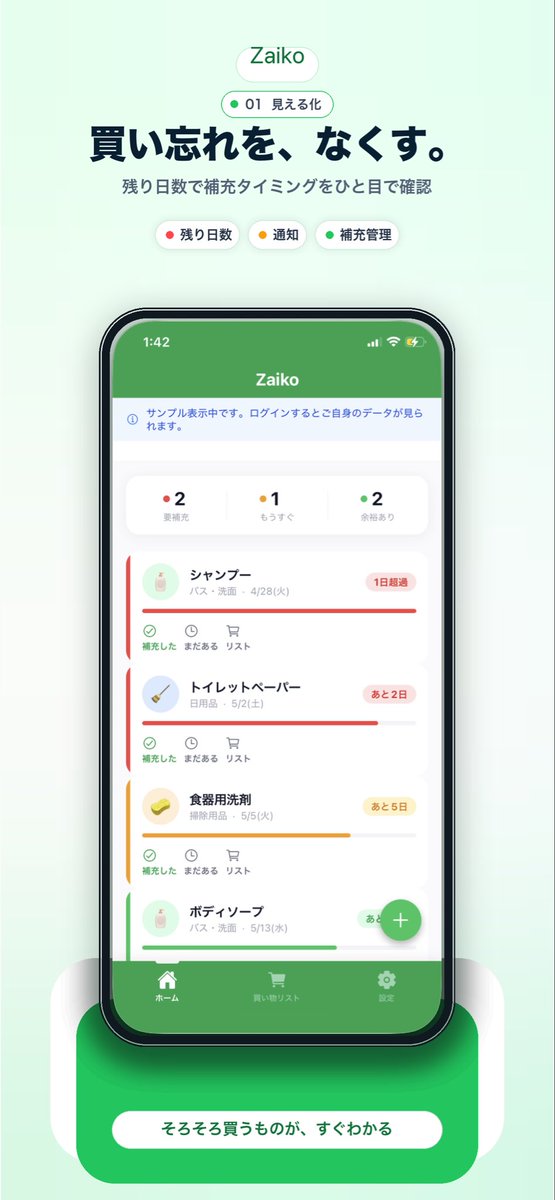
Craft a sleek, Japanese-inspired promotional poster for your inventory app, featuring a detailed smartphone UI with stock cards—ideal for app stores and landing pages.
الموجّه · EN
一张简洁的移动端 App 宣传海报,采用柔和的薄荷绿背景,构图居中且呈垂直分布,用于宣传名为 argapp name: Zaiko 的库存管理 App。顶部放置一个圆角白色胶囊状 Logo,内含绿色的 App 名称;下方是一个较小的轮廓胶囊,包含一个绿点、数字 01 以及日文文本“見える化”。在下方添加一行深海军蓝色的加粗日文大标题:argheadline text: 買い忘れを、なくす。,随后是较小的灰色日文副标题:残り日数で補充タイミングをひと目で確認。在副标题下方,横向排列 3 个圆角分类标签:一个带有红点的白色标签,标注为“残り日数”;一个带有黄点的白色标签,标注为“通知”;以及一个带有绿点的白色标签,标注为“補充管理”。在中心位置,展示一个正面的黑色边框智能手机模型,屏幕显示杂货与家庭库存追踪 App 的界面。手机屏幕顶部应有一个纯绿色状态栏,显示 App 名称;下方是一个浅色信息条;接着是一行包含 3 个状态计数器的摘要卡片:红点“2 要補充”、黄点“1 もうすぐ”以及绿点“2 余裕あり”。下方显示一个垂直滚动的列表,包含 4 张带有圆角、细微阴影和彩色紧急状态条的库存物品卡片:1) シャンプー,配有红色状态条和写着“1日超過”的红色徽章;2) トイレットペーパー,配有红色状态条和写着“あと2日”的红色徽章;3) 食器用洗剤,配有黄色状态条和写着“あと5日”的黄色徽章;4) ボディーソープ,配有绿色状态条和写着“あと10日”的绿色徽章。每张卡片左侧包含一个小圆形产品图标、日文物品名称及分类/日期文本,底部操作栏包含 3 个小控件,分别标注为“補充した”、“まだある”和“リスト”。在手机屏幕右下角附近添加一个悬浮的绿色圆形加号按钮。在 App UI 底部,包含一个绿色标签栏,内含 3 个导航项及图标:ホーム、買い物リスト 和 設定。将手机放置在一个带有柔和白色侧支撑和明显柔和阴影的亮面圆角绿色底座上,并在底座上添加一个大型圆角白色行动呼吁(CTA)胶囊,内含日文文本 argbutton text: そろそろ買うものが、すぐわかる。整体风格:精致的初创公司落地页模型、iOS App 截图美学、柔和渐变、极简日式 UI 设计、清晰的排版、居中构图、柔和的环境阴影、优质的应用商店营销视觉图。
حول هذا الموجّه
Craft a sleek, Japanese-inspired promotional poster for your inventory app, featuring a detailed smartphone UI with stock cards—ideal for app stores and landing pages. Use it as a الفن المفاهيمي starting point for GPT Image 2: keep the visual structure and style constraints intact, then swap in your own subject, brand, or scene.
Start by replacing app name, headline text, and button text, then keep the camera, composition, and material cues in the same order. This makes the output easier to compare across variations.
كيفية استخدام هذا الموجّه
- Copy the prompt text from this page.
- Paste it into your preferred AI image generator (e.g., Sora, Midjourney, DALL-E 3).
- Replace the variables in curly braces
{argument name="..." default="..."}with your own app name, headline, and button text. - Generate the image. If text clarity is poor, consider using an AI model that excels at rendering text, or overlay the text manually afterward.
- Download the high-resolution image for use in app store listings, landing pages, or social media.


