
GPT Image 2موجّه AI
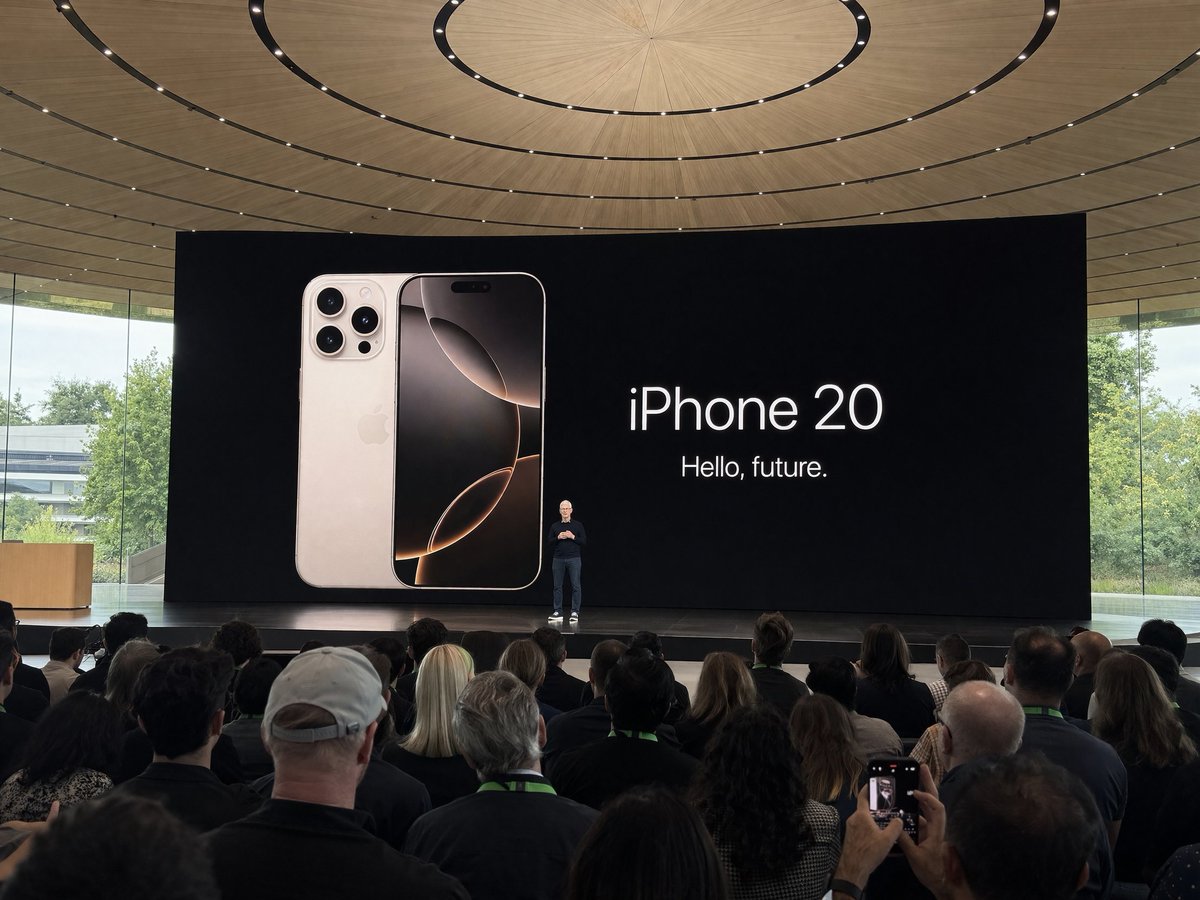
Apple Park Event Photo — Amateur Crowd Shot Prompt
Create a realistic, distant crowd-perspective photo of a keynote speech at Apple Park using this customizable Sora 2 prompt for authentic amateur-style images.
الموجّه · EN
使用 argdevice: iPhone 在 argevent: iPhone 20 发布会 期间于 Apple Park 拍摄的业余照片,argsubject: Tim Cook 正在台上演讲。从人群中远距离拍摄
حول هذا الموجّه
Create a realistic, distant crowd-perspective photo of a keynote speech at Apple Park using this customizable Sora 2 prompt for authentic amateur-style images. Use it as a الفن المفاهيمي starting point for GPT Image 2: keep the visual structure and style constraints intact, then swap in your own subject, brand, or scene.
Start by replacing device, event, and subject, then keep the camera, composition, and material cues in the same order. This makes the output easier to compare across variations.
كيفية استخدام هذا الموجّه
- Copy the prompt text and its variable placeholders (device, event, subject).
- Open your preferred AI image or video generator (e.g., Sora 2, Runway, Kling).
- Replace the default variables with your desired device name, event title, and speaker name.
- Paste the customized prompt into the model's input field.
- Generate the image and adjust settings like resolution or aspect ratio if needed.


