
Sora2 Hub
Sora2 Hub
  • مكتبة المطالبات
  • التسعير
  • معرض الأعمال
Sora2 Hub
Sora2 Hub
Sora2 Hub

Sora2 Hub

منصة إنشاء احترافية بالذكاء الاصطناعي مدعومة بـ Sora 2 و Veo 3.1 و Nano Banana Pro. أنشئ مقاطع فيديو مذهلة وصورًا بجودة الاستوديو مع تحكم متقدم وجودة HD وبدون علامات مائية.

Email:support@sora2hub.org

مولد الفيديو بالذكاء الاصطناعي

  • نص إلى فيديو
  • صورة إلى فيديو
  • Veo 3.1
  • Sora 2
  • Kling 3.0
  • Kling 2.6
  • Kling 2.5
  • Runway
  • Wan 2.6
  • Seedance 2.0
  • Hailuo 2.3
  • Grok Imagine
  • HappyHorse-1.0

مولد الصور بالذكاء الاصطناعي

  • نص إلى صورة
  • صورة إلى صورة
  • Nano Banana Pro
  • Nano Banana
  • 4o Image
  • Flux Kontext
  • Z Image
  • Seedream 4.5
  • Seedream 5.0 Lite
  • Nano Banana 2
  • GPT Image 2
  • محسن الصور بالذكاء الاصطناعي

تأثيرات الذكاء الاصطناعي

  • فلتر العمر بالذكاء الاصطناعي
  • تبديل الجنس بالذكاء الاصطناعي
  • قبلة الذكاء الاصطناعي
  • عناق الذكاء الاصطناعي
  • صورة جيبلي
  • فلتر حورية البحر بالذكاء الاصطناعي
  • اهتزاز الجسم بالذكاء الاصطناعي
  • فلتر الابتسامة
  • سمين الذكاء الاصطناعي
  • شخصية الحركة

المنتج

  • الميزات
  • معارض
  • التسعير

الشركة

  • حول
  • اتصل

© 2025 • Sora2 Hub ORG جميع الحقوق محفوظة.

  • سياسة الخصوصية
  • شروط الخدمة
  • سياسة الاسترداد
  1. الرئيسية
  2. /
  3. الموجّهات
  4. /
  5. GPT Image 2
  6. /
  7. Amateur iPhone Crowd Photo — Apple Park Keynote Prompt
GPT Image 2موجّه AI

Amateur iPhone Crowd Photo — Apple Park Keynote Prompt

Generate a realistic, crowd-perspective amateur photo of a keynote presentation at Apple Park using your iPhone or other device.
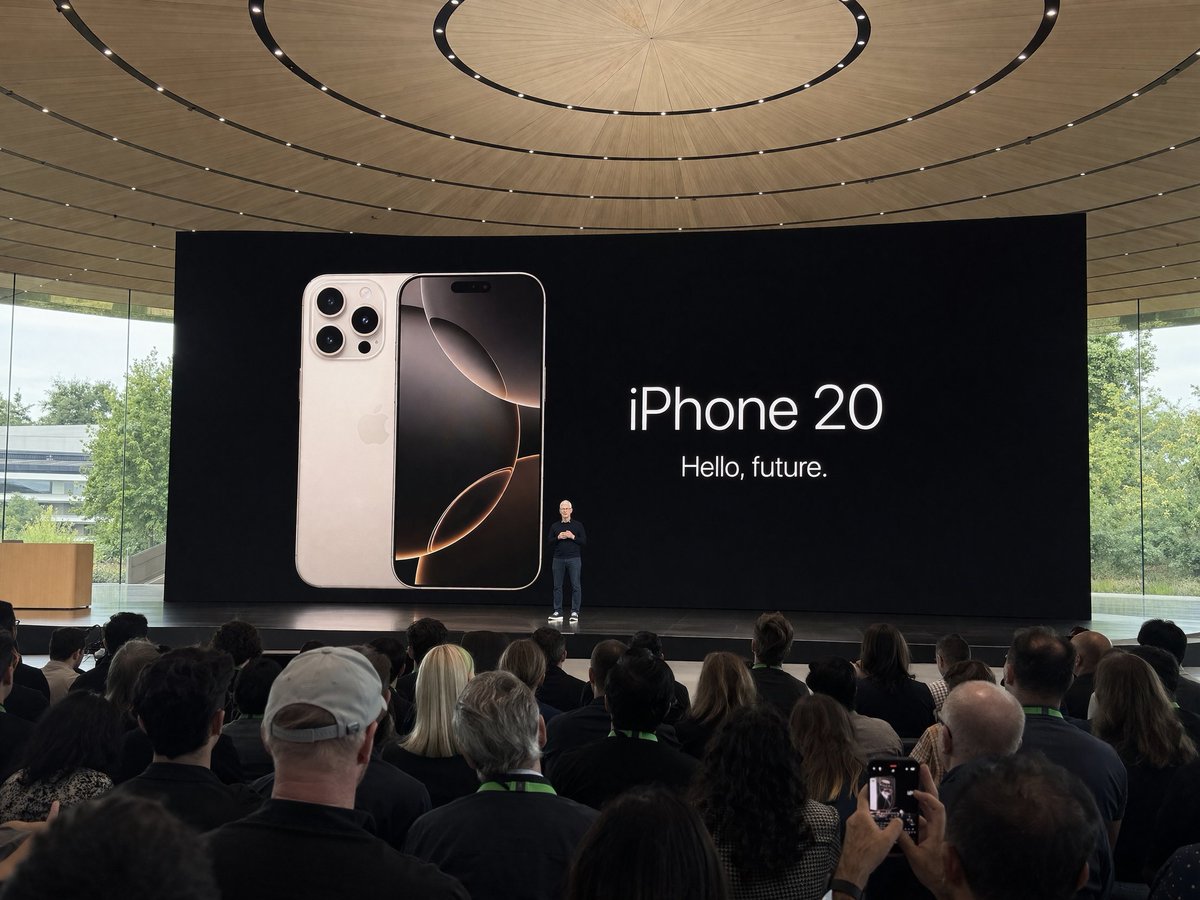
Amateur iPhone Crowd Photo — Apple Park Keynote Prompt
الموجّه · EN
Amateur argdevice: iPhone photo at Apple Park during the argevent: iPhone 20 keynote, argsubject: Tim Cook presenting on stage. Shot from the crowd at a distance

حول هذا الموجّه

Generate a realistic, crowd-perspective amateur photo of a keynote presentation at Apple Park using your iPhone or other device. Use it as a الفن المفاهيمي starting point for GPT Image 2: keep the visual structure and style constraints intact, then swap in your own subject, brand, or scene.

Common directions include gptimage2api prompts, gptimage2api, and en. Treat these tags as creative cues; the prompt structure and preview image are the more useful guide.

Start by replacing device, event, and subject, then keep the camera, composition, and material cues in the same order. This makes the output easier to compare across variations.

كيفية استخدام هذا الموجّه

  1. Copy the prompt text into your preferred AI image generator.
  2. Select a model like Sora 2, DALL·E 3, or Midjourney.
  3. Customize the variables: change the device (e.g., 'Samsung Galaxy'), event (e.g., 'WWDC 2024'), or subject (e.g., 'Jony Ive').
  4. Generate the image and review the output.
  5. Adjust any variables or regenerate for a different angle or lighting.

الأسئلة الشائعة

Patrick

@prompts→

تاريخ النشر
30 أبريل 2026
اللغة الأصلية
EN
النموذج
GPT Image 2
التصنيف
الفن المفاهيمي
GPT Image 2الفن المفاهيميgpt-image-2gptimage2api promptsgptimage2apien
مشاهدات
1.3K
نسخ
121
إعجابات
91

مشاركة

المزيد من GPT Image 2

تصفح الكل
Ultra-Realistic 3D Exploded View Prompt: Sony BRAVIA 8K TV

Ultra-Realistic 3D Exploded View Prompt: Sony BRAVIA 8K TV

@Ankit_patel211
Anime Reaction Thumbnail Prompt — Neon Edgy VTuber

Anime Reaction Thumbnail Prompt — Neon Edgy VTuber

@abdiisan
Dark Anime Devil Girl Mario Kart Poster — Sora 2 Prompt

Dark Anime Devil Girl Mario Kart Poster — Sora 2 Prompt

@opener_ai

أنشئ أسرع باستخدام موجّهات Sora2Hub.

استخدم صفحات الموجّهات المنسقة كنقاط دخول قابلة للبحث، ثم انتقل مباشرة إلى التوليد بسياق النموذج المناسب.

استكشف الموجّهات

