
GPT Image 2موجّه AI
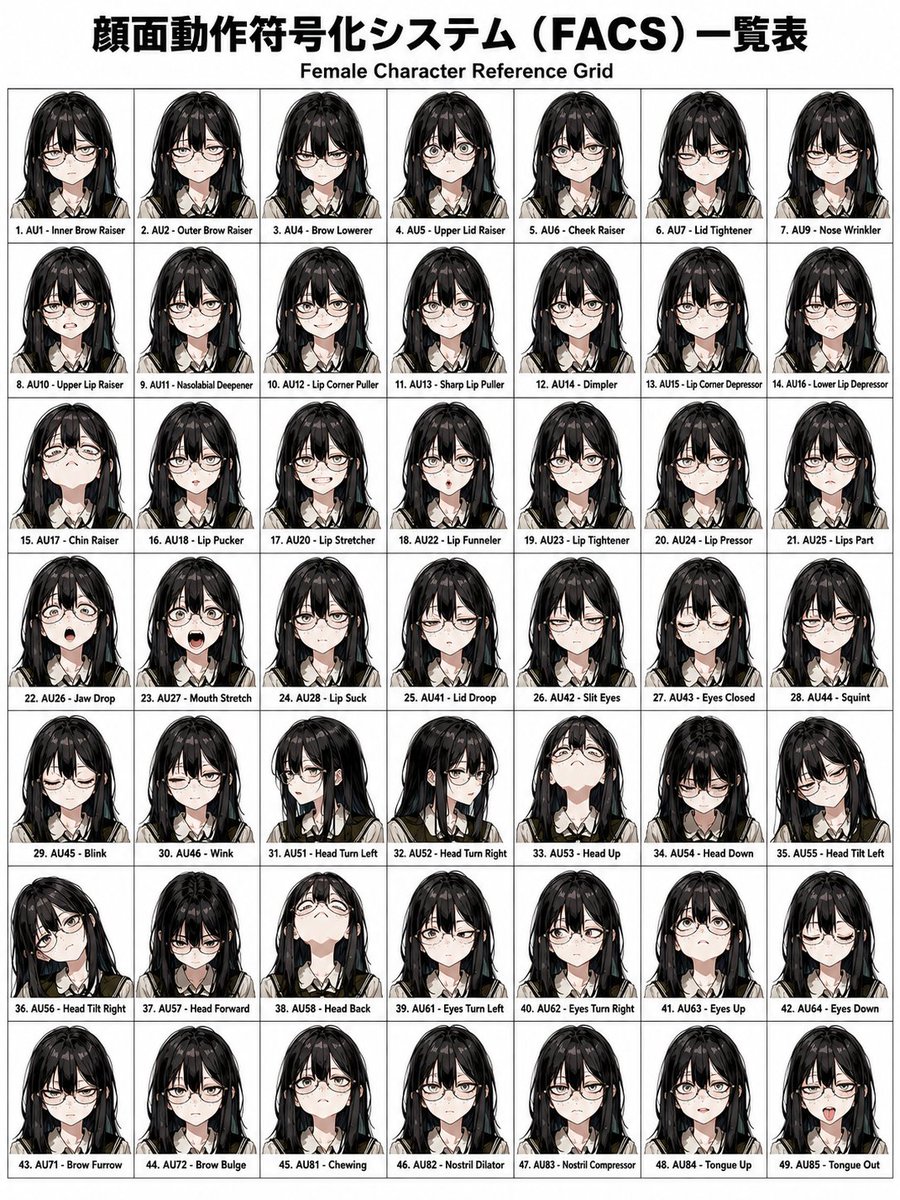
FACS AU46 Wink — Precise Facial Expression Prompt
Control facial expressions with pinpoint accuracy using the FACS (Facial Action Coding System) AU codes to modify character emotions in AI image generation.
الموجّه · EN
面部表情更改 FACS AU46\n\n面部动作编码系统 (FACS) 列表\n女性角色参考网格\n\n1. AU1 - 内眉提升 (Inner Brow Raiser)\n2. AU2 - 外眉提升 (Outer Brow Raiser)\n3. AU4 - 眉毛下压 (Brow Lowerer)\n4. AU5 - 上眼睑提升 (Upper Lid Raiser)\n5. AU6 - 脸颊提升 (Cheek Raiser)\n6. AU7 - 眼睑收紧 (Lid Tightener)\n7. AU9 - 鼻部皱缩 (Nose Wrinkler)\n8. AU10 - 上唇提升 (Upper Lip Raiser)\n9. AU11 - 鼻唇沟加深 (Nasolabial Deepener)\n10. AU12 - 嘴角上扬 (Lip Corner Puller)\n11. AU13 - 唇部尖锐拉伸 (Sharp Lip Puller)\n12. AU14 - 酒窝形成 (Dimpler)\n13. AU15 - 嘴角下压 (Lip Corner Depressor)\n14. AU16 - 下唇下压 (Lower Lip Depressor)\n15. AU17 - 下巴提升 (Chin Raiser)\n16. AU18 - 噘嘴 (Lip Pucker)\n17. AU20 - 唇部拉伸 (Lip Stretcher)\n18. AU22 - 唇部收拢 (Lip Funneler)\n19. AU23 - 唇部收紧 (Lip Tightener)\n20. AU24 - 唇部挤压 (Lip Pressor)\n21. AU25 - 双唇分开 (Lips Part)\n22. AU26 - 下颌下垂 (Jaw Drop)\n23. AU27 - 张口 (Mouth Stretch)\n24. AU28 - 吸唇 (Lip Suck)\n25. AU41 - 眼睑下垂 (Lid Droop)\n26. AU42 - 眯眼 (Slit Eyes)\n27. AU43 - 闭眼 (Eyes Closed)\n28. AU44 - 挤眼 (Squint)\n29. AU45 - 眨眼 (Blink)\n30. AU46 - 眨单眼 (Wink)\n31. AU51 - 头部左转 (Head Turn Left)\n32. AU52 - 头部右转 (Head Turn Right)\n33. AU53 - 抬头 (Head Up)\n34. AU54 - 低头 (Head Down)\n35. AU55 - 头部左倾 (Head Tilt Left)\n36. AU56 - 头部右倾 (Head Tilt Right)\n37. AU57 - 头部前伸 (Head Forward)\n38. AU58 - 头部后仰 (Head Back)\n39. AU61 - 眼球左转 (Eyes Turn Left)\n40. AU62 - 眼球右转 (Eyes Turn Right)\n41. AU63 - 眼球上转 (Eyes Up)\n42. AU64 - 眼球下转 (Eyes Down)\n43. AU71 - 皱眉 (Brow Furrow)\n44. AU72 - 眉部隆起 (Brow Bulge)\n45. AU81 - 咀嚼 (Chewing)\n46. AU82 - 鼻孔扩张 (Nostril Dilator)\n47. AU83 - 鼻孔收缩 (Nostril Compressor)\n48. AU84 - 舌头上抬 (Tongue Up)\n49. AU85 - 伸舌 (Tongue Out)
حول هذا الموجّه
Control facial expressions with pinpoint accuracy using the FACS Facial Action Coding System AU codes to modify character emotions in AI image generation. Use it as a الفن المفاهيمي starting point for GPT Image 2: keep the visual structure and style constraints intact, then swap in your own subject, brand, or scene.
Start with small changes to subject, scene, camera, and color, then generate a few variations to compare composition and detail without turning the page copy into keyword stuffing.
كيفية استخدام هذا الموجّه
- Copy the full FACS prompt from the page.
- Select a compatible AI image model (e.g., GPT Image 2.0, Sora 2).
- Upload your female character reference image if needed.
- Adjust AU code intensity values or choose a specific AU (like AU46 for wink) to define the expression.
- Generate the image to see the precisely modified facial expression.


