
Pencak Silat Choreography Poster — 16-Panel Martial Arts Guide
Generate a clean 4x4 instructional poster showing 16 counts of Pencak Silat moves with motion arrows, sketch lines, and captions.
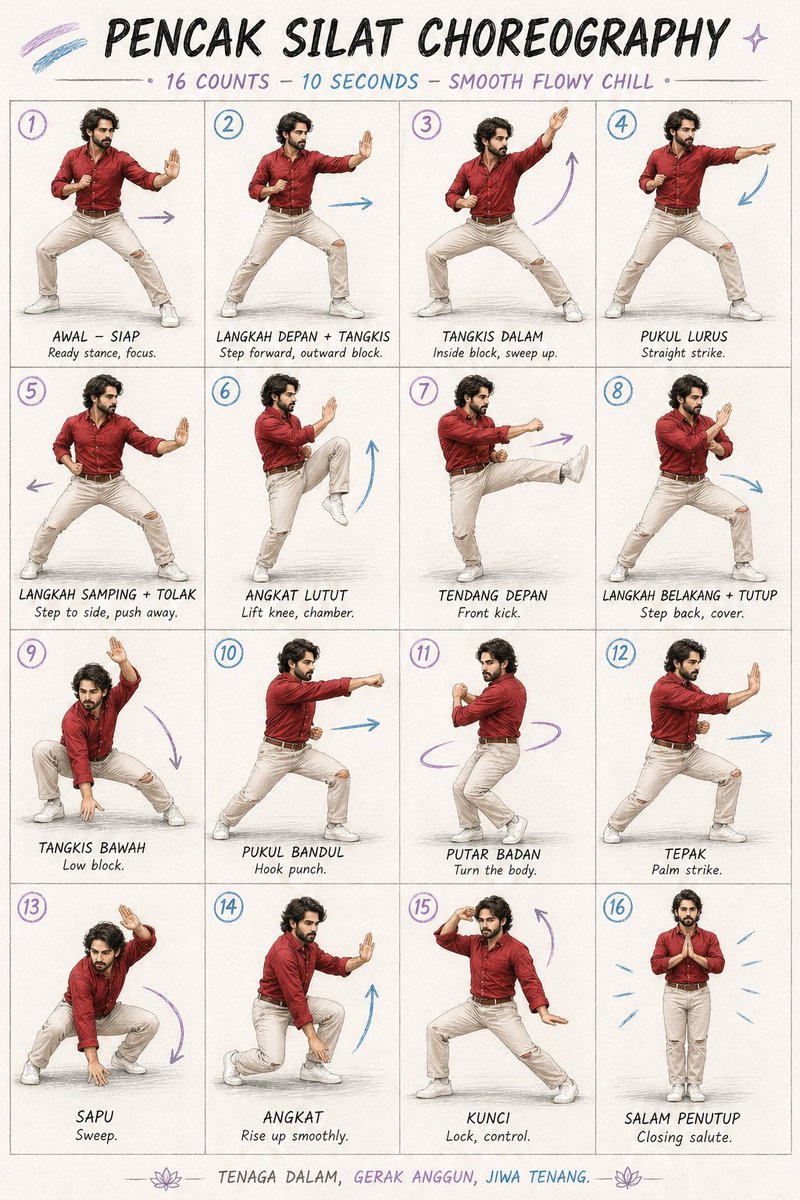
A clean instructional poster in a 4x4 grid (16 panels) showing a male martial artist demonstrating Pencak Silat choreography. The subject is a fit man with medium-length dark hair and a beard, wearing a red button-up shirt, beige pants, and white sneakers. Style is semi-realistic illustration mixed with hand-drawn sketch lines, soft shadows, and a light textured paper background. Each panel includes subtle motion arrows and small captions. Minimalist, balanced layout. शीर्ष title at top: 'Pencak Silat Choreography – 16 Counts – 10 Seconds – Smooth Flowy Chill'. Panel 1: wide ready stance, knees bent, one hand guarding forward, focused expression.
Panel 2: step forward with outward block, arm extended defensively.
Panel 3: inside block sweeping upward diagonally, torso rotating.
Panel 4: strong straight punch forward, aligned hips.
Panel 5: side step into low stance, both hands pushing outward.
Panel 6: knee lifted high in chamber position, balanced posture.
Panel 7: front kick extended forward, opposite arm guarding.
Panel 8: step backward into defensive cover, arms crossing.
Panel 9: low block, sweeping arm downward in deep stance.
Panel 10: hook punch across body with hip rotation.
Panel 11: turning body with pivoting feet, circular motion.
Panel 12: forward palm strike, stable stance.
Panel 13: low sweeping motion near ground in squat stance.
Panel 14: rising smoothly from low stance, upward motion.
Panel 15: controlled locking pose, one arm raised defensively.
Panel 16: closing salute, feet together, hands pressed at chest, calm posture. Include hand-drawn arrows (blue and purple accents), clean infographic layout, evenly spaced panels, consistent character design across all frames. A focused male martial artist performs a smooth, flowing Pencak Silat sequence in a minimalist studio. He is in his late 20s, athletic build, medium height, warm tan skin, with thick wavy dark hair and a short, well-groomed beard. He wears a fitted deep red button-up shirt with sleeves rolled to the forearms, beige slim-fit pants with slight wear at the knees, and clean white sneakers. His expression is calm, controlled, and intent. The setting is a softly lit neutral studio with an off-white textured backdrop and a slightly worn wooden floor. Lighting is diffused and cinematic, creating gentle shadows and emphasizing fluid motion.
The choreography is continuous and rhythmic, with no abrupt cuts: 0–2s: يبدأ in a grounded ready stance, knees bent, one palm forward in guard, eyes locked ahead 2–4s: steps forward into an outward block, transitioning into an inside sweeping block upward 4–6s: rotates hips into a straight punch, then shifts weight into a side step with a pushing motion 6–8s: lifts knee smoothly and extends into a controlled front kick, maintaining balance 8–10s: steps back into a guarded cover, drops into a low block, then rises into a hook punch 10–12s: pivots the body with a clean turn, transitioning into a forward palm strike 12–14s: lowers into a sweeping motion, then rises fluidly into a locking control pose 14–15s: finishes upright with a respectful closing salute, hands together at chest level Movement style is soft, flowing, controlled, with precise martial intention rather than aggression. Emphasis on balance, breath, and continuity. Camera is a steady medium-wide shot with subtle slow tracking, no cuts.
حول هذا الموجّه
Generate a clean 4x4 instructional poster showing 16 counts of Pencak Silat moves with motion arrows, sketch lines, and captions. Use it as a الفن المفاهيمي starting point for GPT Image 2: keep the visual structure and style constraints intact, then swap in your own subject, brand, or scene.
Common directions include gptimage2api prompts, gptimage2api, and ko. Treat these tags as creative cues; the prompt structure and preview image are the more useful guide.
Start with small changes to subject, scene, camera, and color, then generate a few variations to compare composition and detail without turning the page copy into keyword stuffing.
كيفية استخدام هذا الموجّه
- Copy the full prompt text above.
- Choose an AI image model that supports detailed multi-panel layouts (e.g., Sora 2, Midjourney, or DALL·E).
- Paste the prompt into the prompt field and adjust details like hair color, clothing, or panel count if needed.
- Generate the image and review the layout for clarity.
- Re-generate or refine the prompt if panels overlap or arrows are unclear.


