
GPT Image 2موجّه AI
London Nocturnal Urban Archive — 3D Relief Map Prompt
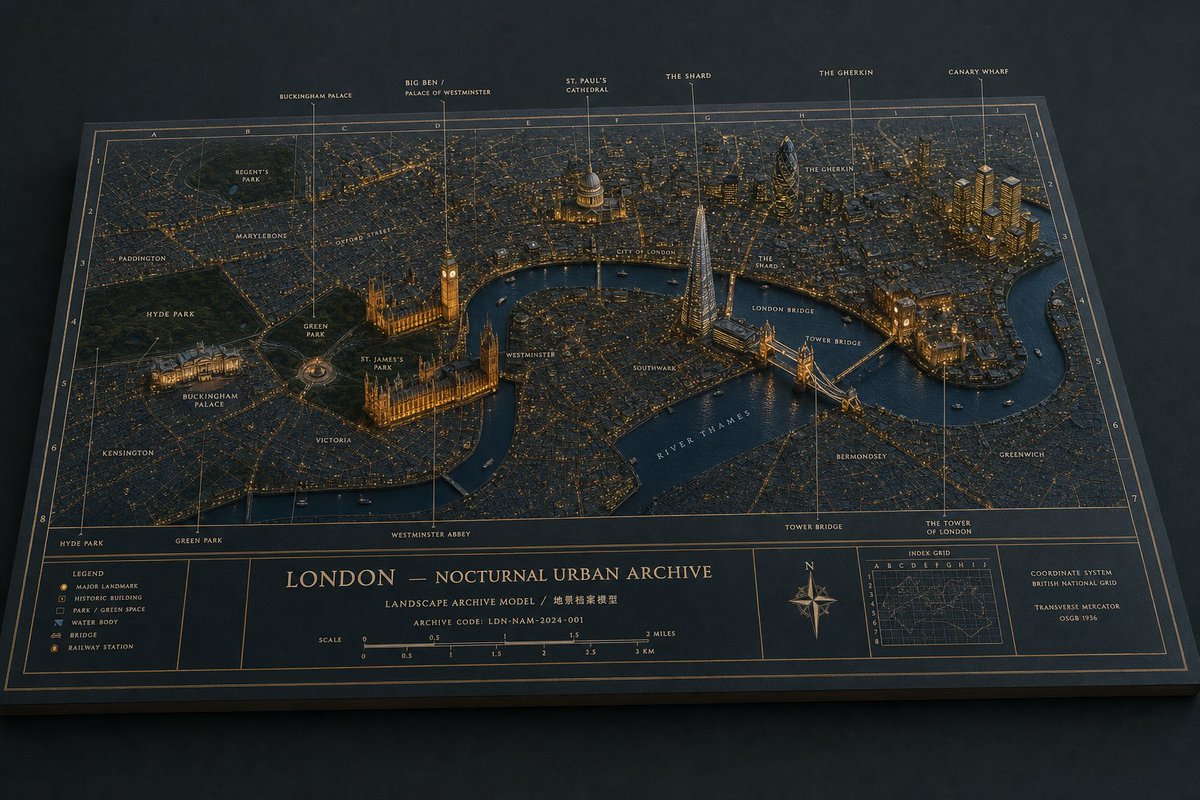
Generate a cinematic, museum-style 3D topographic map of London at night with illuminated landmarks, archival grids, and a detailed legend.
الموجّه · EN
目标:创建一个名为 argcity title: LONDON — NOCTURNAL URBAN ARCHIVE 的电影级实体博物馆立体模型地图,将伦敦呈现为放置在平面地图项目上的 3D 建筑档案模型。 画布:宽屏 16:9 水平图像,四分之三俯视视角,整个项目在深色哑光桌面上清晰可见。使用克制的夜间色调:深海军蓝纸张、炭灰色街道、温暖的琥珀色城市灯光、柔和的金色地图线条、深蓝色水域以及精致的灰白色字体。 主场景:构建一个伦敦市中心的精细微缩浮雕地图,泰晤士河在左下方和右侧蜿蜒流过。街道应呈现为密集的细线网格,并点缀着数千盏微小的暖色灯光。公园是深绿色的凹陷区域。建筑物为低矮的哑光凸起,关键地标则更高、更具雕塑感。让模型具有触感和实体感:纸张纹理、斜切的项目边缘、投影、河上的微型船只以及逼真的博物馆展示照明。 地标与标注:包含 6 个垂直向上的注释标注,带有细金色引导线和小号大写标签:1) Buckingham Palace,2) Big Ben / Palace of Westminster,3) St. Paul's Cathedral,4) The Shard,5) The Gherkin,6) Canary Wharf。将它们从左到右放置在顶部边缘。泰晤士河附近的威斯敏斯特宫和 Big Ben 需有温暖的照明,St. Paul's Cathedral 带有发光的圆顶,The Shard 为高耸尖锐的玻璃尖塔,The Gherkin 为圆润的子弹形塔楼,Canary Wharf 为一组金色高层建筑,Tower Bridge 为横跨泰晤士河的照明桥梁。 地图标签:在地图上直接添加小号大写字母的街区和地点标签,包括 Regent's Park、Marylebone、Oxford Street、Paddington、Hyde Park、Green Park、St. James's Park、Buckingham Palace、Kensington、Victoria、Westminster、Southwark、City of London、London Bridge、Tower Bridge、Bermondsey、Greenwich、River Thames、The Shard、The Gherkin 和 The Tower of London。使用符合档案地图美学的柔和奶油色或浅金色字体。 网格与边框系统:叠加一个精确的地图集风格索引网格,顶部为字母,侧面为数字。使用细金色网格线、双线边框和雕刻般的档案绘图风格。项目应看起来像一个高级景观档案模型,而非数字截图。 底部信息栏:保留一个全宽的地图页脚,分为多个框架面板。左侧面板包含一个包含 6 个符号条目的图例:主要地标、历史建筑、公园/绿地、水体、桥梁、火车站。中心面板包含大标题 argcity title: LONDON — NOCTURNAL URBAN ARCHIVE、副标题 argsubtitle text: LANDSCAPE ARCHIVE MODEL / 地景档案模型、档案代码 argarchive code: ARCHIVE CODE: LDN-NAM-2024-001 以及标注为英里和公里的比例尺(0 到 3 英里和 0 到 3 公里)。右侧包含一个罗盘玫瑰、一个小插图索引网格地图以及坐标说明 argcoordinate note: COORDINATE SYSTEM — BRITISH NATIONAL GRID — TRANSVERSE MERCATOR — OSGB 1936。 风格限制:超精细的编辑级产品摄影,逼真的微缩材料,清晰但微小的可读字体,冷海军蓝阴影下的暖琥珀色高光,仅在极边缘处有浅景深,无人像,无现代 UI,无水印,除指定数量外,不得添加额外的图例或地标标注。
حول هذا الموجّه
Generate a cinematic, museum-style 3D topographic map of London at night with illuminated landmarks, archival grids, and a detailed legend. Use it as a الفن المفاهيمي starting point for GPT Image 2: keep the visual structure and style constraints intact, then swap in your own subject, brand, or scene.
Start by replacing city title, subtitle text, archive code, and coordinate note, then keep the camera, composition, and material cues in the same order. This makes the output easier to compare across variations.
كيفية استخدام هذا الموجّه
- Copy the full prompt text, including all bracketed variables like
{city title}. - Select a capable AI image generator like Sora 2 or a similar diffusion model.
- Customize the variable fields (e.g.,
city title,archive code) to match your desired city or project. - Adjust the core city description and landmark list to focus on a different location if needed.
- Generate the image. For best results, use a high-resolution or widescreen output setting.


