
GPT Image 2موجّه AI
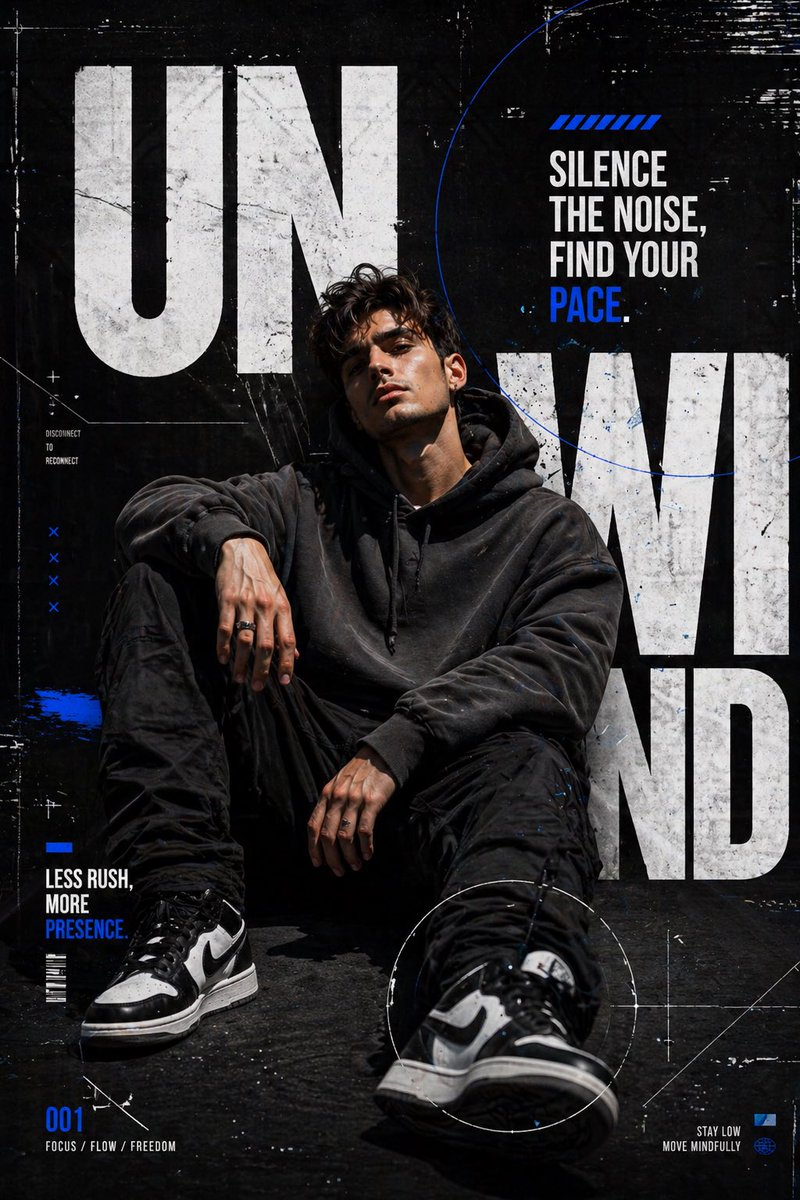
Cinematic Urban Streetwear Poster — Sora 2 Prompt
Generate a high-contrast, cinematic streetwear fashion poster with bold typography and minimal, futuristic aesthetics.
الموجّه · EN
创作一张高对比度的城市 argstyle: 街头风海报,主角是一位 argsubject: 年轻男性,随意地坐在深色纹理背景前。主角身穿炭灰色超大款连帽衫、黑色工装裤和单色运动鞋,发型凌乱,配饰极简。添加柔和的电影级光影和微妙的阴影,以突出面部轮廓和服装细节。排版应大胆、现代且超大,并融入背景布局中。使用白色和电光蓝的混合点缀。主标题(大号,断裂式排版):“argmain text: UNWIND” 副标题:“Silence the noise, find your pace.” 小字说明:“Less rush, more presence.” 添加细线条、圆圈和故障纹理等抽象几何元素。加入微妙的颗粒感和噪点,营造原始的时尚杂志感。构图应兼具时尚杂志封面与街头服饰广告的风格。配色方案:黑色、白色、深灰色、电光蓝点缀。风格:极简主义、电影感、前卫、现代时尚、略带未来感。
حول هذا الموجّه
Generate a high-contrast, cinematic streetwear fashion poster with bold typography and minimal, futuristic aesthetics. Use it as a الفن المفاهيمي starting point for GPT Image 2: keep the visual structure and style constraints intact, then swap in your own subject, brand, or scene.
Start by replacing style, subject, and main text, then keep the camera, composition, and material cues in the same order. This makes the output easier to compare across variations.
كيفية استخدام هذا الموجّه
- Copy the entire prompt text from the prompt body section.
- Select your preferred AI image generation model (e.g., Sora, Stable Diffusion, Midjourney).
- Replace the default values for
style,subject, andmain textinside the curly braces {} with your own creative ideas. - Paste the customized prompt into your chosen AI model's input field.
- Generate the image and iterate by adjusting your variables for the perfect result.


