
Sora2 Hub
Sora2 Hub
  • مكتبة المطالبات
  • التسعير
  • معرض الأعمال
Sora2 Hub
Sora2 Hub
Sora2 Hub

Sora2 Hub

منصة إنشاء احترافية بالذكاء الاصطناعي مدعومة بـ Sora 2 و Veo 3.1 و Nano Banana Pro. أنشئ مقاطع فيديو مذهلة وصورًا بجودة الاستوديو مع تحكم متقدم وجودة HD وبدون علامات مائية.

Email:support@sora2hub.org

مولد الفيديو بالذكاء الاصطناعي

  • نص إلى فيديو
  • صورة إلى فيديو
  • Veo 3.1
  • Sora 2
  • Kling 3.0
  • Kling 2.6
  • Kling 2.5
  • Runway
  • Wan 2.6
  • Seedance 2.0
  • Hailuo 2.3
  • Grok Imagine
  • HappyHorse-1.0

مولد الصور بالذكاء الاصطناعي

  • نص إلى صورة
  • صورة إلى صورة
  • Nano Banana Pro
  • Nano Banana
  • 4o Image
  • Flux Kontext
  • Z Image
  • Seedream 4.5
  • Seedream 5.0 Lite
  • Nano Banana 2
  • GPT Image 2
  • محسن الصور بالذكاء الاصطناعي

تأثيرات الذكاء الاصطناعي

  • فلتر العمر بالذكاء الاصطناعي
  • تبديل الجنس بالذكاء الاصطناعي
  • قبلة الذكاء الاصطناعي
  • عناق الذكاء الاصطناعي
  • صورة جيبلي
  • فلتر حورية البحر بالذكاء الاصطناعي
  • اهتزاز الجسم بالذكاء الاصطناعي
  • فلتر الابتسامة
  • سمين الذكاء الاصطناعي
  • شخصية الحركة

المنتج

  • الميزات
  • معارض
  • التسعير

الشركة

  • حول
  • اتصل

© 2025 • Sora2 Hub ORG جميع الحقوق محفوظة.

  • سياسة الخصوصية
  • شروط الخدمة
  • سياسة الاسترداد
  1. الرئيسية
  2. /
  3. الموجّهات
  4. /
  5. GPT Image 2
  6. /
  7. Kyoto Hidden Mascot Tilt-Shift Diorama — Sora 2 Prompt
GPT Image 2موجّه AI

Kyoto Hidden Mascot Tilt-Shift Diorama — Sora 2 Prompt

Generate a hyper-detailed miniature Kyoto souvenir street scene where viewers hunt for a hidden chibi mascot, perfect for seek-and-find travel illustrations.
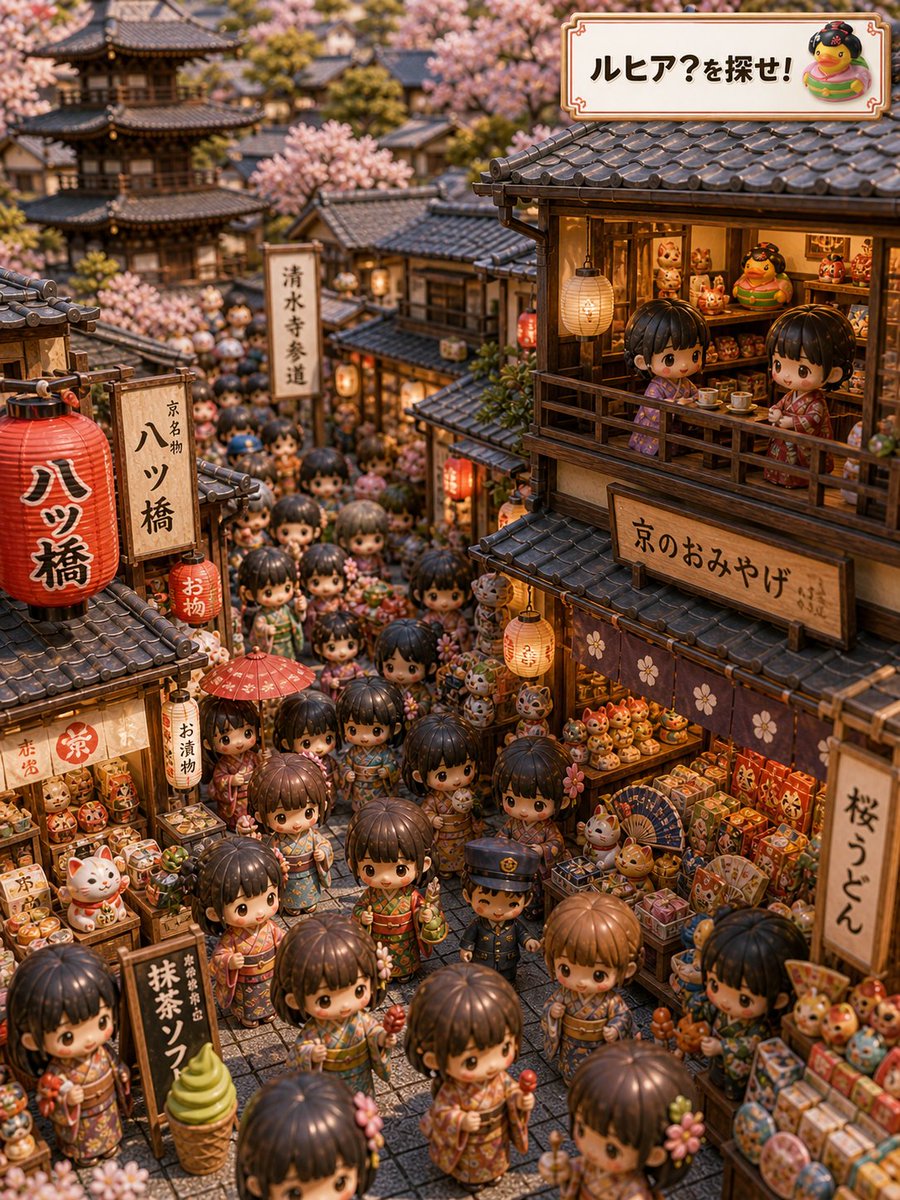
Kyoto Hidden Mascot Tilt-Shift Diorama — Sora 2 Prompt
الموجّه · EN
type
高度精细的等距视角隐藏物品旅行插画
concept
一个温馨的京都纪念品街场景,观众需要在其中寻找名为 {argument name="mascot name" default="ルヒア"} 的小吉祥物,呈现出一种奇思妙想的“寻找角色”解谜感。
setting
location
寺庙附近的京都古老参道
season
{argument name="season" default="春季樱花季"}
time
温暖的金色傍晚,伴有发光的商店灯笼
architecture
传统的木质町屋商店、深色弧形瓦屋顶、格子窗、狭窄的石板巷,远处是景深虚化处理的多层宝塔和寺庙建筑
atmosphere
热闹的黄金周旅游氛围,拥挤而可爱,怀旧,微缩模型感
style
visual_style
超精细可爱 3D 微缩模型,Q 版人偶人群,移轴摄影效果,温暖的电影感光效,密集的隐藏物品构图,玩具般的质感,浅景深
camera
高处四分之三等距视角,俯瞰狭窄的商业街,竖屏构图
color_palette
暖棕色、灯笼红、柔和的樱花粉、奶油色纸质招牌、色彩丰富的纪念品包装
main_scene
crowd
数十名身着花纹和服与浴衣的 Q 版儿童和游客挤满街道;大头、亮晶晶的眼睛,小手拿着甜点、雨伞、护身符、烤串和纪念品
shops
左右两侧各有两家主要的纪念品店,摆满了招财猫、达摩玩偶、盒装甜点、扇子、护身符、糖果、抹茶点心和小玩具
hidden_object
将吉祥物 {argument name="mascot name" default="ルヒア"} 自然地隐藏在纪念品或人群中,它是一个有着可爱脸庞的圆滚滚黄色小鸟状角色,不显眼但可以找到。
top_right_banner
带有棕色边框的装饰性奶油色招牌,上面写着 {argument name="headline text" default="ルヒア?を探せ!"},文字旁边还有该圆滚滚吉祥物的小插图。
visible_text_and_signs
count
9
labels
item 1
text
ルヒア?を探せ!
position
右上角装饰性横幅
item 2
text
八ツ橋
position
左侧前景的大红灯笼
item 3
text
京都名物 八ツ橋
position
红灯笼旁边的竖式木牌
item 4
text
清水寺参道
position
背景中间的竖式白色路牌
item 5
text
京のおみやげ
position
右侧上方商店的大型横向招牌
item 6
text
桜うどん
position
右侧商店边缘的竖式招牌
item 7
text
抹茶ソフト
position
左侧街道下方附近的黑色立牌
item 8
text
お漬物
position
左侧商店附近的小型竖式招牌
item 9
text
お物
position
中左侧附近的小型红色挂灯笼
notable_discrete_objects
count
12
items
item 1
大型红色纸灯笼
item 2
小型红色挂灯笼
item 3
阳台上的奶油色纸灯笼
item 4
人群中的红色遮阳伞
item 5
绿色抹茶冰淇淋展示模型
item 6
招财猫摆件
item 7
达摩玩偶
item 8
盒装纪念品甜点
item 9
折扇
item 10
圆形糖果串
item 11
木质阳台茶桌
item 12
远处的宝塔
composition_notes
使画面密集地填满许多微小的面孔和物体,但要保持沿巷道清晰的视觉路径。利用樱花枝条勾勒屋顶和背景。包含充满微型纪念品的温暖商店内部。增加一些由人头和灯笼造成的自然遮挡,以增强寻物解谜的趣味性,但避免任何遮挡面部或出现黑块的情况。
quality
前景细节锐利,屋顶瓦片和木材纹理复杂,日文招牌清晰可辨,高分辨率,迷人且适合全家欣赏

حول هذا الموجّه

Generate a hyper-detailed miniature Kyoto souvenir street scene where viewers hunt for a hidden chibi mascot, perfect for seek-and-find travel illustrations. Use it as a الفن المفاهيمي starting point for GPT Image 2: keep the visual structure and style constraints intact, then swap in your own subject, brand, or scene.

This prompt is organized as structured JSON with fields such as type, concept, setting, style, main scene, visible text and signs, and notable discrete objects. Keeping that hierarchy helps the model separate the subject, layout, interface elements, and detail constraints.

Start with small changes to subject, scene, camera, and color, then generate a few variations to compare composition and detail without turning the page copy into keyword stuffing.

كيفية استخدام هذا الموجّه

  1. Copy the full prompt JSON block into your Sora 2 or compatible AI image generator.
  2. Select a model that excels at detailed 3D miniature or isometric illustration styles.
  3. Customize the mascot name, season, or headline text arguments to personalize the scene.
  4. Adjust the output aspect ratio to vertical/portrait to match the described composition.
  5. Generate the image and refine by regenerating or tweaking the hidden object placement description.


الأسئلة الشائعة

藍澤 ミライ

@mirai_ai2050→

تاريخ النشر
15 مايو 2026
اللغة الأصلية
EN
النموذج
GPT Image 2
التصنيف
الفن المفاهيمي
GPT Image 2الفن المفاهيميgpt-image-2twitter
مشاهدات
814
نسخ
66
إعجابات
59

مشاركة

المزيد من GPT Image 2

تصفح الكل
Graphic Novel Ink Splash Portrait — Sora 2 Prompt

Graphic Novel Ink Splash Portrait — Sora 2 Prompt

@iamsofiaijaz
Celebrity Crossover — Sora 2 Prompt

Celebrity Crossover — Sora 2 Prompt

@Conor_D_Dart
AI-Generated Crossover Fighter Screenshot — Sora 2 Prompt

AI-Generated Crossover Fighter Screenshot — Sora 2 Prompt

@momoringo_sub

أنشئ أسرع باستخدام موجّهات Sora2Hub.

استخدم صفحات الموجّهات المنسقة كنقاط دخول قابلة للبحث، ثم انتقل مباشرة إلى التوليد بسياق النموذج المناسب.

استكشف الموجّهات
