
GPT Image 2موجّه AI
Japan Street Mount Fuji with Cloud Kanji — Sora 2 Prompt
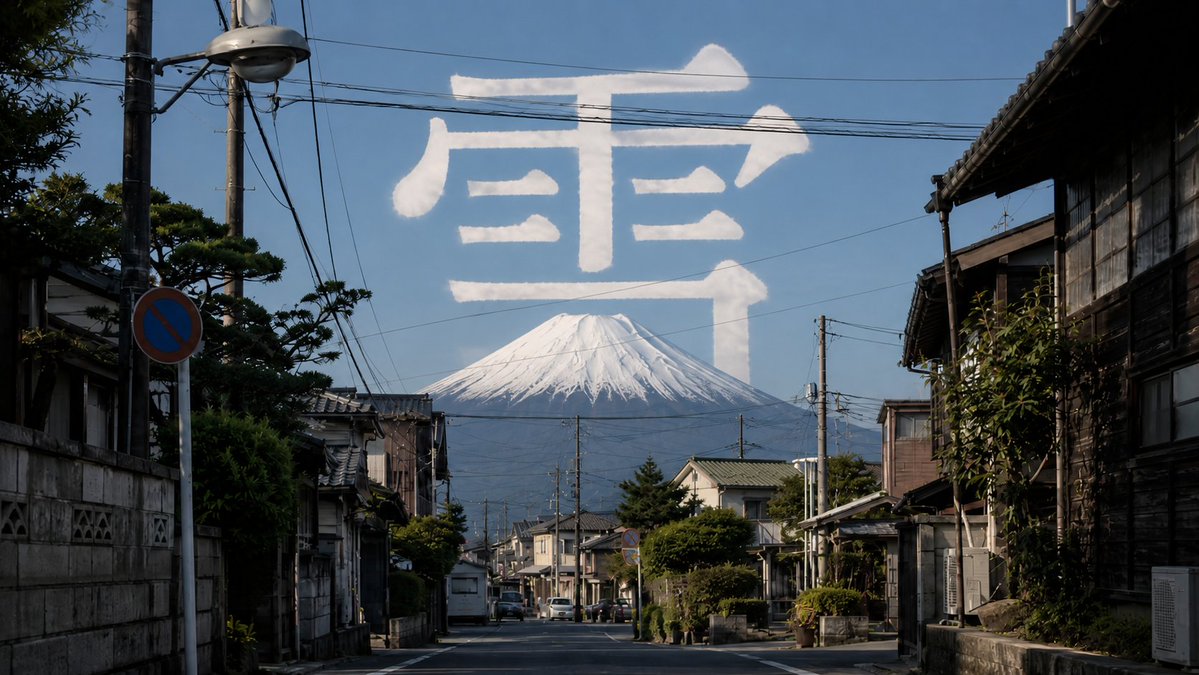
Generate a photorealistic Japanese street scene with Mount Fuji in the distance and a giant cloud-formed kanji character floating in a clear blue sky.
الموجّه · EN
创作一张照片级真实的广角街道摄影作品,场景设定在安静的日本传统街区。镜头直视一条空旷的住宅街道,两侧排列着古老的木屋、瓦片屋顶、混凝土墙、小花园、电线杆、架空电线、路灯、停放的微型车以及蓝色的禁止停车标志。在远景背景中,将一座巨大的积雪山峰 argmountain: Mount Fuji 置于街道尽头的中心位置,上方是清澈的深蓝色天空。在天空上方,形成一个由巨大的白色云朵组成的汉字 argsky character: 雪,看起来就像是用柔软蓬松的云朵或尾迹云写成,半透明且自然采光,横跨山峰上方几乎整个画幅。使用真实的午间阳光,呈现清晰的阴影、纪实旅行摄影构图、高细节、自然色彩、大气深度,且前景中不出现人物。
حول هذا الموجّه
Generate a photorealistic Japanese street scene with Mount Fuji in the distance and a giant cloud-formed kanji character floating in a clear blue sky. Use it as a الفن المفاهيمي starting point for GPT Image 2: keep the visual structure and style constraints intact, then swap in your own subject, brand, or scene.
Start by replacing mountain and sky character, then keep the camera, composition, and material cues in the same order. This makes the output easier to compare across variations.
كيفية استخدام هذا الموجّه
- Copy the full prompt text from the prompt page.
- Choose an AI image or video model that supports photorealistic generation (e.g., Sora 2, Midjourney, or DALL·E).
- Customize the
{mountain}and{sky character}variables to swap the landmark or kanji to your preference. - Paste the prompt into your model's input field and adjust aspect ratio or resolution settings if available.
- Generate and review; refine the variables or lighting details until the result matches your vision.


