
GPT Image 2موجّه AI
Abyss Covenant: Dark Biomechanical Concept Art — Sora 2 Prompt
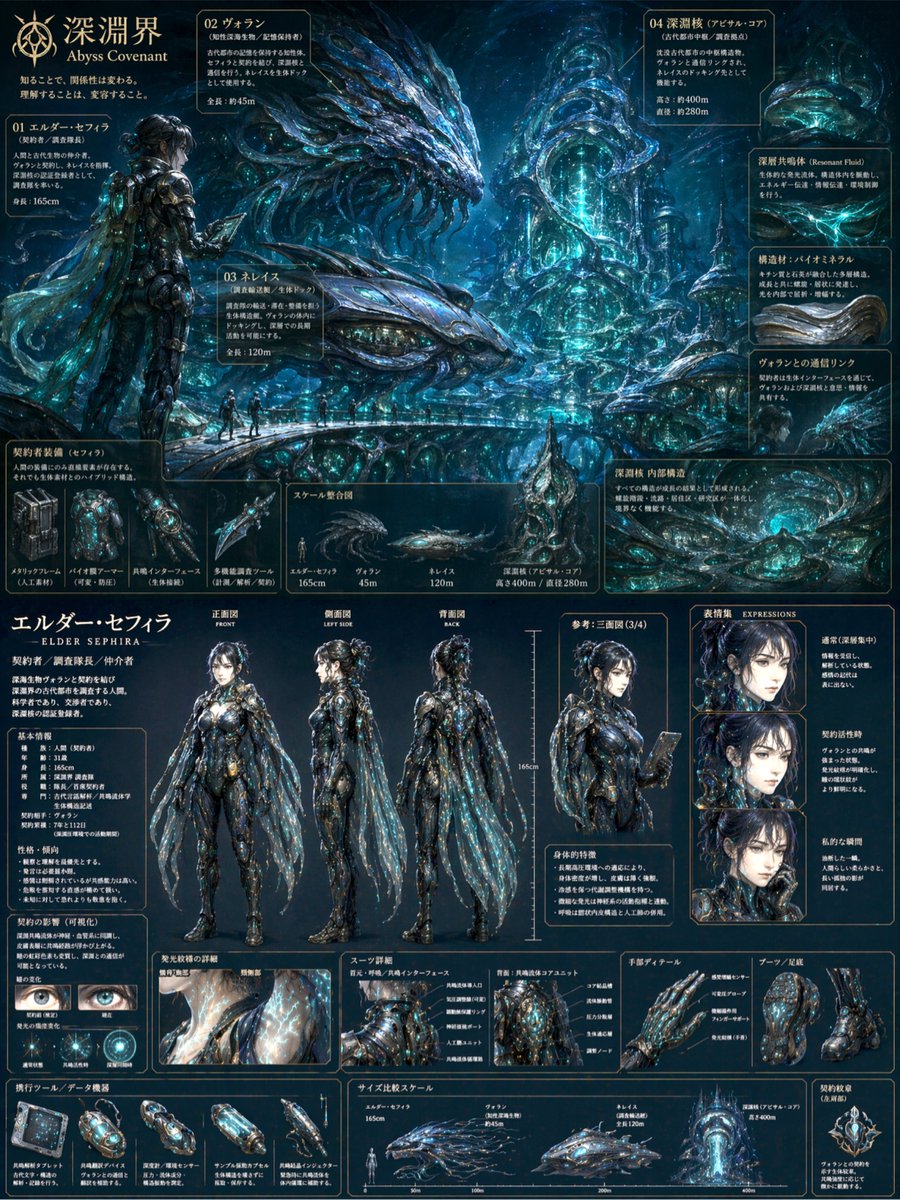
Create a detailed abyssal biomechanical concept art sheet: character reference, turnarounds, expressions, and gear — ideal for dark fantasy worldbuilding.
الموجّه · EN
{ "type": "综合概念艺术与角色参考表", "overall_aesthetic": "深渊暗黑风格,高细节,argument name=\"theme color\" default=\"生物发光蓝\" 点缀,生物机械感", "header": { "title": "argument name=\"main title\" default=\"深渊界 Abyss Covenant\"", "subtitle": "认知即改变,理解即蜕变。", }, "layout": { "top_section": { "type": "环境与生物概念艺术", "description": "水下深渊景观,包含 argument name=\"creature type\" default=\"巨型蛇形利维坦\" 和高耸的有机结构", "labeled_entities": { "count": 4, "labels": ["01 长者塞菲拉 (Elder Sephira)", "02 沃兰 (Volan)", "03 涅瑞伊得 (Nereis)", "04 深渊核 (Abyssal Core)"] }, "sub_panels": [ { "title": "契约者装备", "count": 4, "description": "生物机械武器与工具" }, { "title": "比例整合图", "count": 4, "description": "人类、生物与结构的轮廓尺寸对比" } ] }, "bottom_section": { "type": "角色设计表", "character": { "name": "argument name=\"character name\" default=\"长者塞菲拉 - ELDER SEPHIRA -\"", "design": "女性,深色乱发丸子头,身着 argument name=\"suit style\" default=\"带有半透明披风的复杂深色生物机械装甲\"" }, "turnaround_poses": { "count": 4, "labels": ["正面图 FRONT", "侧面图 LEFT SIDE", "背面图 BACK", "参考:三视图 (3/4)"] }, "expressions": { "title": "表情集 EXPRESSIONS", "count": 3, "labels": ["通常(深层专注)", "契约激活时", "私下瞬间"] }, "detail_panels": [ { "title": "瞳孔变化", "count": 2, "description": "展示瞳孔变化的眼部特写" }, { "title": "装甲细节", "count": 2, "description": "胸部与背部装甲核心结构图" }, { "title": "手部细节 / 靴子与足底", "count": 2, "description": "手套与靴子特写" } ], "bottom_row": [ { "title": "便携工具 / 数据设备", "count": 5, "description": "手持设备与胶囊" }, { "title": "尺寸对比标尺", "count": 4, "description": "辅助尺寸对比图表" }, { "title": "契约纹章", "count": 1, "description": "发光的圆形纹章" } ] } }
}
حول هذا الموجّه
Create a detailed abyssal biomechanical concept art sheet: character reference, turnarounds, expressions, and gear — ideal for dark fantasy worldbuilding. Use it as a الفن المفاهيمي starting point for GPT Image 2: keep the visual structure and style constraints intact, then swap in your own subject, brand, or scene.
Start with small changes to subject, scene, camera, and color, then generate a few variations to compare composition and detail without turning the page copy into keyword stuffing.
كيفية استخدام هذا الموجّه
- Copy the prompt into your preferred AI image generator that supports detailed prompts (e.g., Sora 2, Midjourney, Stable Diffusion).
- Select a model capable of high-detail fantasy art and biomechanical designs.
- Customize the bracketed variables (theme color, creature type, character name) to match your vision.
- Generate the image and review the layout; adjust variables or regenerate if needed.
- Use the output as a concept art reference for games, stories, or further AI refinement.


