
GPT Image 2موجّه AI

The Knockout Infographic Prompt — Sora 2 Prompt

Generate a detailed, multi-section infographic explaining The Knockout drama with charts, flowcharts, and vector illustrations.
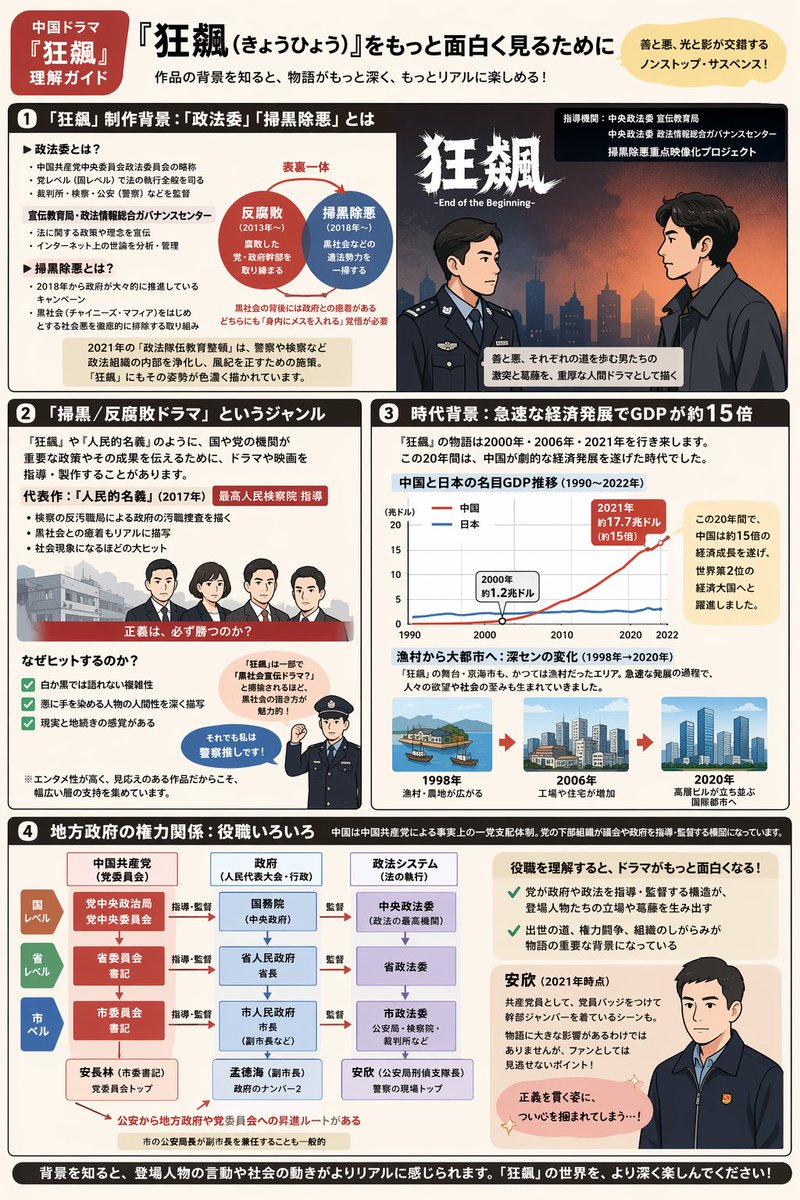
The Knockout Infographic Prompt — Sora 2 Prompt
الموجّه · EN
type
综合信息图表说明表
style
{argument name="illustration style" default="扁平矢量动漫风格"}
color_palette
{argument name="color palette" default="米色背景,搭配深棕色、红色和蓝色点缀"}
layout
header
tag
中国电视剧《狂飙》观剧指南
main_title
{argument name="main title" default="如何更深入地欣赏《狂飙》"}
subtitle
了解作品背后的社会背景,让故事变得更深刻、更真实!
top_right_badge
善与恶、光与影交织的硬核悬疑剧!
sections
item 1
number
1
title
《狂飙》制作背景:什么是“政法委”与“扫黑除恶”
components
item 1
type
bulleted text
description
政治术语定义
item 2
type
diagram
description
两个重叠的圆圈,分别标注为“反腐败”和“扫黑除恶”
item 3
type
illustration
description
两名男性的侧面相对形象;一人身穿警服,一人身穿深色西装并系红色领带
item 2
number
2
title
“扫黑/反腐剧”这一类型
components
item 1
type
illustration
description
4 名角色(3 男 1 女)站在红色横幅后的阵容
item 2
type
checklist
count
3
description
剧集走红的原因,配有绿色勾选标记
item 3
type
illustration
description
一名警察向上指并带有对话气泡
item 3
number
3
title
时代背景:GDP 增长约 15 倍的经济飞速发展
components
item 1
type
chart
chart_type
{argument name="chart type" default="比较两个趋势随时间变化的折线图"}
description
1990 年至 2022 年中国与日本的 GDP 对比
item 2
type
timeline
count
3
description
城市演变过程:1998 年村庄、2006 年工厂、2020 年现代化高楼城市
item 4
number
4
title
地方政府权力关系:职务解析
components
item 1
type
flowchart
topic
{argument name="flowchart topic" default="地方政府权力结构"}
description
3x3 网格,展示国家、省、市三级在党、政、法系统中的架构
item 2
type
illustration
description
一名身穿深色夹克的男子向前看,配有解释其角色的文字
footer
text
了解背景后,人物的言行与社会动态将显得更加真实。请尽情深入探索《狂飙》的世界吧!

حول هذا الموجّه

Generate a detailed, multi-section infographic explaining The Knockout drama with charts, flowcharts, and vector illustrations. Use it as a الفن المفاهيمي starting point for GPT Image 2: keep the visual structure and style constraints intact, then swap in your own subject, brand, or scene.

This prompt is organized as structured JSON with fields such as type, style, color palette, and layout. Keeping that hierarchy helps the model separate the subject, layout, interface elements, and detail constraints.

Start with small changes to subject, scene, camera, and color, then generate a few variations to compare composition and detail without turning the page copy into keyword stuffing.

كيفية استخدام هذا الموجّه

  1. Copy the prompt template.
  2. Paste into an AI image generator like DALL-E 3 or Midjourney.
  3. Modify the variables (illustration style, color palette, chart type) as needed.
  4. Generate the infographic. Refine by adjusting details in subsequent generations.

الأسئلة الشائعة

المزيد من GPT Image 2

تصفح الكل

أنشئ أسرع باستخدام موجّهات Sora2Hub.

استخدم صفحات الموجّهات المنسقة كنقاط دخول قابلة للبحث، ثم انتقل مباشرة إلى التوليد بسياق النموذج المناسب.

