
GPT Image 2موجّه AI
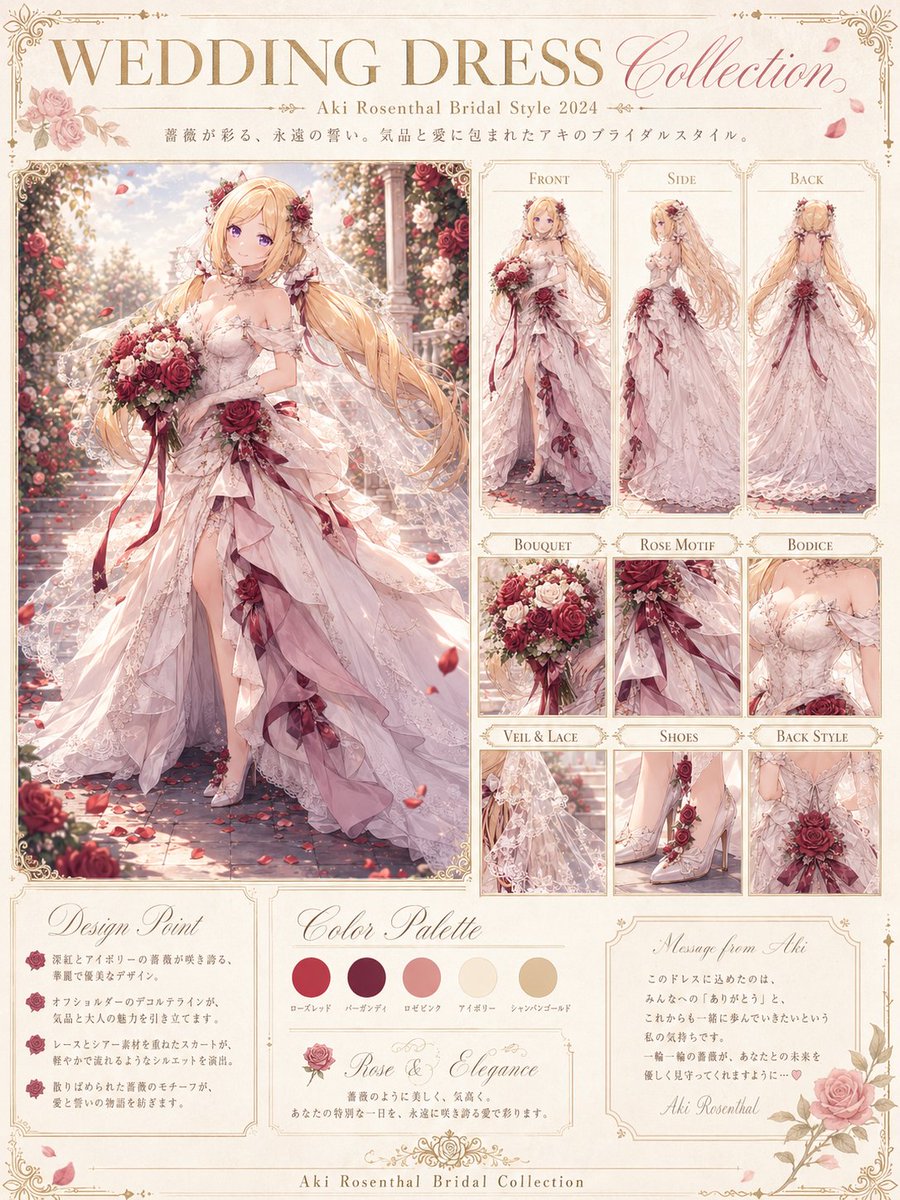
Anime Bridal Dress Collection — Elegant Fashion Catalog Prompt
Generate a sophisticated anime-style wedding dress portfolio with detailed design panels, color palettes, and romantic floral accents.
الموجّه · EN
目标:为 argcharacter name: Aki Rosenthal 创建一个精致的动漫婚纱系列设计项目,呈现为一张优雅的婚纱时尚展示页。 画布:垂直 4:5 海报,暖象牙色羊皮纸背景,带有花卉边角装饰的纤细华丽金边,页面周围散落着柔和的玫瑰花瓣。采用高细节浪漫动漫插画风格,柔和光影,细腻线条,奢华婚纱杂志排版。 页眉:顶部为金色大号衬线字体标题“WEDDING DRESS”,右侧为流动的粉色草书“Collection”。下方添加副标题“- argcharacter name: Aki Rosenthal Bridal Style 2024 -”以及一行简短的灰色小字日式装饰标语。 主体:左侧为一张大型全身婚纱插画,描绘了一位长发金发的精灵系动漫新娘,身处玫瑰花园通道中。她穿着浪漫的 argdress color: 淡腮红象牙色 婚纱,采用露肩紧身胸衣、透明蕾丝袖、层叠不对称荷叶边裙摆、高开叉设计,配有拖地头纱、玫瑰发饰、酒红色玫瑰点缀、丝带、蕾丝刺绣和珠宝细节。她手捧一束由红、粉、象牙色玫瑰组成的花束,系着长长的酒红色丝带。她的头发极长,呈流动的金色,带有柔和的卷曲和花卉配饰。面部应适当简化或轻微遮挡,以保持对婚纱设计的关注。背景:阳光明媚的玫瑰拱门、石子路、漂浮的花瓣、梦幻的虚化效果。 右侧布局:包含 9 个带边框的参考面板,排列成整洁的时尚规格网格。顶行有 3 个高面板,分别标注为“Front”(正面)、“Side”(侧面)和“Back”(背面),展示该婚纱的对应视角。下方有 6 个小细节面板,分别标注为“Bouquet”(花束)、“Rose Motif”(玫瑰图案)、“Bodice”(胸衣)、“Veil & Lace”(头纱与蕾丝)、“Shoes”(鞋子)和“Back Style”(背部款式)。细节面板应展示:1 个花束特写、1 个腰部玫瑰图案与丝带特写、1 个胸衣特写、1 个头纱与蕾丝特写、1 个带玫瑰装饰的蕾丝高跟鞋特写,以及 1 个后背胸衣与大型玫瑰装饰特写。 底部信息区:添加 4 张带金框的奶油色卡片。卡片 1 “Design Point”(设计要点)包含 3 个带小型酒红色玫瑰图标的要点。卡片 2 “Color Palette”(调色板)包含 5 个圆形色样,并用日式小字标注:玫瑰红、酒红、玫瑰粉、象牙白和香槟金。卡片 3 “Rose & Elegance”(玫瑰与优雅)包含一幅小型玫瑰插画和一段简短的诗意婚纱描述。卡片 4 “Message from Aki”(来自 Aki 的寄语)包含一段简短的手写风格笔记和签名“Aki Rosenthal”。底部居中页脚文字为“Aki Rosenthal Bridal Collection”。 视觉风格:柔和的水彩动漫渲染与精致的时尚插画相结合,华丽的维多利亚风格婚纱目录设计,暖奶油色纸张,金色排版,柔和的酒红色玫瑰,腮红粉色面料,半透明蕾丝,优雅的阴影,高细节,细腻的高光,无生硬对比。 约束:保持精确的面板数量:1 个主插画,3 个视图面板,6 个细节面板,4 张底部卡片,5 个色样,以及 3 个设计要点。使用可读的装饰性英文标题。避免使用徽标、水印、现代 UI 元素或多余字符。
حول هذا الموجّه
Generate a sophisticated anime-style wedding dress portfolio with detailed design panels, color palettes, and romantic floral accents. Use it as a الفن المفاهيمي starting point for GPT Image 2: keep the visual structure and style constraints intact, then swap in your own subject, brand, or scene.
Start by replacing character name and dress color, then keep the camera, composition, and material cues in the same order. This makes the output easier to compare across variations.
كيفية استخدام هذا الموجّه
- Copy the entire prompt and paste it into a capable AI image generator like Sora 2.
- Replace the default character name (e.g., 'Aki Rosenthal') and dress color in the curly braces with your desired choices.
- Generate the image, reviewing the output for adherence to the detailed layout, panel count, and style descriptions.
- Iterate on the generation if needed, perhaps by slightly rephrasing the prompt for clarity on specific elements like the 'back style' panel or 'design points' cards.


