Sora2 Hub
Sora2 Hub
  • مكتبة المطالبات
  • التسعير
  • معرض الأعمال
Sora2 Hub
Sora2 Hub
Sora2 Hub

Sora2 Hub

منصة إنشاء احترافية بالذكاء الاصطناعي مدعومة بـ Sora 2 و Veo 3.1 و Nano Banana Pro. أنشئ مقاطع فيديو مذهلة وصورًا بجودة الاستوديو مع تحكم متقدم وجودة HD وبدون علامات مائية.

Email:support@sora2hub.org

مولد الفيديو بالذكاء الاصطناعي

  • نص إلى فيديو
  • صورة إلى فيديو
  • Veo 3.1
  • Sora 2
  • Kling 3.0
  • Kling 2.6
  • Kling 2.5
  • Runway
  • Wan 2.6
  • Seedance 2.0
  • Hailuo 2.3
  • Grok Imagine
  • HappyHorse-1.0
  • HappyHorse 1.1
  • Kling 3.0 Turbo
  • Volcengine Video-to-Video Lip Sync
  • OmniHuman 1.5
  • Grok Imagine Video 1.5
  • Gemini Omni
  • Wan 2.7 Video
  • Seedance 2.0 Mini

مولد الصور بالذكاء الاصطناعي

  • نص إلى صورة
  • صورة إلى صورة
  • Nano Banana Pro
  • Nano Banana
  • 4o Image
  • Flux Kontext
  • Z Image
  • Seedream 4.5
  • Seedream 5.0 Lite
  • Nano Banana 2
  • GPT Image 2
  • محسن الصور بالذكاء الاصطناعي
  • Seedream 5.0 Pro
  • Nano Banana 2 Lite
  • Qwen Image 2.0

تأثيرات الذكاء الاصطناعي

  • فلتر العمر بالذكاء الاصطناعي
  • تبديل الجنس بالذكاء الاصطناعي
  • قبلة الذكاء الاصطناعي
  • عناق الذكاء الاصطناعي
  • صورة جيبلي
  • فلتر حورية البحر بالذكاء الاصطناعي
  • اهتزاز الجسم بالذكاء الاصطناعي
  • فلتر الابتسامة
  • سمين الذكاء الاصطناعي
  • شخصية الحركة

المنتج

  • الميزات
  • معارض
  • التسعير

الشركة

  • حول
  • اتصل

© 2025 • Sora2 Hub ORG جميع الحقوق محفوظة.

  • سياسة الخصوصية
  • شروط الخدمة
  • سياسة الاسترداد
  1. الرئيسية
  2. /
  3. الموجّهات
  4. /
  5. GPT Image 2
  6. /
  7. Japanese SaaS Form Builder: 6 Input Types — Sora 2 Prompt
GPT Image 2موجّه AI

Japanese SaaS Form Builder: 6 Input Types — Sora 2 Prompt

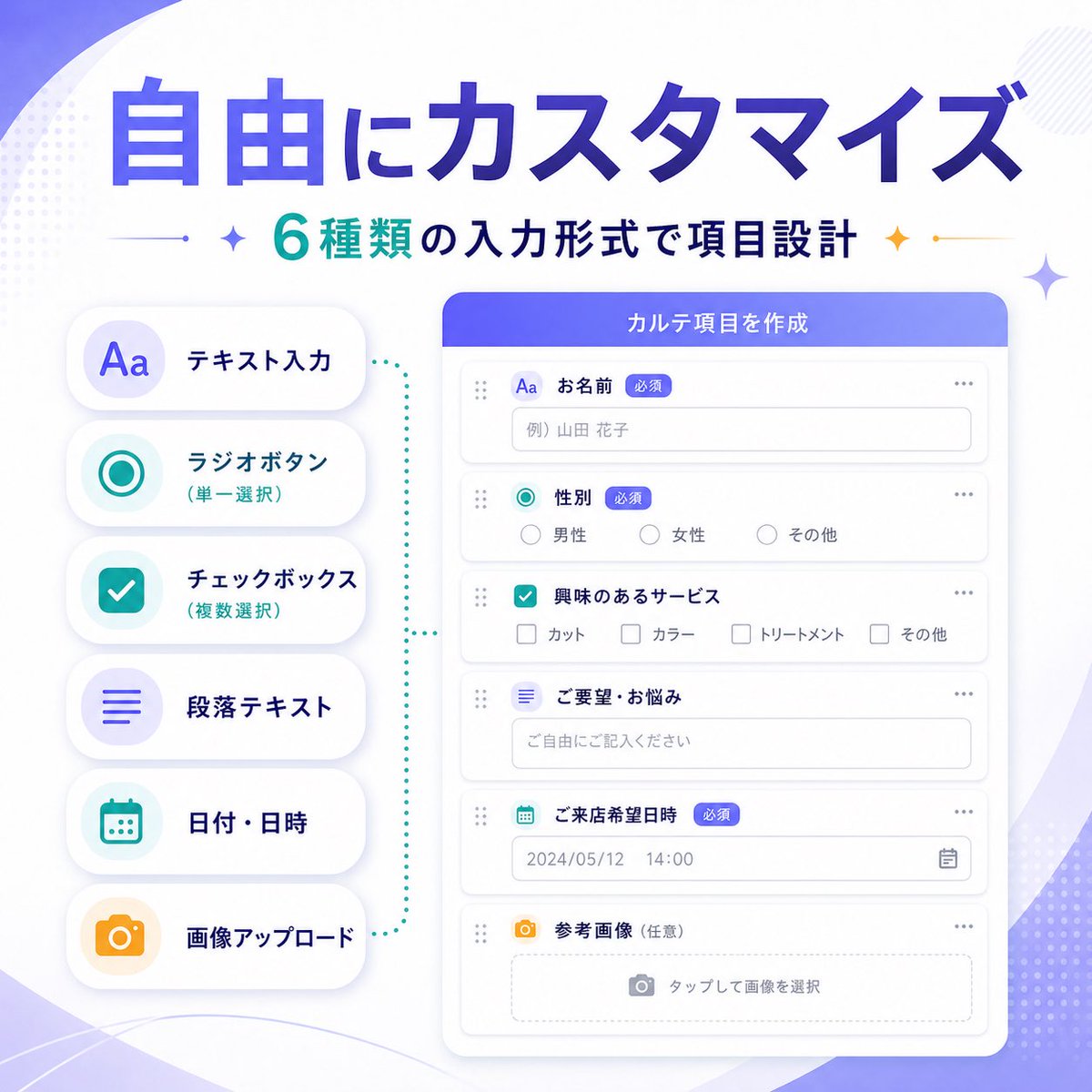
Generate a sleek Japanese-style SaaS marketing infographic showcasing six customizable form input types for product feature updates.
Japanese SaaS Form Builder: 6 Input Types — Sora 2 Prompt
الموجّه · EN
type
SaaS 功能更新横幅信息图
style
简洁现代的日本科技营销视觉,柔和渐变抽象背景,高级 UI 展示,极简扁平插画,圆角卡片,微妙阴影,清晰排版
language
中文
canvas
aspect_ratio
1:1
background
白色底色搭配柔和紫色渐变波纹,淡雅点状半调装饰,角落带有轻盈的几何闪烁效果
headline
main
{argument name="headline text" default="自由自定义"}
sub
{argument name="subheadline text" default="6 种输入格式,灵活设计表单项"}
main_style
超大加粗日系无衬线字体,深蓝至紫罗兰渐变填充
sub_style
中等加粗日系无衬线字体,青色与深海军蓝文字,两侧带有小型装饰性闪烁图标和细分割线
layout
composition
双栏产品功能横幅
sections
item 1
title
输入类型列表
position
left
count
6
labels
item 1
文本输入
item 2
单选按钮(单选)
item 3
复选框(多选)
item 4
段落文本
item 5
日期/时间
item 6
图片上传
container
6 个圆角白色胶囊卡片垂直堆叠,带有柔和阴影
icon_style
浅色圆形徽章内的大型简约彩色图标
colors
item 1
purple
item 2
teal
item 3
teal
item 4
purple
item 5
teal
item 6
orange
item 2
title
表单构建器 UI
position
right
count
6
labels
item 1
姓名
item 2
性别
item 3
感兴趣的服务
item 4
需求/困扰
item 5
到店期望日期
item 6
参考图片(可选)
container
大型圆角白色应用程序窗口,带有紫蓝色标题栏
header_text
{argument name="panel title" default="创建表单项"}
field_types
item 1
单行文本输入
item 2
单选按钮
item 3
复选框组
item 4
多行文本区域
item 5
日期和时间选择器
item 6
图片上传拖拽区
connector
青色点状括号式引导线,视觉上连接左侧功能列表与右侧表单构建器面板
ui_details
badges_count
3
badges
item 1
必填
item 2
必填
item 3
必填
sample_values
name_placeholder
例) 山田 花子
radio_options
item 1
男
item 2
女
item 3
其他
checkbox_options
item 1
剪发
item 2
染发
item 3
护理
item 4
其他
textarea_placeholder
请自由填写
date_value
2024/05/12
time_value
14:00
upload_hint
点击选择图片
window_controls
极简圆点和拖拽手柄,带有细浅灰色边框的整洁表单行
color_palette
primary
紫罗兰至宝蓝色渐变
secondary
青色
accent
橙色
surface
白色
text
海军蓝与灰色
quality
高分辨率精致初创公司营销图,平衡的间距,优雅的 SaaS 推广横幅,用于宣布可自定义的表单输入类型

حول هذا الموجّه

Generate a sleek Japanese-style SaaS marketing infographic showcasing six customizable form input types for product feature updates. Use it as a الفن المفاهيمي starting point for GPT Image 2: keep the visual structure and style constraints intact, then swap in your own subject, brand, or scene.

This prompt is organized as structured JSON with fields such as type, style, language, canvas, headline, layout, and ui details. Keeping that hierarchy helps the model separate the subject, layout, interface elements, and detail constraints.

Start with small changes to subject, scene, camera, and color, then generate a few variations to compare composition and detail without turning the page copy into keyword stuffing.

كيفية استخدام هذا الموجّه

  1. Copy the prompt text.
  2. Choose an AI image generator like Midjourney, DALL·E, or Stable Diffusion.
  3. Customize the headline and subheadline arguments (e.g., "headline text", "subheadline text") to match your feature.
  4. Adjust the panel title or other variables as needed.
  5. Generate the image and refine if necessary.
الأسئلة الشائعة

サトウヒデキ LINEミニアプリを創る人

@Satohide1994→

تاريخ النشر
25 أبريل 2026
اللغة الأصلية
EN
النموذج
GPT Image 2
التصنيف
الفن المفاهيمي
GPT Image 2الفن المفاهيميgpt-image-2twitter
مشاهدات
205
نسخ
29
إعجابات
6

مشاركة

المزيد من GPT Image 2

تصفح الكل
Ultra-Realistic 3D Exploded View Prompt: Sony BRAVIA 8K TV

Ultra-Realistic 3D Exploded View Prompt: Sony BRAVIA 8K TV

@Ankit_patel211
Sleeping Anime Star Witch — Dreamy Cosmic Sora 2 Prompt

Sleeping Anime Star Witch — Dreamy Cosmic Sora 2 Prompt

@prompts
Anime Mahjong Win Scene with Yakuza Score UI — Sora 2 Prompt

Anime Mahjong Win Scene with Yakuza Score UI — Sora 2 Prompt

@AI_Ossan

أنشئ أسرع باستخدام موجّهات Sora2Hub.

استخدم صفحات الموجّهات المنسقة كنقاط دخول قابلة للبحث، ثم انتقل مباشرة إلى التوليد بسياق النموذج المناسب.

استكشف الموجّهات