
Sora2 Hub
Sora2 Hub
  • مكتبة المطالبات
  • التسعير
  • معرض الأعمال
Sora2 Hub
Sora2 Hub
Sora2 Hub

Sora2 Hub

منصة إنشاء احترافية بالذكاء الاصطناعي مدعومة بـ Sora 2 و Veo 3.1 و Nano Banana Pro. أنشئ مقاطع فيديو مذهلة وصورًا بجودة الاستوديو مع تحكم متقدم وجودة HD وبدون علامات مائية.

Email:support@sora2hub.org

مولد الفيديو بالذكاء الاصطناعي

  • نص إلى فيديو
  • صورة إلى فيديو
  • Veo 3.1
  • Sora 2
  • Kling 3.0
  • Kling 2.6
  • Kling 2.5
  • Runway
  • Wan 2.6
  • Seedance 2.0
  • Hailuo 2.3
  • Grok Imagine
  • HappyHorse-1.0

مولد الصور بالذكاء الاصطناعي

  • نص إلى صورة
  • صورة إلى صورة
  • Nano Banana Pro
  • Nano Banana
  • 4o Image
  • Flux Kontext
  • Z Image
  • Seedream 4.5
  • Seedream 5.0 Lite
  • Nano Banana 2
  • GPT Image 2
  • محسن الصور بالذكاء الاصطناعي

تأثيرات الذكاء الاصطناعي

  • فلتر العمر بالذكاء الاصطناعي
  • تبديل الجنس بالذكاء الاصطناعي
  • قبلة الذكاء الاصطناعي
  • عناق الذكاء الاصطناعي
  • صورة جيبلي
  • فلتر حورية البحر بالذكاء الاصطناعي
  • اهتزاز الجسم بالذكاء الاصطناعي
  • فلتر الابتسامة
  • سمين الذكاء الاصطناعي
  • شخصية الحركة

المنتج

  • الميزات
  • معارض
  • التسعير

الشركة

  • حول
  • اتصل

© 2025 • Sora2 Hub ORG جميع الحقوق محفوظة.

  • سياسة الخصوصية
  • شروط الخدمة
  • سياسة الاسترداد
  1. الرئيسية
  2. /
  3. الموجّهات
  4. /
  5. GPT Image 2
  6. /
  7. Dark Tech Marketing Collage Slides — Sora 2 Prompt
GPT Image 2موجّه AI

Dark Tech Marketing Collage Slides — Sora 2 Prompt

Generate a premium multi-panel startup marketing collage with smart scales, brand updates, AI chat UI, and referral banners in sleek dark mode.
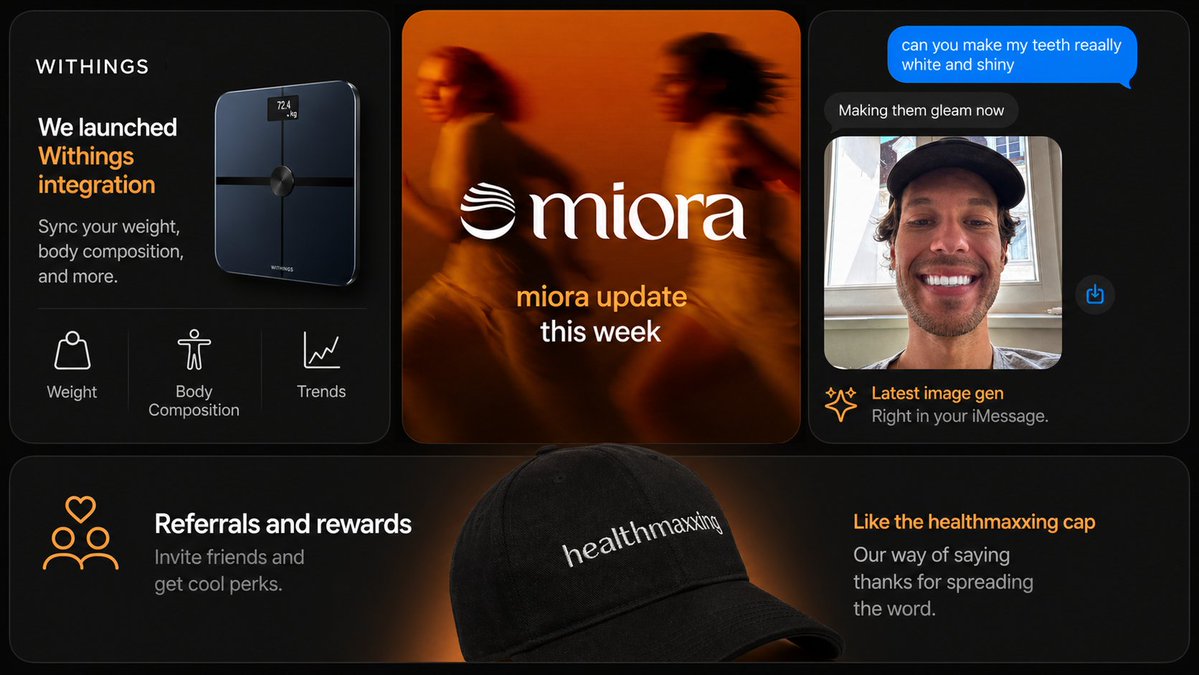
Dark Tech Marketing Collage Slides — Sora 2 Prompt
الموجّه · EN
type
现代营销 Slides 拼贴
style
高端深色模式科技品牌演示,时尚产品营销,柔和光效,圆角卡片,细腻渐变,高对比度,精致的初创公司美学
canvas
aspect_ratio
16:9
background
深黑色,带有微弱的暖橙色光晕点缀
brand
name
{argument name="brand name" default="WITHINGS"}
accent_color
暖橙色
layout
structure
顶行 3 张卡片,底部全宽横幅卡片 1 张
card_count
4
sections
item 1
title
智能秤产品卡片
position
左上
count
3
labels
item 1
体重
item 2
身体成分
item 3
趋势
content
深色卡片,左上角为品牌名称,大号白色和橙色标题写着 'We launched Withings integration',较小的副标题 'Sync your weight, body composition, and more.',右侧浮动着一台光亮的黑色智能秤,带有微小的发光屏幕,显示 '72.4 kg',底部特征行由细分隔线隔开,显示 3 个白色线条图标及标签
item 2
title
品牌更新卡片
position
顶部居中
count
1
labels
item 1
miora 本周更新
content
暖橙色调的模糊生活方式图像,展示 2 名奔跑者,中间为巨大的白色衬线字体 Logo '{argument name="center brand" default="miora"}',左侧带有波浪状徽标,下方堆叠文本,第一行为橙色,第二行为白色
item 3
title
聊天图像生成卡片
position
右上
count
4
labels
item 1
你能让我的牙齿变得非常洁白闪亮吗
item 2
正在为您美化
item 3
最新图像生成
item 4
直接在 iMessage 中使用。
content
深色 iMessage 风格手机对话界面,顶部为亮蓝色发出消息气泡,下方为深灰色回复气泡,下方显示肖像照片预览,展示一名戴黑色帽子的人在窗前,脸部被矩形模糊遮挡,右侧浮动一个小蓝色分享图标,页脚标题带有火花图标、橙色大标题和灰色副标题
item 4
title
推荐横幅卡片
position
底部全宽
count
2
labels
item 1
推荐与奖励
item 2
喜欢这款 healthmaxxing 帽子
content
宽幅深色横幅,中心前景处为一顶黑色棒球帽,后方有柔和的橙色聚光灯,帽子上绣有白色文字 '{argument name="cap text" default="healthmaxxing"}',左侧有 3 个人的橙色线条图标,上方带有一个心形,以及白色标题和灰色副标题 'Invite friends and get cool perks.',右侧有橙色标题和灰色副标题 'Our way of saying thanks for spreading the word.'
design_details
corners
每张卡片均采用大圆角
borders
细腻的灰色细边框
spacing
卡片之间间距均匀
typography
UI 和营销文案采用简洁的无衬线字体,中心 Logo 字标采用优雅的衬线字体
lighting
深邃的黑色背景,配以橙色边缘光和光晕
product_rendering
高端逼真的 3D 产品和配件渲染
ui_style
极简高端应用/商店推广美学
text_overrides
top_left_brand
{argument name="headline brand" default="WITHINGS"}
center_update_line
{argument name="update text" default="miora update this week"}

حول هذا الموجّه

Generate a premium multi-panel startup marketing collage with smart scales, brand updates, AI chat UI, and referral banners in sleek dark mode. Use it as a الفن المفاهيمي starting point for GPT Image 2: keep the visual structure and style constraints intact, then swap in your own subject, brand, or scene.

This prompt is organized as structured JSON with fields such as type, style, canvas, brand, layout, design details, and text overrides. Keeping that hierarchy helps the model separate the subject, layout, interface elements, and detail constraints.

Start with small changes to subject, scene, camera, and color, then generate a few variations to compare composition and detail without turning the page copy into keyword stuffing.

كيفية استخدام هذا الموجّه

  1. Copy the full prompt JSON and paste it into your AI image generator supporting Sora 2 or similar models.
  2. Choose a high-resolution model like Sora 2 for best detail on gradients and UI mockups.
  3. Customize variables: replace brand name (default WITHINGS), center brand (default miora), and cap text (default healthmaxxing) with your own.
  4. Adjust the aspect ratio if needed — 16:9 works for presentations, but 1:1 suits social media posts.
  5. Generate and iterate: refine prompts for card layouts, accent colors, or add specific product imagery.


الأسئلة الشائعة

Nikolai Madlener

@MadlenerNikolai→

تاريخ النشر
30 أبريل 2026
اللغة الأصلية
EN
النموذج
GPT Image 2
التصنيف
الفن المفاهيمي
GPT Image 2الفن المفاهيميgpt-image-2twitter
مشاهدات
636
نسخ
34
إعجابات
20

مشاركة

المزيد من GPT Image 2

تصفح الكل
Dark Anime Devil Girl Mario Kart Poster — Sora 2 Prompt

Dark Anime Devil Girl Mario Kart Poster — Sora 2 Prompt

@opener_ai
Photorealistic Fashion Magazine Cover — Sora 2 Prompt

Photorealistic Fashion Magazine Cover — Sora 2 Prompt

@aichof21
Minimalist Japanese Electric Nail Clipper Product Landing Page — Sora 2 Prompt

Minimalist Japanese Electric Nail Clipper Product Landing Page — Sora 2 Prompt

@eisho_m

أنشئ أسرع باستخدام موجّهات Sora2Hub.

استخدم صفحات الموجّهات المنسقة كنقاط دخول قابلة للبحث، ثم انتقل مباشرة إلى التوليد بسياق النموذج المناسب.

استكشف الموجّهات
