
GPT Image 2موجّه AI
Tech Keynote Data Slide Generator — Sora 2 Prompt
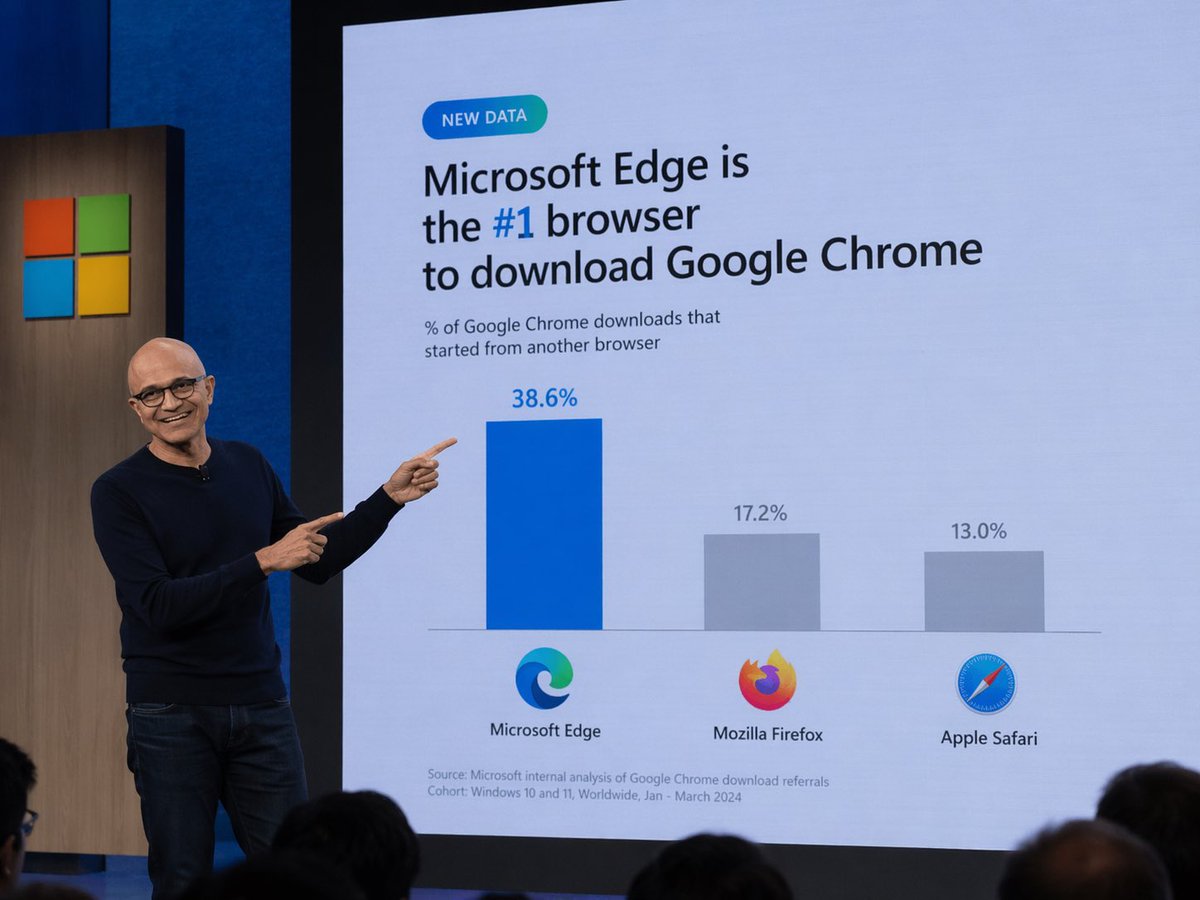
Creates a realistic photo of a tech executive presenting a humorous or customized data slide during a keynote.
الموجّه · EN
A photograph of a tech keynote presentation. A bald man with glasses, wearing a dark blue sweater and jeans, stands on a stage to the left, smiling and pointing with both index fingers at a large presentation screen behind him. The screen displays a slide with a light blue background. At the top left is a small teal pill-shaped badge reading "NEW DATA". Below it, the main headline reads "argheadline: Microsoft Edge is the #1 browser to download Google Chrome", with "#1" highlighted in blue. A subheadline reads "% of Google Chrome downloads that started from another browser". Below this is a bar chart with three bars. The first bar is tall and blue, labeled "38.6%" above it, with the Microsoft Edge logo and text "Microsoft Edge" below it. The second bar is shorter and gray, labeled "17.2%" above it, with the Mozilla Firefox logo and text "Mozilla Firefox" below it. The third bar is the shortest and gray, labeled "13.0%" above it, with the Apple Safari logo and text "Apple Safari" below it. At the bottom left of the slide, small text reads "Source: Microsoft internal analysis of Google Chrome download referrals Cohort: Windows 10 and 11, Worldwide, Jan - March 2024". To the left of the screen, a wooden panel features the Microsoft logo (four colored squares). The backs of audience members' heads are visible in the foreground at the bottom.
حول هذا الموجّه
Creates a realistic photo of a tech executive presenting a humorous or customized data slide during a keynote. Use it as a الفن المفاهيمي starting point for GPT Image 2: keep the visual structure and style constraints intact, then swap in your own subject, brand, or scene.
Common directions include gptimage2api prompts, gptimage2api, and en. Treat these tags as creative cues; the prompt structure and preview image are the more useful guide.
Start by replacing headline, then keep the camera, composition, and material cues in the same order. This makes the output easier to compare across variations.
كيفية استخدام هذا الموجّه
- Copy the prompt text.
- Choose your preferred AI model (e.g., Sora 2, DALL-E 3).
- Edit the
{headline}variable to change the slide's main text. - Generate the image and refine the prompt if needed.


