
Sora2 Hub
Sora2 Hub
  • مكتبة المطالبات
  • التسعير
  • معرض الأعمال
Sora2 Hub
Sora2 Hub
Sora2 Hub

Sora2 Hub

منصة إنشاء احترافية بالذكاء الاصطناعي مدعومة بـ Sora 2 و Veo 3.1 و Nano Banana Pro. أنشئ مقاطع فيديو مذهلة وصورًا بجودة الاستوديو مع تحكم متقدم وجودة HD وبدون علامات مائية.

Email:support@sora2hub.org

مولد الفيديو بالذكاء الاصطناعي

  • نص إلى فيديو
  • صورة إلى فيديو
  • Veo 3.1
  • Sora 2
  • Kling 3.0
  • Kling 2.6
  • Kling 2.5
  • Runway
  • Wan 2.6
  • Seedance 2.0
  • Hailuo 2.3
  • Grok Imagine
  • HappyHorse-1.0

مولد الصور بالذكاء الاصطناعي

  • نص إلى صورة
  • صورة إلى صورة
  • Nano Banana Pro
  • Nano Banana
  • 4o Image
  • Flux Kontext
  • Z Image
  • Seedream 4.5
  • Seedream 5.0 Lite
  • Nano Banana 2
  • GPT Image 2
  • محسن الصور بالذكاء الاصطناعي

تأثيرات الذكاء الاصطناعي

  • فلتر العمر بالذكاء الاصطناعي
  • تبديل الجنس بالذكاء الاصطناعي
  • قبلة الذكاء الاصطناعي
  • عناق الذكاء الاصطناعي
  • صورة جيبلي
  • فلتر حورية البحر بالذكاء الاصطناعي
  • اهتزاز الجسم بالذكاء الاصطناعي
  • فلتر الابتسامة
  • سمين الذكاء الاصطناعي
  • شخصية الحركة

المنتج

  • الميزات
  • معارض
  • التسعير

الشركة

  • حول
  • اتصل

© 2025 • Sora2 Hub ORG جميع الحقوق محفوظة.

  • سياسة الخصوصية
  • شروط الخدمة
  • سياسة الاسترداد
  1. الرئيسية
  2. /
  3. الموجّهات
  4. /
  5. GPT Image 2
  6. /
  7. Visa App UI Before-After — Sora 2 Prompt
GPT Image 2موجّه AI

Visa App UI Before-After — Sora 2 Prompt

Generate a sleek SaaS-style comparison showing an old visa landing page redesigned into an interactive global mobility dashboard.
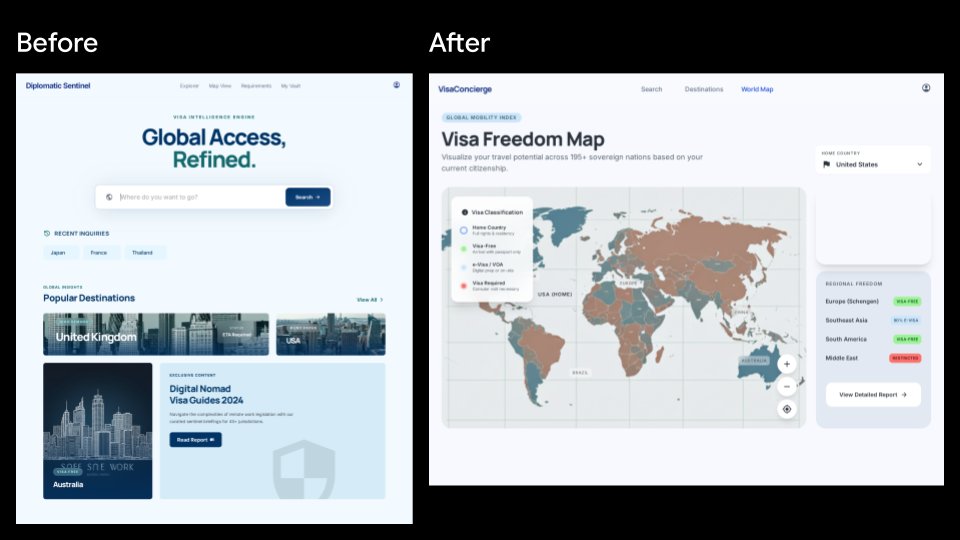
Visa App UI Before-After — Sora 2 Prompt
الموجّه · EN
type
并排产品 UI 对比模型
canvas
aspect_ratio
16:9 宽屏
background
纯黑色
style
简洁的 SaaS 展示幻灯片,清晰的矢量 UI,高保真 Web 应用截图
layout
sections
item 1
title
改版前
position
左侧
count
1
description
一个淡蓝色的旅行签证智能落地页,置于白色浏览器框架内,上方用白色大字标注“改版前”。
item 2
title
改版后
position
右侧
count
1
description
一个重新设计的签证自由度地图仪表盘,置于白色浏览器框架内,上方用白色大字标注“改版后”。
comparison_count
2
left_before_screen
brand
Diplomatic Sentinel
navigation_count
4
navigation_labels
item 1
探索
item 2
签证视图
item 3
要求
item 4
我的保险库
main_badge
签证智能引擎
headline
{argument name="before headline text" default="全球通行,精益求精。"}
search_bar
placeholder
你想去哪里?
button
搜索
recent_inquiries_count
3
recent_inquiries
item 1
日本
item 2
法国
item 3
泰国
popular_destinations_count
3
popular_destinations
item 1
英国
item 2
美国
item 3
澳大利亚
feature_card
title
2024 年数字游民签证指南
button
阅读报告
visual
极简盾牌水印和淡蓝色编辑卡片
visual_style
柔和阴影,圆角卡片,淡蓝色背景,海军蓝与青色排版,旅行目的地照片缩略图
right_after_screen
brand
VisaConcierge
navigation_count
3
navigation_labels
item 1
搜索
item 2
目的地
item 3
世界地图
main_badge
全球流动性指数
headline
{argument name="after headline text" default="签证自由度地图"}
subheading
根据您当前的国籍,可视化您在 195 个以上主权国家的旅行潜力。
map_panel
description
仪表盘中央的大型交互式世界地图,采用柔和的青色、棕褐色、灰色和红色进行国家分类
legend_count
4
legend_labels
item 1
母国
item 2
免签
item 3
电子签 / 落地签
item 4
需签证
map_controls_count
3
map_controls
item 1
放大
item 2
缩小
item 3
定位目标
right_sidebar
cards_count
2
cards
item 1
title
母国
selected_value
{argument name="home country" default="美国"}
item 2
title
区域自由度
regions_count
4
regions
item 1
欧洲(申根区)— 免签
item 2
东南亚 — 免签
item 3
南美洲 — 免签
item 4
中东 — 受限
button
查看详细报告
visual_style
现代分析仪表盘,圆角白色卡片,柔和灰色背景,细微阴影,紧凑的无衬线字体
overall_direction
生成一张精美的旅行签证 Web 产品改版前后对比幻灯片。左侧屏幕应呈现为通用的目的地搜索落地页,而右侧屏幕应看起来更实用且数据丰富,重点突出交互式全球签证自由度地图和侧边栏洞察。

حول هذا الموجّه

Generate a sleek SaaS-style comparison showing an old visa landing page redesigned into an interactive global mobility dashboard. Use it as a الفن المفاهيمي starting point for GPT Image 2: keep the visual structure and style constraints intact, then swap in your own subject, brand, or scene.

This prompt is organized as structured JSON with fields such as type, canvas, layout, left before screen, right after screen, and overall direction. Keeping that hierarchy helps the model separate the subject, layout, interface elements, and detail constraints.

Start with small changes to subject, scene, camera, and color, then generate a few variations to compare composition and detail without turning the page copy into keyword stuffing.

كيفية استخدام هذا الموجّه

  1. Copy the full prompt into your Sora 2 or compatible image generator.
  2. Choose a 16:9 widescreen setting for best results.
  3. Customize variables like before headline text, after headline text, and home country to match your needs.
  4. Generate and review — iterate by adjusting layout or color details if desired.

الأسئلة الشائعة

Wayne Dong

@linxid19942024→

تاريخ النشر
15 مايو 2026
اللغة الأصلية
EN
النموذج
GPT Image 2
التصنيف
الفن المفاهيمي
GPT Image 2الفن المفاهيميgpt-image-2twitter
مشاهدات
5.6K
نسخ
596
إعجابات
392

مشاركة

المزيد من GPT Image 2

تصفح الكل
Anime Reaction Thumbnail Prompt — Neon Edgy VTuber

Anime Reaction Thumbnail Prompt — Neon Edgy VTuber

@abdiisan
AI-Generated Crossover Fighter Screenshot — Sora 2 Prompt

AI-Generated Crossover Fighter Screenshot — Sora 2 Prompt

@momoringo_sub
Cyberpunk Catgirl Soda Splash — Sora 2 Prompt

Cyberpunk Catgirl Soda Splash — Sora 2 Prompt

@kuso_seisakusyo

أنشئ أسرع باستخدام موجّهات Sora2Hub.

استخدم صفحات الموجّهات المنسقة كنقاط دخول قابلة للبحث، ثم انتقل مباشرة إلى التوليد بسياق النموذج المناسب.

استكشف الموجّهات

