
GPT Image 2موجّه AI
Dark Editorial News UI — Japanese Article Prompt
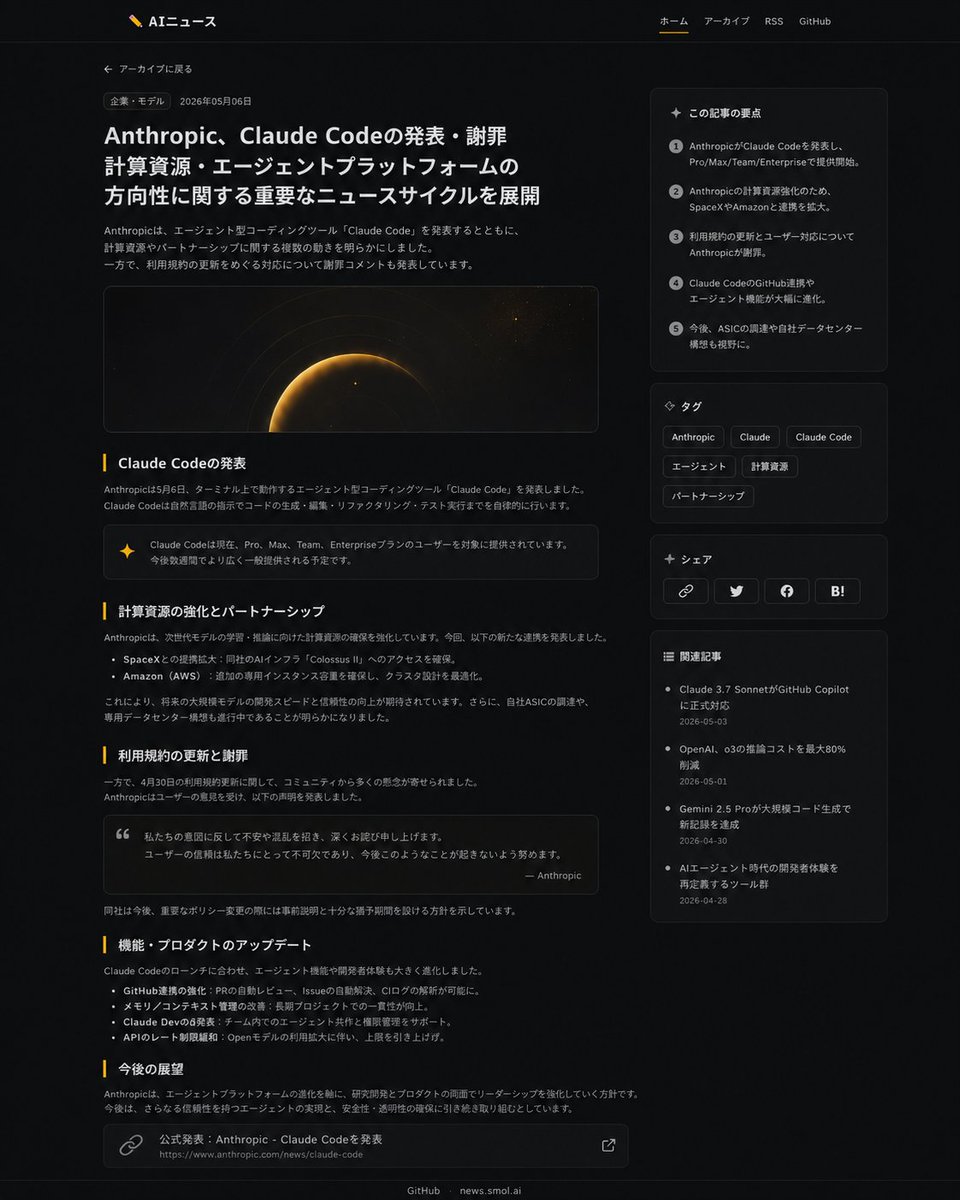
Transform a plain Japanese news article into a polished dark-mode editorial layout with sidebar summaries, tags, share buttons, and related links.
الموجّه · EN
以 REFERENCE_1 作为源文章页面,REFERENCE_0 作为网站品牌/导航参考,将文章页面重新设计为精致的现代深色模式新闻 UI,同时保留日语文章主题和整体网站标识。保留带有 Logo 和导航链接的页眉,但将文章布局加宽并使其更具编辑感:添加“返回归档”链接、分类标签、日期、醒目的大标题、简短的导语段落,以及带有深空/行星发光主题的宽幅电影感主图。将文章正文重新格式化为清晰的板块,包含 5 个可见的章节标题:「Claude Codeの発表」、「計算資源の強化とパートナーシップ」、「利用規約の更新と謝罪」、「機能・プロダクトのアップデート」以及「今後の展望」。添加内嵌 UI 增强功能,包括一个高亮提示/标注框、一个引用框、项目符号列表以及底部的来源链接卡片。添加一个右侧边栏,包含 4 个堆叠卡片:1) 「この記事の要点」,包含 5 个带编号的摘要要点;2) 「タグ」,包含 6 个标签,分别为 Anthropic、Claude、Claude Code、エージェント、計算資源、パートナーシップ;3) 「シェア」,包含 4 个分享按钮/图标,分别为链接、Twitter/X、Facebook 和 Hatena Bookmark;4) 「関連記事」,包含 4 个相关文章链接及日期。使用细微的边框、圆角卡片、柔和的灰色文本、琥珀色强调线条以及充足的留白;保留页脚的 GitHub 和 news.smol.ai 链接。
حول هذا الموجّه
Transform a plain Japanese news article into a polished dark-mode editorial layout with sidebar summaries, tags, share buttons, and related links. Use it as a الفن المفاهيمي starting point for GPT Image 2: keep the visual structure and style constraints intact, then swap in your own subject, brand, or scene.
Start with small changes to subject, scene, camera, and color, then generate a few variations to compare composition and detail without turning the page copy into keyword stuffing.
كيفية استخدام هذا الموجّه
- Copy the full prompt and replace REFERENCE_0 and REFERENCE_1 with your brand navigation page and source article URL.
- Paste into your preferred AI model (GPT-4o, Claude, Gemini, etc.) that supports structured HTML/CSS generation.
- Adjust section headings, sidebar tags, or color accents to match your content niche.
- Generate the output and review the dark-theme layout, sidebar cards, and typography.
- Export or refine the HTML/CSS as needed for integration into your site.


