
GPT Image 2Prompt AI
12-Panel Anime & Game Style Photo Grid — Sora 2 Prompt
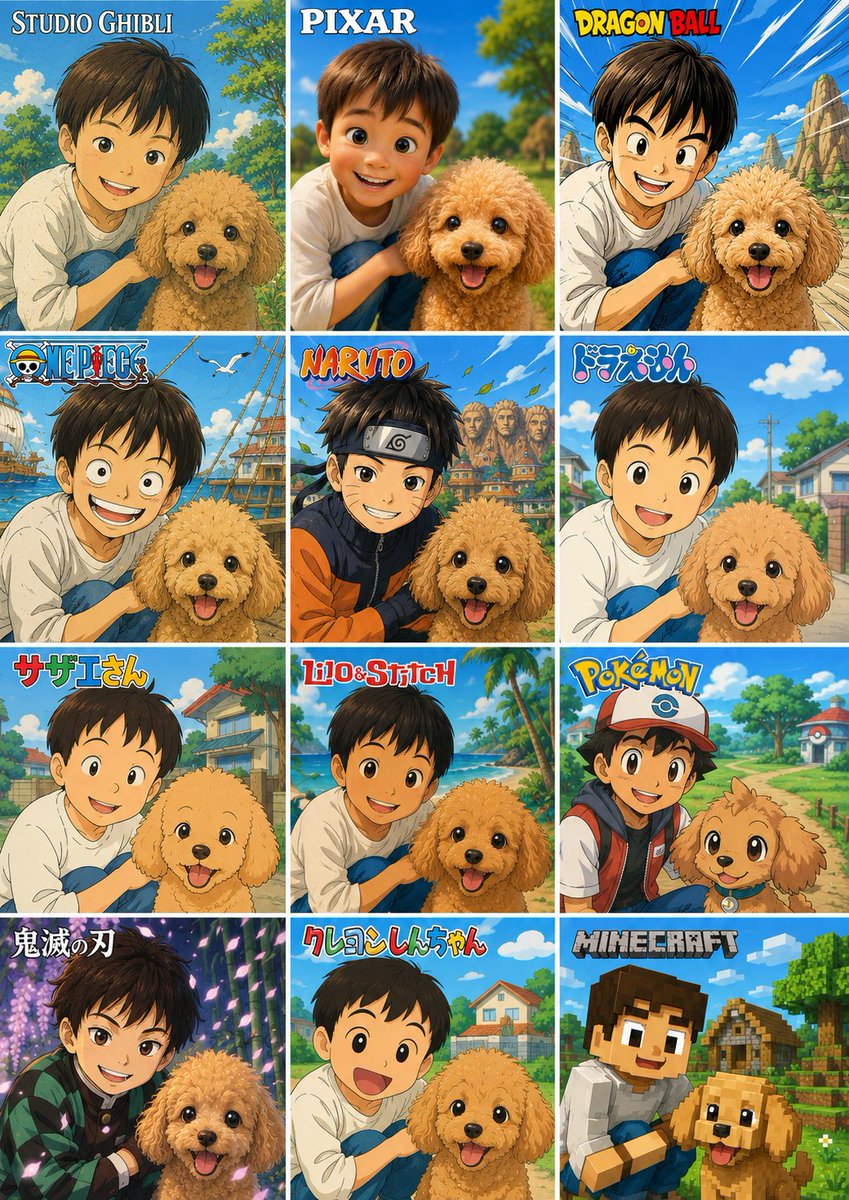
Transform a boy-and-dog photo into a vibrant 12-panel vertical grid, each panel re-imagined in a different iconic anime or game art style.
PROMPT · EN
使用提供的参考照片,创建一个垂直对比图,将男孩与狗的照片转换为 3 列 4 行、共 12 个正方形面板的网格,每个面板展示以不同流行动漫/游戏风格重新构思的相同构图。保持男孩和狗作为参考照片中可识别的主体,保留他们相对的姿势和亲密度,但以要求的风格渲染每个面板,并配以相符的背景、线条、色彩和角色比例。在每个面板顶部添加醒目的风格标题/Logo。 画布与布局:制作一个包含 12 个等大面板的垂直拼贴画,面板间留有细白边,按从左到右、从上到下的顺序排列。 面板风格及可见标签(共 12 个):
1. 吉卜力工作室 — 标签:“STUDIO GHIBLI”,柔和的手绘田园动漫风格。
2. 皮克斯 — 标签:“PIXAR”,精致的 3D 家庭动画风格。
3. 七龙珠 — 标签:“DRAGON BALL”,带有速度线和岩石景观的动态少年动作风格。
4. 海贼王 — 标签:“ONE PIECE”,带有船只元素的航海冒险动漫风格。
5. 火影忍者 — 标签:“NARUTO”,带有村庄屋顶和护额造型的忍者动漫风格。
6. 哆啦 A 梦 — 标签:“ドラえもん”,明亮的郊区儿童动漫风格。
7. 海螺小姐 — 标签:“サザエさん”,经典的日本家庭动漫风格。
8. 星际宝贝 — 标签:“Lilo & Stitch”,热带岛屿动画风格。
9. 宝可梦 — 标签:“POKÉMON”,色彩丰富的训练师与伙伴冒险风格。
10. 鬼灭之刃 — 标签:“鬼滅の刃”,带有发光粒子的戏剧性暗黑奇幻动漫风格。
11. 蜡笔小新 — 标签:“クレヨンしんちゃん”,简洁圆润的儿童动漫风格。
12. 我的世界 — 标签:“MINECRAFT”,方块体素游戏风格。 可自定义文本:在面板标题出现的位置使用 argfirst style label: STUDIO GHIBLI、argsecond style label: PIXAR、argthird style label: DRAGON BALL、argninth style label: POKÉMON 以及 argtwelfth style label: MINECRAFT。 约束条件:不要添加额外的面板或标签。在每个面板中保留参考主体,包括男孩和狗,仅改变艺术风格、环境细节和受特许经营启发的视觉语言。保持拼贴画整洁、色彩丰富且具有海报感。
Informazioni su questo prompt
Transform a boy-and-dog photo into a vibrant 12-panel vertical grid, each panel re-imagined in a different iconic anime or game art style. Use it as a Concept Art starting point for GPT Image 2: keep the visual structure and style constraints intact, then swap in your own subject, brand, or scene.
Start by replacing first style label, second style label, third style label, and ninth style label, then keep the camera, composition, and material cues in the same order. This makes the output easier to compare across variations.
Come usare questo prompt
- Copy this prompt and paste it into your Sora 2 interface.
- Select the Sora 2 video generation model.
- Replace the default style labels (e.g., STUDIO GHIBLI) in the curly-brace arguments with your preferred names if you wish.
- Click Generate to produce the 12-panel vertical collage with your custom photo reference.


