
GPT Image 2Prompt AI

GPT-Image-2 Infographic: Cyberpunk Tech Layout — Prompt

Create a detailed cyberpunk infographic comparing rumored next-gen AI models with glowing neon aesthetics and complex layouts.
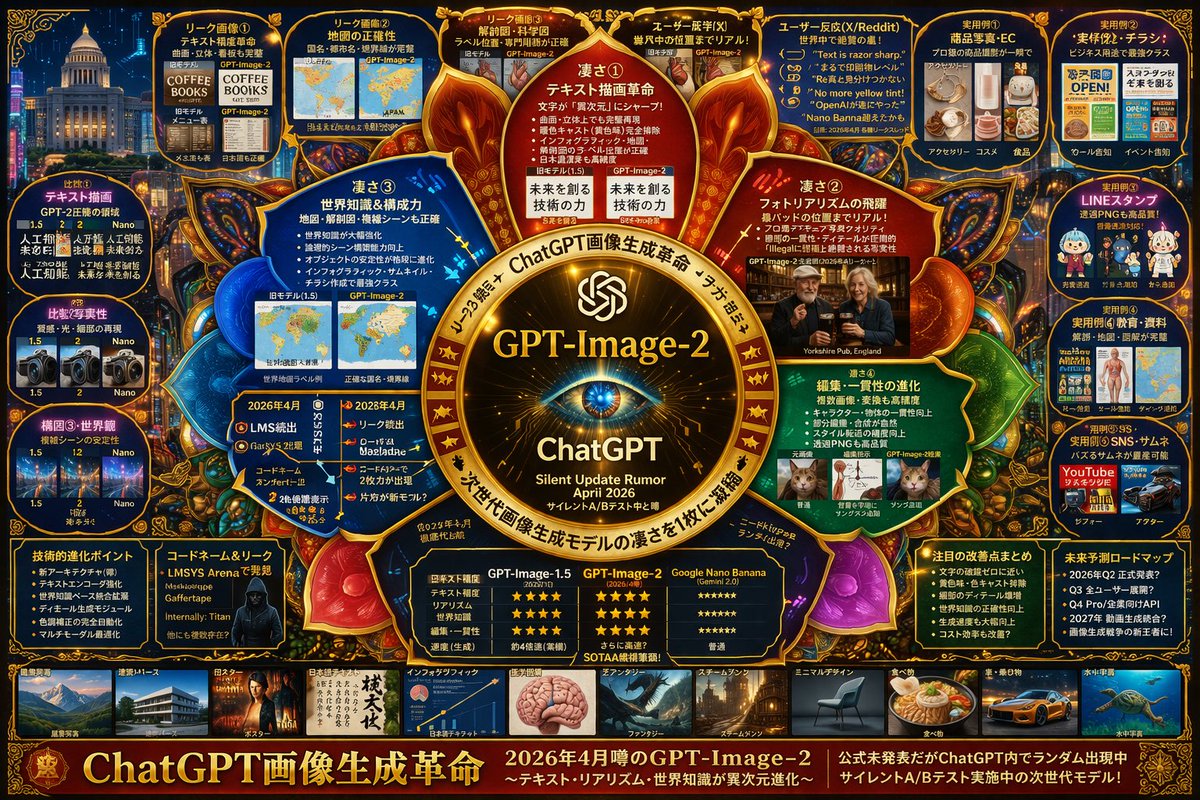
GPT-Image-2 Infographic: Cyberpunk Tech Layout — Prompt
PROMPT · EN
type
高密度未来科技风信息图项目
theme
colors
{argument name="theme color" default="金色与深蓝色"}
style
深色模式,发光霓虹边框,复杂的思维导图布局,赛博科技美学
centerpiece
description
发光的金色圆形徽标,类似于眼睛或相机镜头
text
item 1
{argument name="main title" default="GPT-Image-2"}
item 2
ChatGPT
item 3
静默更新传闻 {argument name="release date" default="2026 年 4 月"}
layout
top_left
title
泄露图片
count
4
items
item 1
文本渲染咖啡菜单
item 2
世界地图
item 3
解剖图
item 4
照片级真实感的酒吧
top_right
title
用例与反馈
count
5
items
item 1
电商产品
item 2
商业传单
item 3
聊天贴纸
item 4
教育材料
item 5
YouTube 缩略图
left_side
title
版本对比
count
3
items
item 1
文本渲染对比
item 2
照片真实感对比
item 3
构图稳定性对比
inner_ring
title
核心功能
count
4
items
item 1
文本绘制革命
item 2
照片真实感飞跃
item 3
世界知识
item 4
编辑一致性
bottom_left
title
技术规格
count
2
items
item 1
技术演进要点
item 2
带有代号的黑客剪影
bottom_center
title
模型对比表
columns
3
headers
item 1
GPT-Image-1.5
item 2
{argument name="main title" default="GPT-Image-2"}
item 3
{argument name="competitor model" default="Google Nano Banana"}
rows
item 1
文本准确性
item 2
真实感
item 3
世界知识
item 4
编辑能力
item 5
速度
bottom_right
title
未来展望
count
2
items
item 1
显著改进列表
item 2
未来路线图时间轴
bottom_edge
title
风格画廊
count
10
items
item 1
建筑
item 2
海报
item 3
日语文本
item 4
信息图
item 5
奇幻
item 6
蒸汽朋克
item 7
极简设计
item 8
食物
item 9
汽车
item 10
水下
footer
title
主横幅
text
item 1
{argument name="subtitle" default="ChatGPT 画像生成革命"}
item 2
处于静默 A/B 测试中的下一代模型

Informazioni su questo prompt

Create a detailed cyberpunk infographic comparing rumored next-gen AI models with glowing neon aesthetics and complex layouts. Use it as a Concept Art starting point for GPT Image 2: keep the visual structure and style constraints intact, then swap in your own subject, brand, or scene.

This prompt is organized as structured JSON with fields such as type, theme, centerpiece, and layout. Keeping that hierarchy helps the model separate the subject, layout, interface elements, and detail constraints.

Start with small changes to subject, scene, camera, and color, then generate a few variations to compare composition and detail without turning the page copy into keyword stuffing.

Come usare questo prompt

  1. Copy the full prompt from this page.
  2. Choose an AI image generator (e.g., DALL·E 3, Midjourney, Stable Diffusion).
  3. Tweak the customizable variables like theme color or main title to fit your needs.
  4. Paste the prompt and generate the infographic.
  5. Regenerate with different seeds or minor adjustments until you get the perfect high-tech layout.

FAQ

Altro da GPT Image 2

Vedi tutto

Crea più velocemente con i prompt Sora2Hub.

Usa pagine prompt curate come ingressi ricercabili e passa subito alla generazione con il contesto modello corretto.

Esplora prompt

