
GPT Image 2Prompt AI
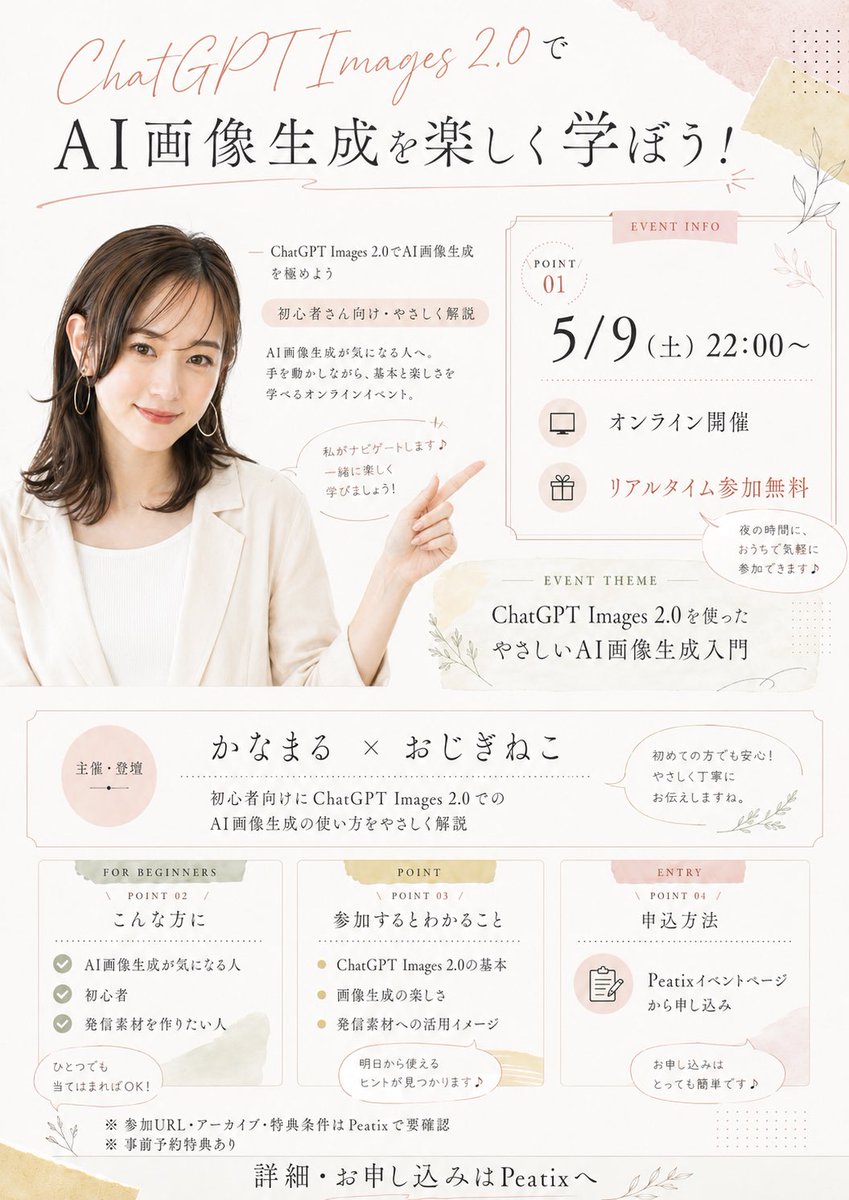
Japanese Watercolor Seminar Flyer — Warm & Elegant Design
Generate a soft, elegant Japanese-style online seminar flyer with watercolor stationery aesthetics, featuring a speaker photo, event info, and charming botanical accents.
PROMPT · EN
以 REFERENCE_0 作为演讲者照片,制作一张采用暖米色/粉色水彩文具风格的柔和、优雅的日式在线研讨会传单。保持演讲者的发型、服装、耳环和匿名化面部遮挡的一致性,将其裁剪并放置在传单左侧,延伸/生成其上半身,使其面带微笑看向观众,一只手臂抬起指向右侧的活动信息。在米白色背景上添加精致的植物线条艺术、浅色和纸胶带纹理、纤细的装饰边框、圆点装饰以及淡粉色/金色的高光。 将传单设计为垂直的活动公告,包含以下独立的区域:1 个顶部大标题区、1 个右侧活动信息卡片、1 个活动主题条、1 个主办方/演讲者条以及 3 个底部信息卡片。 需要包含的可见文字:
顶部标题:“ChatGPT Images 2.0で” 以及主标题 “AI画像生成を楽しく学ぼう!”
演讲者附近:“ChatGPT Images 2.0でAI画像生成を極めよう”、“初心者さん向け・やさしく解説”、“AI画像生成が気になる人へ。手を動かしながら、基本と楽しさを学べるオンラインイベント。” 以及一个对话气泡 “私がナビゲートします♪ 一緒に楽しく学びましょう!”
右侧活动信息卡片标注为 “EVENT INFO”,包含 “POINT 01”、日期/时间 “5/9(土)22:00〜”、“オンライン開催”、“リアルタイム参加無料”,以及一个小对话气泡 “夜の時間に、おうちで気軽に参加できます♪”
活动主题条标注为 “EVENT THEME”:“ChatGPT Images 2.0を使った やさしいAI画像生成入門”
主办方条:左侧圆形 “主催・登壇”、中间 “かなまる × おじぎねこ”、副标题 “初心者向けにChatGPT Images 2.0での AI画像生成の使い方をやさしく解説”、右侧对话气泡 “初めての方でも安心!やさしく丁寧にお伝えしますね。”
底部 3 个卡片:卡片 1 标注为 “FOR BEGINNERS / POINT 02 / こんな方に”,包含 3 个清单项 “AI画像生成が気になる人”、“初心者”、“発信素材を作りたい人” 以及气泡 “ひとつでも当てはまればOK!”;卡片 2 标注为 “POINT / POINT 03 / 参加するとわかること”,包含 3 个要点 “ChatGPT Images 2.0の基本”、“画像生成の楽しさ”、“発信素材への活用イメージ” 以及气泡 “明日から使えるヒントが見つかります♪”;卡片 3 标注为 “ENTRY / POINT 04 / 申込方法”,包含 “Peatixイベントページから申し込み” 以及气泡 “お申し込みはとっても簡単です♪”
页脚备注:“※参加URL・アーカイブ・特典条件はPeatixで要確認”、“※事前予約特典あり”,以及最终行动号召 “詳細・お申し込みはPeatixへ”。 排版设计需精炼且具有空气感,将优雅的日式明朝体衬线文字与 “ChatGPT Images 2.0” 的手写体相结合。请使用 argevent date and time: 5/9(土)22:00〜、argmain headline: AI画像生成を楽しく学ぼう!、argpresenter names: かなまる × おじぎねこ、argevent platform: Peatix 以及 argtheme text: ChatGPT Images 2.0を使った やさしいAI画像生成入門。
Informazioni su questo prompt
Generate a soft, elegant Japanese-style online seminar flyer with watercolor stationery aesthetics, featuring a speaker photo, event info, and charming botanical accents. Use it as a Concept Art starting point for GPT Image 2: keep the visual structure and style constraints intact, then swap in your own subject, brand, or scene.
Start by replacing event date and time, main headline, presenter names, and event platform, then keep the camera, composition, and material cues in the same order. This makes the output easier to compare across variations.
Come usare questo prompt
- Copy the full prompt into your AI image generator (e.g., Sora, Midjourney, DALL·E).
- Replace the
{argument}placeholders with your event's specific details like date, headline, and presenter names. - Upload your speaker photo as the
REFERENCE_0image for the AI to use as the base portrait. - Adjust any color tones or design elements if needed before generating.
- Generate the image and review; tweak the prompt for better results if necessary.


