
Sora2 Hub
Sora2 Hub
  • Libreria di Prompt
  • Prezzi
  • Vetrina
Sora2 Hub
Sora2 Hub
Sora2 Hub

Sora2 Hub

Piattaforma di creazione professionale AI basata su Sora 2, Veo 3.1 e Nano Banana Pro. Crea video straordinari e immagini di qualità da studio con controllo avanzato, qualità HD e senza filigrana.

Email:support@sora2hub.org

Generatore Video IA

  • Testo a Video
  • Immagine a Video
  • Veo 3.1
  • Sora 2
  • Kling 3.0
  • Kling 2.6
  • Kling 2.5
  • Runway
  • Wan 2.6
  • Seedance 2.0
  • Hailuo 2.3
  • Grok Imagine
  • HappyHorse-1.0

Generatore Immagini IA

  • Testo a Immagine
  • Immagine a Immagine
  • Nano Banana Pro
  • Nano Banana
  • 4o Image
  • Flux Kontext
  • Z Image
  • Seedream 4.5
  • Seedream 5.0 Lite
  • Nano Banana 2
  • GPT Image 2
  • Ingranditore Immagini IA

Effetti IA

  • Filtro Età IA
  • Scambio Genere IA
  • Bacio IA
  • Abbraccio IA
  • Immagine Ghibli
  • Filtro Sirena IA
  • Scossa Corporea IA
  • Filtro Sorriso
  • Grasso IA
  • Action Figure

Prodotto

  • Funzionalità
  • Vetrine
  • Prezzi

Azienda

  • Chi siamo
  • Contatto

© 2025 • Sora2 Hub ORG Tutti i diritti riservati.

  • Informativa sulla Privacy
  • Termini di Servizio
  • Politica di Rimborso
  1. Home
  2. /
  3. Prompt
  4. /
  5. GPT Image 2
  6. /
  7. Anime Character Settei Sheet — Multi-View Reference Generator
GPT Image 2Prompt AI

Anime Character Settei Sheet — Multi-View Reference Generator

Transform one illustration into a full anime character design document with turnarounds, expressions, item details, and color palettes.
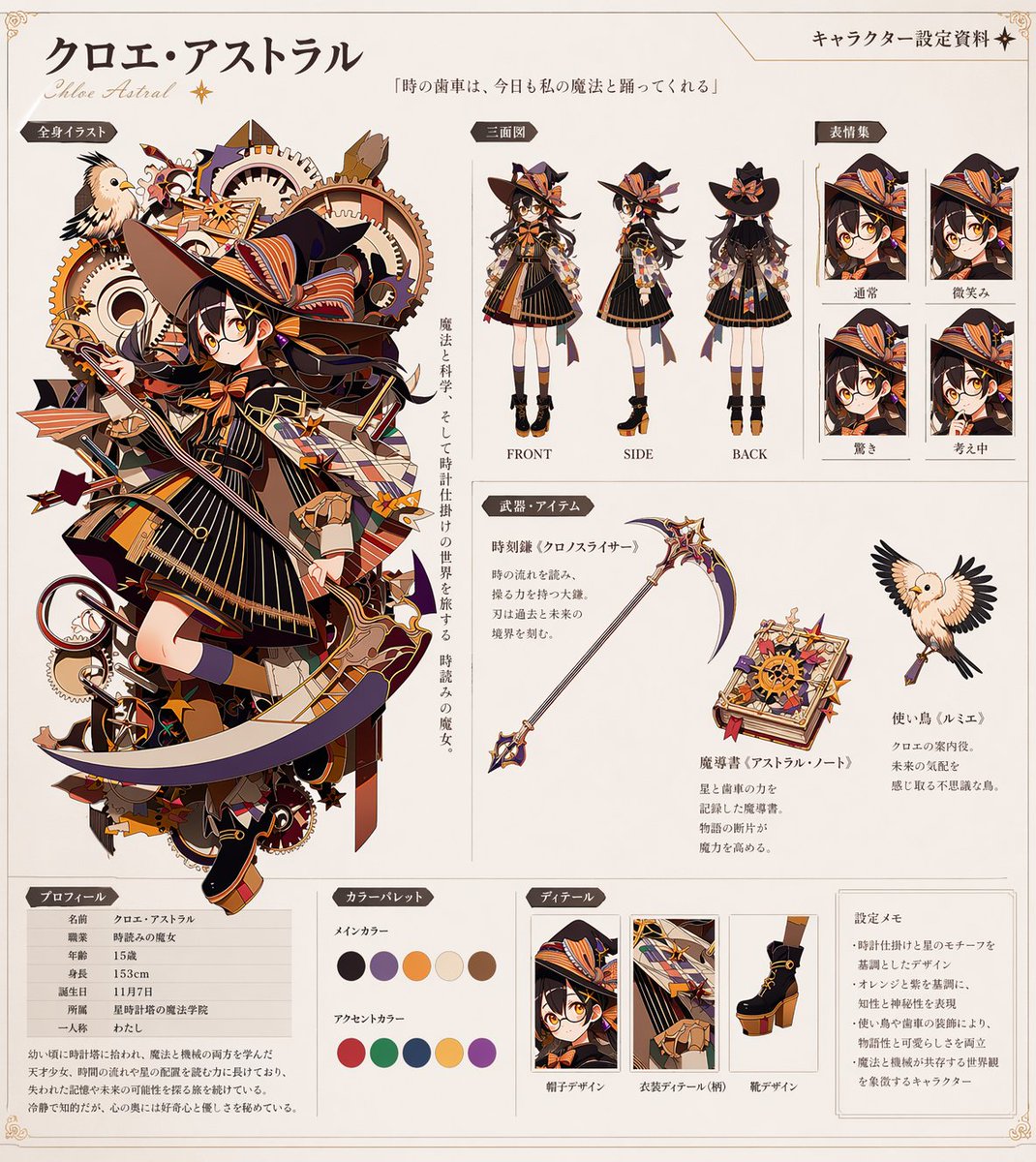
Anime Character Settei Sheet — Multi-View Reference Generator
PROMPT · EN
instruction
Using REFERENCE_0 as the base design, generate a comprehensive anime character reference sheet (settei) on a clean off-white background. Keep the core character design intact but extract and present her in various standard reference formats.
header
character_name
{argument name="character name" default="クロエ・アストラル"}
subtitle
Chloe Astral
document_title
キャラクター設定資料
quote
{argument name="character quote" default="「時の歯車は、今日も私の魔法と踊ってくれる」"}
layout
left_column
section_title
全身イラスト
description
The original complex character art from REFERENCE_0, accompanied by vertical descriptive text.
top_right
section_title
三面図
count
3
description
Full-body standing turnaround views (FRONT, SIDE, BACK) of the character, removing the original gear background.
far_right
section_title
表情集
count
4
labels
item 1
通常
item 2
微笑み
item 3
驚き
item 4
考え中
description
Square headshot panels showing different facial expressions.
middle_right
section_title
武器・アイテム
count
3
items
item 1
Scythe from reference
item 2
New starry spellbook addition
item 3
Bird from reference with spread wings
description
Isolated props with accompanying text descriptions.
bottom_row
item 1
section_title
プロフィール
description
Data table with 7 stat rows and a short biography paragraph.
item 2
section_title
カラーパレット
count
10
description
Circular color swatches divided into 5 main colors and 5 accent colors.
item 3
section_title
ディテール
count
3
labels
item 1
帽子デザイン
item 2
衣装ディテール(柄)
item 3
靴デザイン
description
Close-up rectangular detail crops of the hat, outfit pattern, and shoes.
item 4
section_title
設定メモ
count
4
description
Text box containing 4 bullet points of design notes.

Informazioni su questo prompt

Transform one illustration into a full anime character design document with turnarounds, expressions, item details, and color palettes. Use it as a Concept Art starting point for GPT Image 2: keep the visual structure and style constraints intact, then swap in your own subject, brand, or scene.

This prompt is organized as structured JSON with fields such as instruction, header, and layout. Keeping that hierarchy helps the model separate the subject, layout, interface elements, and detail constraints.

Start with small changes to subject, scene, camera, and color, then generate a few variations to compare composition and detail without turning the page copy into keyword stuffing.

Come usare questo prompt

  1. Copy the prompt into your preferred AI image generator (e.g., Sora 2, Midjourney).
  2. Replace the character name and character quote variables with your own details or keep the defaults.
  3. Upload a high-quality base character illustration as the REFERENCE_0 image.
  4. Adjust any specific section counts or labels if needed (e.g., number of expressions).
  5. Generate the image and review the multi-panel layout for consistency.

FAQ

minesan

@prompts→

Pubblicato
30 apr 2026
Lingua originale
EN
Modello
GPT Image 2
Categoria
Concept Art
GPT Image 2Concept Artgpt-image-2gptimage2api promptsgptimage2apien
Visualizzazioni
50
Copie
3
Mi piace
2

Condividi

Altro da GPT Image 2

Vedi tutto
Anime Mahjong Win Scene with Yakuza Score UI — Sora 2 Prompt

Anime Mahjong Win Scene with Yakuza Score UI — Sora 2 Prompt

@AI_Ossan
Dynamic Nike Ad Poster — Sora 2 Prompt with Sydney Sweeney

Dynamic Nike Ad Poster — Sora 2 Prompt with Sydney Sweeney

@im_shahid7
Anime Idol Profile Page — Lavender Art Style Prompt

Anime Idol Profile Page — Lavender Art Style Prompt

@uzuyanurp

Crea più velocemente con i prompt Sora2Hub.

Usa pagine prompt curate come ingressi ricercabili e passa subito alla generazione con il contesto modello corretto.

Esplora prompt

