
Spacecraft Window View of Moon & Earth — Sora 2 Prompt
Create hyper-realistic 8K cinematic shots from inside a spacecraft, with customizable celestial bodies, astronauts, and immersive sci-fi lighting.
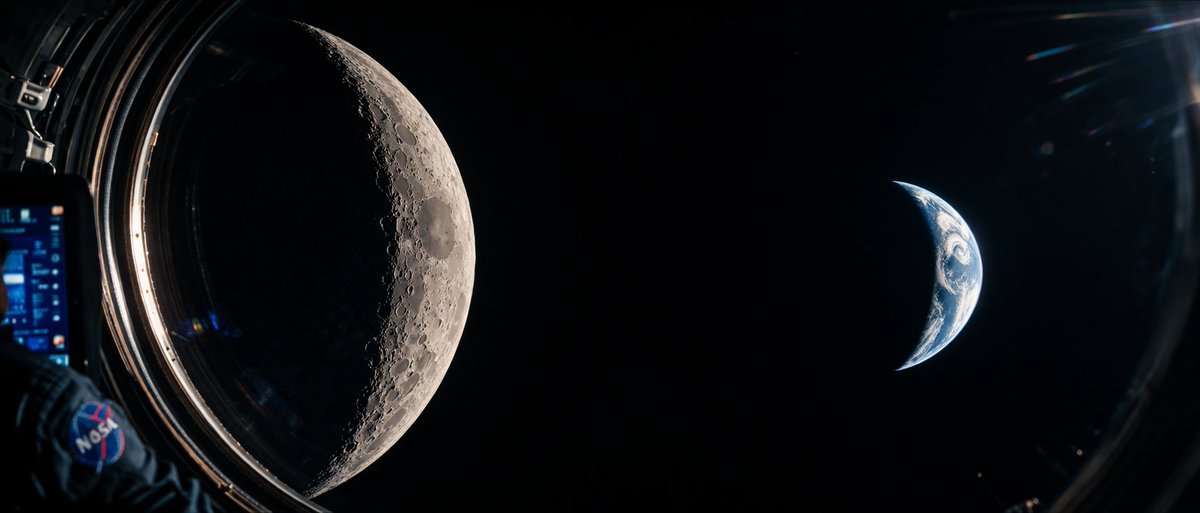
A cinematic, photorealistic wide-angle shot from inside a spacecraft looking out a circular window into the deep blackness of space. On the left side of the frame, a argcelestial body left: massive, highly detailed crescent Moon dominates the view, showcasing intricate craters and rugged terrain illuminated by harsh sunlight. On the right side, a smaller argcelestial body right: crescent Earth glows with blue oceans and white atmospheric clouds. In the immediate foreground on the far left, an argforeground element: astronaut's arm wearing a dark blue spacesuit is visible, featuring a prominent argpatch logo: NASA patch on the shoulder. The astronaut is holding a digital tablet with a glowing blue, complex user interface. The edge of the spacecraft window frames the scene, with subtle lens flares and reflections on the glass adding to the immersive, sci-fi documentary aesthetic. High contrast, hyper-realistic textures, 8k resolution.
Informazioni su questo prompt
Create hyper-realistic 8K cinematic shots from inside a spacecraft, with customizable celestial bodies, astronauts, and immersive sci-fi lighting. Use it as a Concept Art starting point for GPT Image 2: keep the visual structure and style constraints intact, then swap in your own subject, brand, or scene.
Common directions include gptimage2api prompts, gptimage2api, and en. Treat these tags as creative cues; the prompt structure and preview image are the more useful guide.
Start by replacing celestial body left, celestial body right, foreground element, and patch logo, then keep the camera, composition, and material cues in the same order. This makes the output easier to compare across variations.
Come usare questo prompt
- Copy the full prompt text into your AI video or image generator of choice.
- Select a capable model like Sora 2, Kling 2, or Runway Gen-3 for best photorealism.
- Customize the variables in curly braces—swap the celestial bodies, foreground element, or patch logo to match your vision.
- Generate the output and upscale or re-iterate if needed for sharper 8K detail.


