
Sora2 Hub
Sora2 Hub
  • Libreria di Prompt
  • Prezzi
  • Vetrina
Sora2 Hub
Sora2 Hub
Sora2 Hub

Sora2 Hub

Piattaforma di creazione professionale AI basata su Sora 2, Veo 3.1 e Nano Banana Pro. Crea video straordinari e immagini di qualità da studio con controllo avanzato, qualità HD e senza filigrana.

Email:support@sora2hub.org

Generatore Video IA

  • Testo a Video
  • Immagine a Video
  • Veo 3.1
  • Sora 2
  • Kling 3.0
  • Kling 2.6
  • Kling 2.5
  • Runway
  • Wan 2.6
  • Seedance 2.0
  • Hailuo 2.3
  • Grok Imagine
  • HappyHorse-1.0

Generatore Immagini IA

  • Testo a Immagine
  • Immagine a Immagine
  • Nano Banana Pro
  • Nano Banana
  • 4o Image
  • Flux Kontext
  • Z Image
  • Seedream 4.5
  • Seedream 5.0 Lite
  • Nano Banana 2
  • GPT Image 2
  • Ingranditore Immagini IA

Effetti IA

  • Filtro Età IA
  • Scambio Genere IA
  • Bacio IA
  • Abbraccio IA
  • Immagine Ghibli
  • Filtro Sirena IA
  • Scossa Corporea IA
  • Filtro Sorriso
  • Grasso IA
  • Action Figure

Prodotto

  • Funzionalità
  • Vetrine
  • Prezzi

Azienda

  • Chi siamo
  • Contatto

© 2025 • Sora2 Hub ORG Tutti i diritti riservati.

  • Informativa sulla Privacy
  • Termini di Servizio
  • Politica di Rimborso
  1. Home
  2. /
  3. Prompt
  4. /
  5. GPT Image 2
  6. /
  7. GPT-Image-2 Speculation Infographic — Cyber-Investigation Board
GPT Image 2Prompt AI

GPT-Image-2 Speculation Infographic — Cyber-Investigation Board

Create a hyper-dense, mind-map infographic visualizing rumored AI features, leaks, and comparisons in a dark cyber-board style.
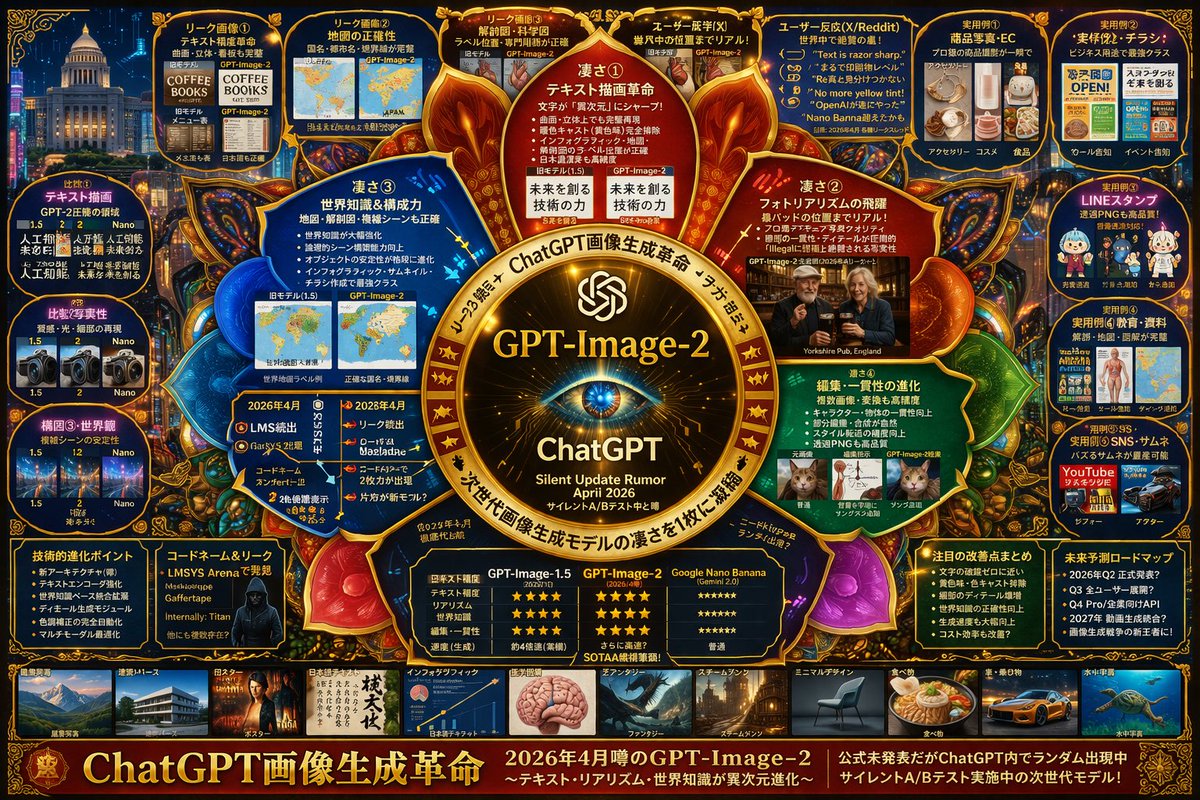
GPT-Image-2 Speculation Infographic — Cyber-Investigation Board
PROMPT · EN
type
complex speculative tech infographic
style
{argument name="color palette" default="dark blue background with gold, red, and cyan glowing accents"}, highly dense, cyber-investigation board, mind-map layout
centerpiece
description
{argument name="central emblem" default="glowing golden circular emblem with an eye"}
text
item 1
{argument name="main title" default="GPT-Image-2"}
item 2
ChatGPT
item 3
{argument name="subtitle" default="Silent Update Rumor April 2026"}
layout
sections
item 1
title
Inner Nodes
position
surrounding center
count
4
labels
item 1
凄さ①
item 2
凄さ②
item 3
凄さ③
item 4
凄さ④
description
glowing circular text nodes highlighting core strengths
item 2
title
Top Leak Panels
position
top row
count
4
labels
item 1
リーク画像①
item 2
リーク画像②
item 3
リーク画像③
item 4
ユーザー既視(X)
description
before/after image comparisons
item 3
title
User Reactions
position
top right
count
1
labels
item 1
ユーザー反応(X/Reddit)
description
panel containing 5 quote bubbles
item 4
title
Practical Examples
position
far right column
count
5
labels
item 1
実用例①
item 2
実用例②
item 3
実用例③
item 4
実用例④
item 5
実用例⑤
description
use-case image grids including e-commerce, flyers, LINE stamps, education, and thumbnails
item 5
title
Comparisons
position
far left column
count
3
labels
item 1
比較①
item 2
比較②
item 3
構図③・世界観
description
version comparison image pairs
item 6
title
Bottom Data Panels
position
bottom row above gallery
count
5
labels
item 1
技術的進化ポイント
item 2
コードネーム&リーク
item 3
比較表
item 4
注目の改善点まとめ
item 5
未来予測ロードマップ
description
bulleted lists, a hacker portrait, and a 3-column star-rating comparison table
item 7
title
Style Gallery
position
bottom strip
count
10
labels
item 1
建築・パース
item 2
ポスター
item 3
日本語テキスト
item 4
インフォグラフィック
item 5
ファンタジー
item 6
スチームパンク
item 7
ミニマルデザイン
item 8
食べ物
item 9
車・乗り物
item 10
水中宇宙
description
horizontal row of thumbnail images showcasing different generation styles
footer
text
{argument name="footer text" default="ChatGPT画像生成革命"}
position
bottom edge

Informazioni su questo prompt

Create a hyper-dense, mind-map infographic visualizing rumored AI features, leaks, and comparisons in a dark cyber-board style. Use it as a Concept Art starting point for GPT Image 2: keep the visual structure and style constraints intact, then swap in your own subject, brand, or scene.

This prompt is organized as structured JSON with fields such as type, style, centerpiece, and layout. Keeping that hierarchy helps the model separate the subject, layout, interface elements, and detail constraints.

Start with small changes to subject, scene, camera, and color, then generate a few variations to compare composition and detail without turning the page copy into keyword stuffing.

Come usare questo prompt

  1. Copy the JSON prompt from the site.
  2. Select a text-to-image model like DALL-E 3 or Stable Diffusion that handles complex prompts.
  3. Customize the variables (e.g., central emblem, main title) in the JSON to fit your topic.
  4. Paste the modified prompt into your chosen AI image generator.
  5. Generate the image and refine as needed for clarity and detail.

FAQ

s_shigel 斉藤 滋

@prompts→

Pubblicato
30 apr 2026
Lingua originale
EN
Modello
GPT Image 2
Categoria
Concept Art
GPT Image 2Concept Artgpt-image-2gptimage2api promptsgptimage2apien
Visualizzazioni
1.6K
Copie
184
Mi piace
88

Condividi

Altro da GPT Image 2

Vedi tutto
Celebrity Crossover — Sora 2 Prompt

Celebrity Crossover — Sora 2 Prompt

@Conor_D_Dart
Futuristic Google Search Ad — AI Prompt

Futuristic Google Search Ad — AI Prompt

@AiWithTariq
Photorealistic Fashion Magazine Cover — Sora 2 Prompt

Photorealistic Fashion Magazine Cover — Sora 2 Prompt

@aichof21

Crea più velocemente con i prompt Sora2Hub.

Usa pagine prompt curate come ingressi ricercabili e passa subito alla generazione con il contesto modello corretto.

Esplora prompt

