Sora2 Hub
Sora2 Hub
  • Libreria di Prompt
  • Prezzi
  • Vetrina
Sora2 Hub
Sora2 Hub
Sora2 Hub

Sora2 Hub

Piattaforma di creazione professionale AI basata su Sora 2, Veo 3.1 e Nano Banana Pro. Crea video straordinari e immagini di qualità da studio con controllo avanzato, qualità HD e senza filigrana.

Email:support@sora2hub.org

Generatore Video IA

  • Testo a Video
  • Immagine a Video
  • Veo 3.1
  • Sora 2
  • Kling 3.0
  • Kling 2.6
  • Kling 2.5
  • Runway
  • Wan 2.6
  • Seedance 2.0
  • Hailuo 2.3
  • Grok Imagine
  • HappyHorse-1.0

Generatore Immagini IA

  • Testo a Immagine
  • Immagine a Immagine
  • Nano Banana Pro
  • Nano Banana
  • 4o Image
  • Flux Kontext
  • Z Image
  • Seedream 4.5
  • Seedream 5.0 Lite
  • Nano Banana 2
  • GPT Image 2
  • Ingranditore Immagini IA

Effetti IA

  • Filtro Età IA
  • Scambio Genere IA
  • Bacio IA
  • Abbraccio IA
  • Immagine Ghibli
  • Filtro Sirena IA
  • Scossa Corporea IA
  • Filtro Sorriso
  • Grasso IA
  • Action Figure

Prodotto

  • Funzionalità
  • Vetrine
  • Prezzi

Azienda

  • Chi siamo
  • Contatto

© 2025 • Sora2 Hub ORG Tutti i diritti riservati.

  • Informativa sulla Privacy
  • Termini di Servizio
  • Politica di Rimborso
  1. Home
  2. /
  3. Prompt
  4. /
  5. GPT Image 2
  6. /
  7. Time-Slip Naval Poster & Schematics — Sora 2 Prompt
GPT Image 2Prompt AI

Time-Slip Naval Poster & Schematics — Sora 2 Prompt

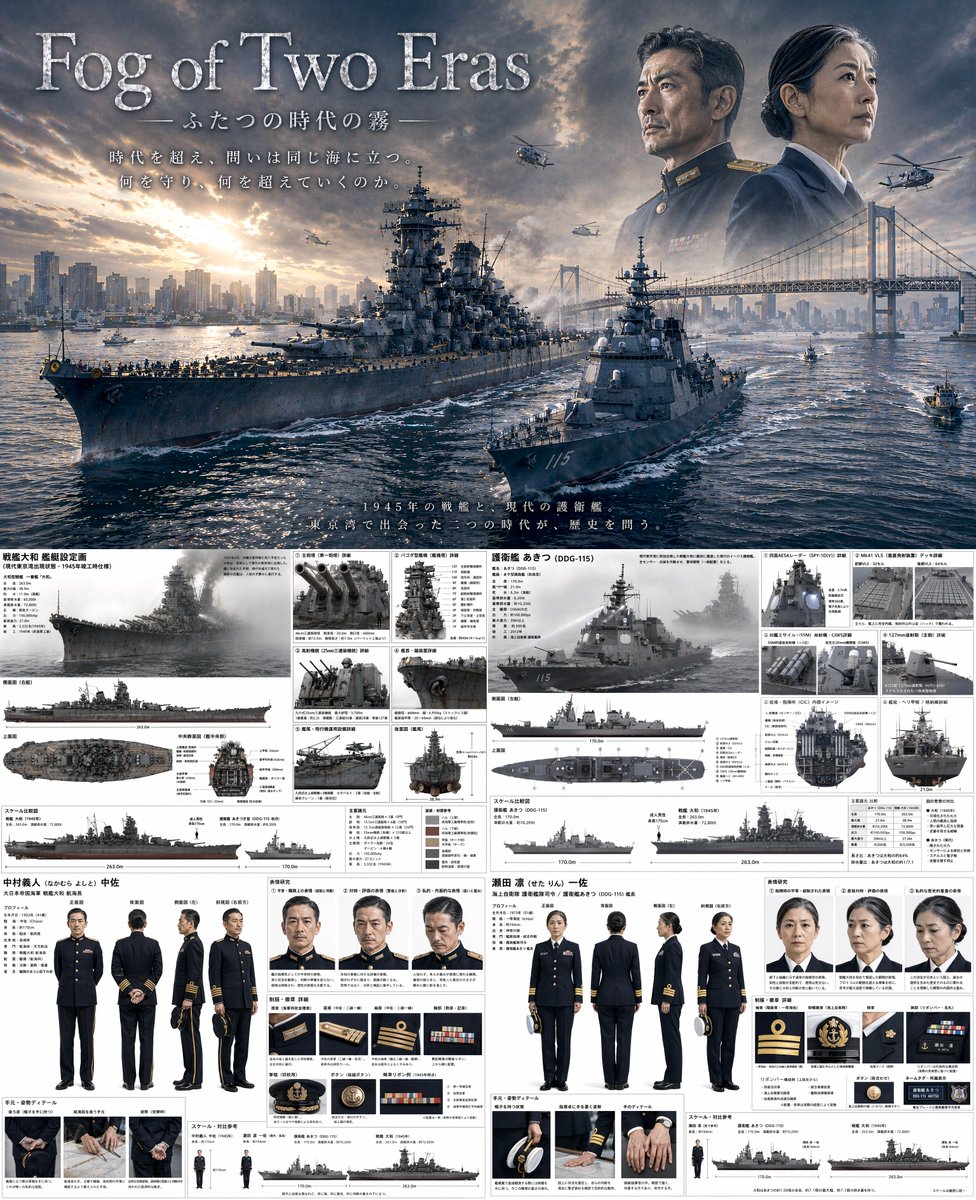
Creates a cinematic split image with a WWII/modern warship movie poster above and detailed ship blueprints and character reference sheets below.
Time-Slip Naval Poster & Schematics — Sora 2 Prompt
PROMPT · EN
type
combined cinematic poster and technical reference sheet
theme
{argument name="theme" default="time-slip military drama"}
layout
top_half
type
movie poster
title
{argument name="main title" default="Fog of Two Eras"}
subtitle
ふたつの時代の霧
tagline
時代を超え、問いは同じ海に立つ。何を守り、何を超えていくのか。
scene
A {argument name="ww2 ship class" default="Yamato-class battleship"} and a {argument name="modern ship class" default="Aegis destroyer"} sailing side-by-side in {argument name="setting" default="Tokyo Bay with Rainbow Bridge and city skyline"} at sunset.
sky_elements
Faded portraits of a WWII naval commander and a modern female naval captain looking out over the bay, with military helicopters flying.
bottom_half
type
split technical reference sheet
left_column
subject
WWII Battleship and Commander
ship_details
title
戦艦大和 艦艇設定画
main_render
1 angled side view
orthographic_views
3 views (side, top, front cross-section)
detail_panels
count
6
descriptions
item 1
Main guns
item 2
Pagoda mast
item 3
AA guns
item 4
Radar
item 5
Catapult
item 6
Stern
scale_chart
1 silhouette comparison
character_details
name
中村義人 中佐
turnaround
count
5
poses
item 1
front
item 2
back
item 3
side
item 4
3/4 front
item 5
3/4 back
expressions
count
3
types
item 1
neutral
item 2
stern
item 3
pensive
uniform_details
count
6
items
item 1
rank insignia
item 2
buttons
item 3
medals
item 4
cap details
hand_details
count
3
poses
item 1
holding cap
item 2
resting
item 3
clenched
right_column
subject
Modern Destroyer and Captain
ship_details
title
護衛艦 あきつ (DDG-115)
main_render
1 angled side view
orthographic_views
3 views (side, top, front cross-section)
detail_panels
count
6
descriptions
item 1
Radar panels
item 2
VLS cells
item 3
Anti-ship missiles
item 4
Main gun
item 5
Bridge interior
item 6
Helicopter deck
scale_chart
1 silhouette comparison
character_details
name
瀬田 凛 一佐
turnaround
count
5
poses
item 1
front
item 2
back
item 3
side
item 4
3/4 front
item 5
3/4 back
expressions
count
3
types
item 1
neutral
item 2
stern
item 3
pensive
uniform_details
count
6
items
item 1
rank insignia
item 2
buttons
item 3
ribbons
item 4
cap details
hand_details
count
3
poses
item 1
holding cap
item 2
resting
item 3
clenched

Informazioni su questo prompt

Creates a cinematic split image with a WWII/modern warship movie poster above and detailed ship blueprints and character reference sheets below. Use it as a Concept Art starting point for GPT Image 2: keep the visual structure and style constraints intact, then swap in your own subject, brand, or scene.

This prompt is organized as structured JSON with fields such as type, theme, and layout. Keeping that hierarchy helps the model separate the subject, layout, interface elements, and detail constraints.

Start with small changes to subject, scene, camera, and color, then generate a few variations to compare composition and detail without turning the page copy into keyword stuffing.

Come usare questo prompt

  1. Copy the prompt code into Sora 2 or compatible AI.
  2. Replace default variables like theme or ship class with your story settings.
  3. Click Generate to produce a high-resolution composite image.
  4. Use the top half for promotion and the bottom for production reference.
FAQ

いにしえ@AI Director & Creator|Will Oldgram

@prompts→

Pubblicato
30 apr 2026
Lingua originale
EN
Modello
GPT Image 2
Categoria
Concept Art
GPT Image 2Concept Artgpt-image-2gptimage2api promptsgptimage2apien
Visualizzazioni
527
Copie
50
Mi piace
22

Condividi

Altro da GPT Image 2

Vedi tutto
Shenzhen Golden Hour City Prompt: Futuristic Heritage Poster

Shenzhen Golden Hour City Prompt: Futuristic Heritage Poster

@ivanalog_com
Minimalist Skincare Brand Manual — Sora 2 Prompt

Minimalist Skincare Brand Manual — Sora 2 Prompt

@FranromeGraph
Cyberpunk Catgirl Soda Splash — Sora 2 Prompt

Cyberpunk Catgirl Soda Splash — Sora 2 Prompt

@kuso_seisakusyo

Crea più velocemente con i prompt Sora2Hub.

Usa pagine prompt curate come ingressi ricercabili e passa subito alla generazione con il contesto modello corretto.

Esplora prompt