
GPT Image 2Prompt AI
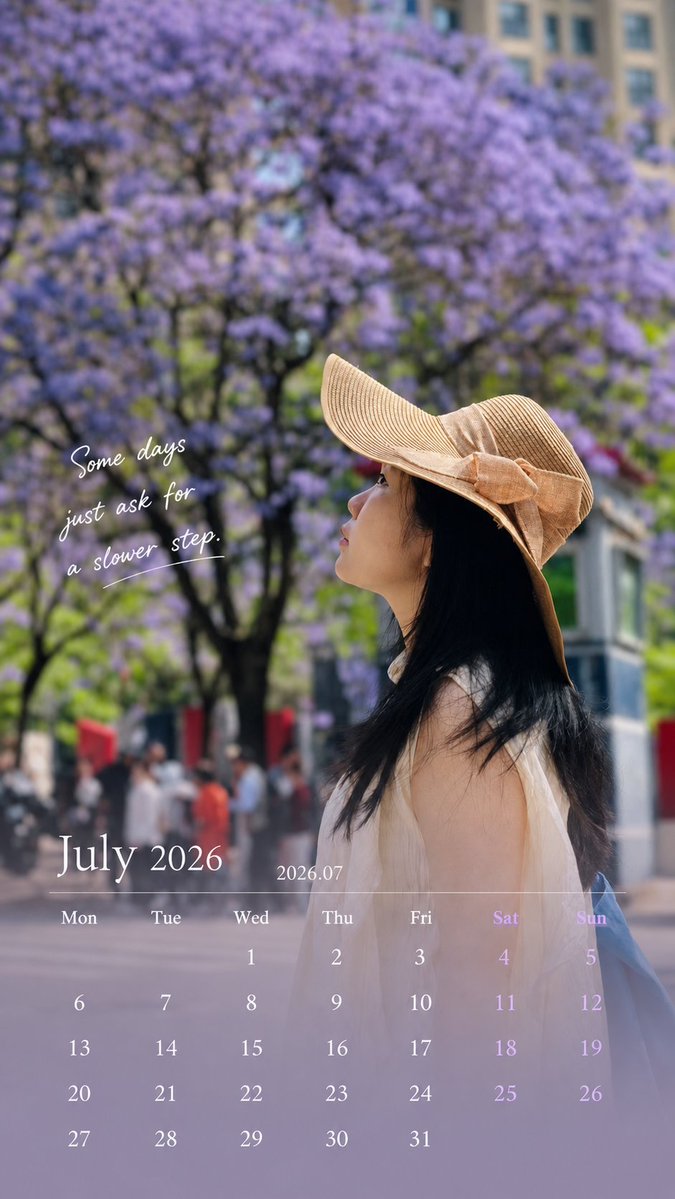
Travel Photo to Vertical Calendar Card — Sora 2 Prompt
Transform a personal travel photo into a 9:16 vertical calendar card with a clean, magazine-style overlay, preserving every original detail of the subject.
1 / 2
PROMPT · EN
Use the uploaded photo to generate a 9:16 vertical calendar card. [1. Execution Mode — Critical] This is an image editing task, NOT image generation. Use the original photo as the base layer
Do NOT recreate, redraw, or reinterpret the image Strictly preserve: face, identity, expression, hair, body, clothing
original lighting, shadows, color temperature
environment and composition ❗ No beautification, no smoothing, no retouching
❗ The photo must look unchanged [2. Allowed Operations — Overlay Only] Only add design elements on top: bottom 30% soft gradient extension (for calendar area)
subtle translucent mask for readability
calendar layout, month title, and short caption Forbidden: repainting or altering existing pixels
changing global color style
applying “design filters”
[3. Color Strategy] Colors must come from the current image: extract primary / secondary / accent colors
apply slight desaturation and brightness normalization only
keep original photo color feeling 👉 Respect the image, do not redesign the color system [4. Layout Structure]
Top 70%: original image (untouched)
Bottom 30%: gradient + calendar
smooth transition, no hard edges
clean spacing, minimal design
magazine-like, not template-style
[5. Calendar Content — Must Be Accurate] Generate correct calendar for the given month: Title: argmonth title: July 2026 / 2026.07
Weekdays: Mon Tue Wed Thu Fri Sat Sun
Dates: accurate alignment based on real calendar
[6. Caption Rules — Important] Length: 8–16 words (or equivalent short phrase) Requirements: max 2 lines
no exclamation marks
no clichés, no motivational tone
do NOT explain emotions Preferred style: subtle, atmospheric
fragment-like, not fully explanatory
leave emotional space 👉 Make people pause, not finish reading [7. Image Selection Guidance — Key to Success] Prefer: side face / partially hidden face
natural遮挡 (hat, hand, shadow)
motion (walking, turning)
mood > facial detail Avoid:
front-facing portraits
strong identity-focused close-ups 👉 Reduce face-modification risk [Final Principle] 👉 Do NOT generate a better photo.
Gently place design on the original photo.
Informazioni su questo prompt
Transform a personal travel photo into a 9:16 vertical calendar card with a clean, magazine-style overlay, preserving every original detail of the subject. Use it as a Concept Art starting point for GPT Image 2: keep the visual structure and style constraints intact, then swap in your own subject, brand, or scene.
Start by replacing month title, then keep the camera, composition, and material cues in the same order. This makes the output easier to compare across variations.
Come usare questo prompt
- Copy the entire prompt body.
- Select your preferred AI model (e.g., Sora 2) that supports image editing and overlays.
- Upload your travel photo as the input image.
- Edit the
[month title]variable in the prompt to match your desired month and year (e.g., "July 2026"). - Generate the image. Review and regenerate if needed.


