
Japanese News Broadcast Scene — Sora 2 Prompt
Create a photorealistic TV news studio with customizable anchor, headlines, and ticker text for any media project.
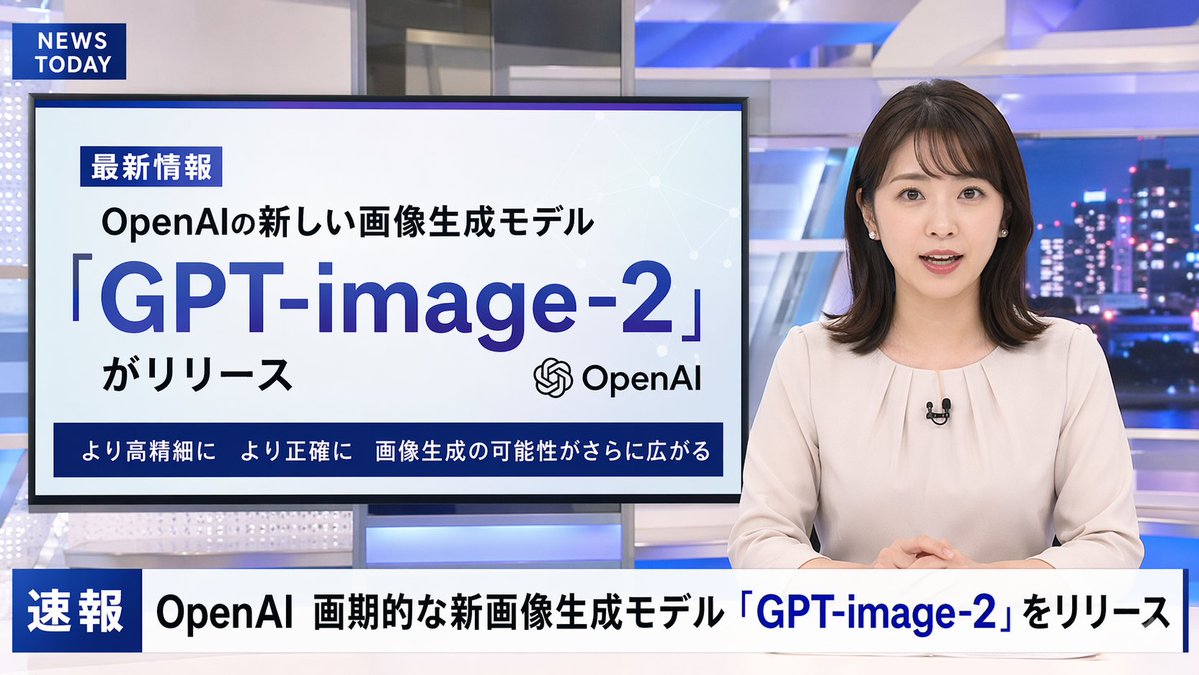
A photorealistic television news broadcast scene featuring a arganchor appearance: young Japanese female with shoulder-length dark hair wearing a light beige blouse and a small black lapel microphone, sitting at a news desk and speaking directly to the camera. The studio background is modern with blue and white lighting and a blurred nighttime city skyline on the right. In the top left corner, there is a dark blue graphic with the white text "argchannel logo text: NEWS TODAY". To the anchor's left is a large presentation monitor displaying a news graphic with a white background and light blue network nodes. The monitor features a dark blue "最新情報" tag, the text "argsubheadline: OpenAIの新しい画像生成モデル", a large prominent headline "argmain headline: 「GPT-image-2」", the text "がリリース", an OpenAI logo, and a dark blue bottom banner reading "より高精細に より正確に 画像生成の可能性がさらに広がる". Across the bottom of the entire screen is a news ticker lower third with a dark blue "速報" box and the scrolling text "argticker text: OpenAI 画期的な新画像生成モデル「GPT-image-2」をリリース".
Informazioni su questo prompt
Create a photorealistic TV news studio with customizable anchor, headlines, and ticker text for any media project. Use it as a Concept Art starting point for GPT Image 2: keep the visual structure and style constraints intact, then swap in your own subject, brand, or scene.
Common directions include gptimage2api prompts, gptimage2api, and en. Treat these tags as creative cues; the prompt structure and preview image are the more useful guide.
Start by replacing anchor appearance, channel logo text, subheadline, and main headline, then keep the camera, composition, and material cues in the same order. This makes the output easier to compare across variations.
Come usare questo prompt
- Copy the full prompt text.
- Select Sora 2 as your AI model.
- Customize the bracketed variables like anchor appearance, headline, and ticker text.
- Generate the video to see your unique broadcast scene.


