
Dreamy Korean Idol Portrait — Soft Film Photography Prompt
Generate intimate, soft-focus Korean idol portraits with natural light, film grain, and customizable outfits for authentic K-pop aesthetic results.
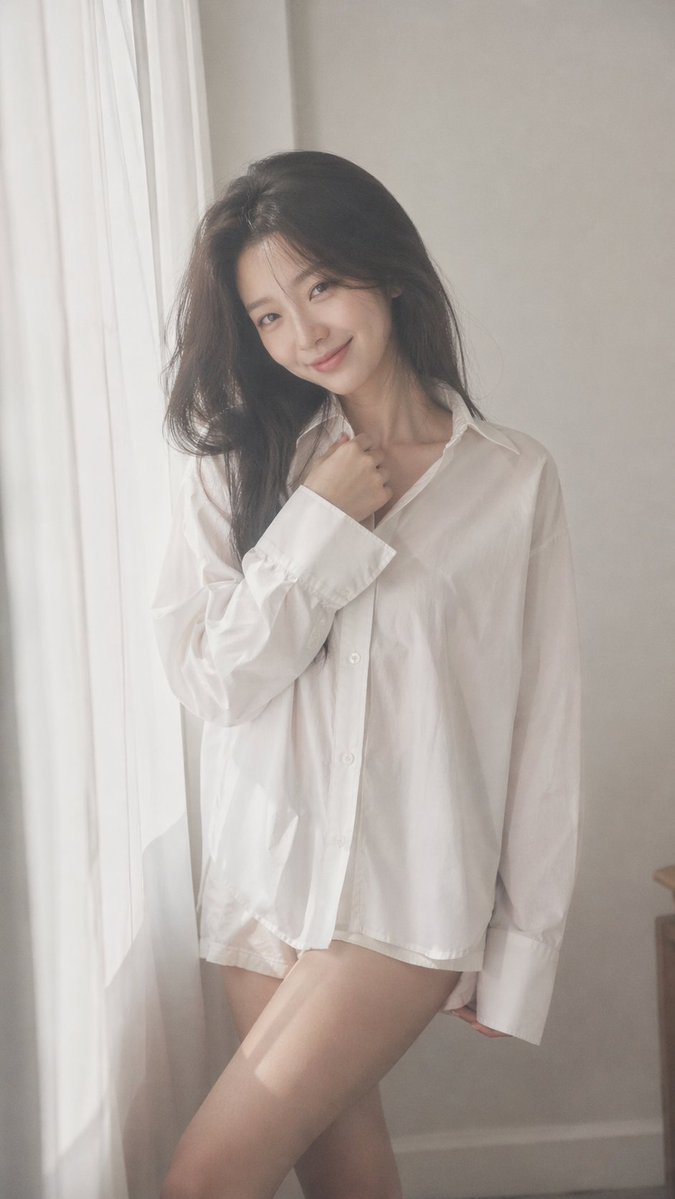
argaspect ratio: 9:16 vertical — argsubject: Korean idol portrait photography, single subject soft black mist filter effect, lowered contrast, gentle highlight bloom, subtle glow, soft diffusion, slightly faded blacks minimal indoor setting near window, white curtains, clean light-toned background young Korean female idol, natural minimal makeup, dewy realistic skin texture, subtle imperfections outfit: argoutfit: oversized white button-up shirt + short bottoms, slightly loose fit, soft and casual styling, no revealing elements hair: long dark hair, slightly messy, natural volume, softly flowing pose: relaxed standing or slight lean, body subtly angled, one leg slightly forward, shoulders relaxed; one hand lightly touching collar or resting near neckline, the other relaxed; gentle body curve without exaggeration expression: soft cute smile, slightly playful eyes, direct or slightly off-camera gaze camera: close to mid-body framing, eye-level, intimate distance, slight handheld feel lighting: diffused natural daylight, soft shadows, gentle light wrapping around face and body mood: cute yet subtly sensual, intimate, everyday softness, quiet romantic atmosphere quality: ultra-realistic, fine film grain, slight softness at edges, natural imperfections, dreamy understated tone
Informazioni su questo prompt
Generate intimate, soft-focus Korean idol portraits with natural light, film grain, and customizable outfits for authentic K-pop aesthetic results. Use it as a Concept Art starting point for GPT Image 2: keep the visual structure and style constraints intact, then swap in your own subject, brand, or scene.
Common directions include gptimage2api prompts, gptimage2api, and ko. Treat these tags as creative cues; the prompt structure and preview image are the more useful guide.
Start by replacing aspect ratio, subject, and outfit, then keep the camera, composition, and material cues in the same order. This makes the output easier to compare across variations.
Come usare questo prompt
- Copy the entire prompt text above.
- Choose a compatible AI image/video model (e.g., Sora 2, Stable Diffusion, Midjourney).
- Customize the variables in curly braces — aspect ratio, subject description, and outfit — to match your creative vision.
- Paste the modified prompt into your model's input field.
- Generate and iterate — adjust variables like hair, expression, or lighting keywords if needed to refine the mood.


