Sora2 Hub
Sora2 Hub
  • Libreria di Prompt
  • Prezzi
  • Vetrina
Sora2 Hub
Sora2 Hub
Sora2 Hub

Sora2 Hub

Piattaforma di creazione professionale AI basata su Sora 2, Veo 3.1 e Nano Banana Pro. Crea video straordinari e immagini di qualità da studio con controllo avanzato, qualità HD e senza filigrana.

Email:support@sora2hub.org

Generatore Video IA

  • Testo a Video
  • Immagine a Video
  • Veo 3.1
  • Sora 2
  • Kling 3.0
  • Kling 2.6
  • Kling 2.5
  • Runway
  • Wan 2.6
  • Seedance 2.0
  • Hailuo 2.3
  • Grok Imagine
  • HappyHorse-1.0
  • HappyHorse 1.1
  • Kling 3.0 Turbo
  • Volcengine Video-to-Video Lip Sync
  • OmniHuman 1.5
  • Grok Imagine Video 1.5
  • Gemini Omni
  • Wan 2.7 Video
  • Seedance 2.0 Mini

Generatore Immagini IA

  • Testo a Immagine
  • Immagine a Immagine
  • Nano Banana Pro
  • Nano Banana
  • 4o Image
  • Flux Kontext
  • Z Image
  • Seedream 4.5
  • Seedream 5.0 Lite
  • Nano Banana 2
  • GPT Image 2
  • Ingranditore Immagini IA
  • Seedream 5.0 Pro
  • Nano Banana 2 Lite
  • Qwen Image 2.0

Effetti IA

  • Filtro Età IA
  • Scambio Genere IA
  • Bacio IA
  • Abbraccio IA
  • Immagine Ghibli
  • Filtro Sirena IA
  • Scossa Corporea IA
  • Filtro Sorriso
  • Grasso IA
  • Action Figure

Prodotto

  • Funzionalità
  • Vetrine
  • Prezzi

Azienda

  • Chi siamo
  • Contatto

© 2025 • Sora2 Hub ORG Tutti i diritti riservati.

  • Informativa sulla Privacy
  • Termini di Servizio
  • Politica di Rimborso
  1. Home
  2. /
  3. Prompt
  4. /
  5. GPT Image 2
  6. /
  7. AI Image Workflow Infographic — Neon UI Dark Tech Prompt
GPT Image 2Prompt AI

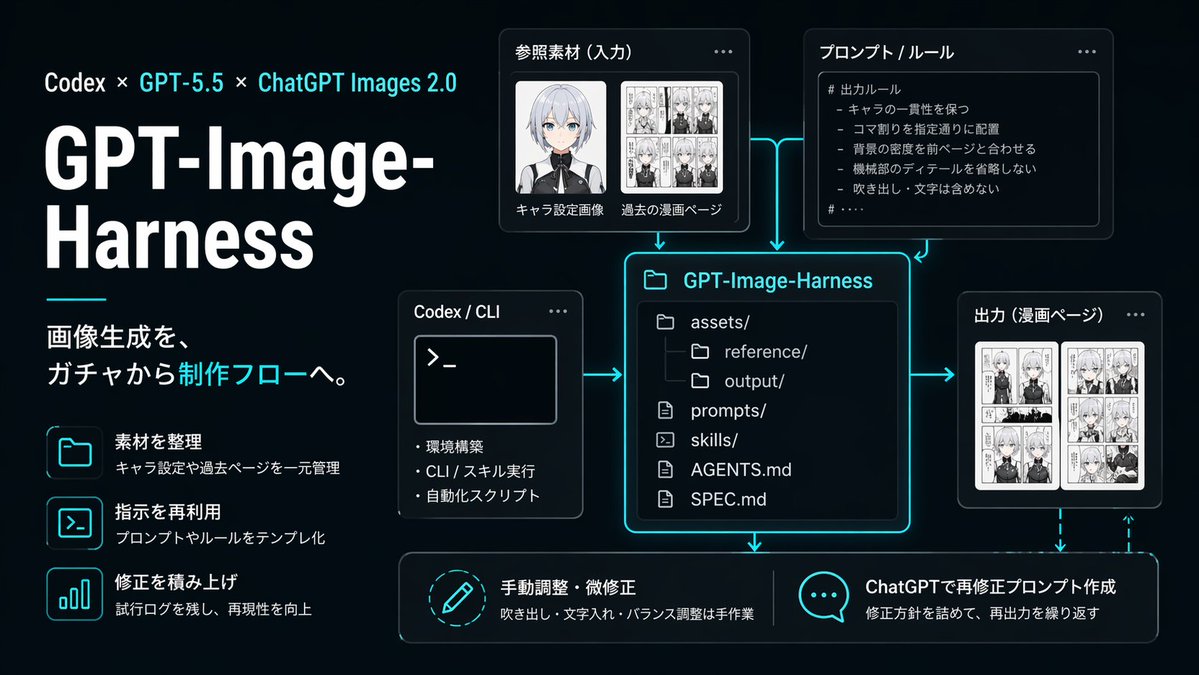
AI Image Workflow Infographic — Neon UI Dark Tech Prompt

A sleek, dark-themed infographic visualizing a structured AI image-generation pipeline, perfect for tech presentations, product documentation, and social media posts about reproducible creative workfl
AI Image Workflow Infographic — Neon UI Dark Tech Prompt
PROMPT · EN
type
深色科技工作流信息图
style
简洁的未来感演示 Slides,黑色至深海军蓝渐变背景,霓虹青色光效点缀,纤细的青色连接箭头,带有圆角的现代 UI 卡片,柔和阴影,高对比度白色字体,精致的初创公司品牌美学
canvas
aspect_ratio
16:9
composition
左对齐标题块,右侧及底部为模块化图表
branding
topline
Codex × GPT-5.5 × ChatGPT Images 2.0
title
GPT-Image-Harness
subtitle
将图像生成从“抽卡”转变为生产流程。
layout
sections
item 1
title
左侧功能列表
position
左侧栏
count
3
labels
item 1
整理素材
item 2
复用指令
item 3
积累修正
item 2
title
参考素材(输入)
position
中上方偏左
count
2
labels
item 1
角色设定图
item 2
过往漫画页
item 3
title
提示词 / 规则
position
中上方偏右
count
1
labels
item 1
# 输出规则
item 4
title
Codex / CLI
position
中心左侧
count
3
labels
item 1
环境搭建
item 2
CLI / 技能执行
item 3
自动化脚本
item 5
title
GPT-Image-Harness
position
中心
count
6
labels
item 1
assets/
item 2
reference/
item 3
output/
item 4
prompts/
item 5
skills/
item 6
AGENTS.md
item 7
SPEC.md
item 6
title
输出(漫画页)
position
中心右侧
count
1
labels
item 1
漫画页
item 7
title
底部操作
position
底行
count
2
labels
item 1
手动调整与微调
item 2
通过 ChatGPT 生成再修正提示词
left_panel
headline_scale
超大
title_weight
加粗超重
decorative_line
标题块下方的短水平青色线条
feature_items
item 1
icon
folder outline glowing cyan
title
整理素材
description
统一管理角色设定和过往页面
item 2
icon
terminal window outline glowing cyan
title
复用指令
description
将提示词和规则模板化
item 3
icon
bar chart outline glowing cyan
title
积累修正
description
保留测试日志,提升可复现性
diagram
nodes
item 1
kind
input card
title
参考素材(输入)
visual
两个缩略图区域,一个动漫角色半身像(面部柔和模糊),一个黑白漫画页拼贴
item 2
kind
rule card
title
提示词 / 规则
visual
代码风格面板内的项目符号列表
body_text
item 1
# 输出规则
item 2
- 保持角色一致性
item 3
- 按指定要求配置分镜
item 4
- 背景密度与前页保持一致
item 5
- 不省略机械细节
item 6
- 不包含对话气泡与文字
item 3
kind
tool card
title
Codex / CLI
visual
带有提示符 >_ 和三个项目符号的终端窗口
item 4
kind
repository card
title
GPT-Image-Harness
visual
带有青色发光边框的大型中央文件树面板
item 5
kind
output card
title
输出(漫画页)
visual
并排的两个漫画页缩略图
item 6
kind
action card
title
手动调整与微调
visual
圆形铅笔图标
description
对话气泡、文字添加及平衡调整均为手动完成
item 7
kind
action card
title
通过 ChatGPT 生成再修正提示词
visual
带有三个点的对话气泡图标
description
明确修正方向,重复进行再输出
connectors
连接输入、规则和 CLI 到中央项目卡片的青色发光箭头;从项目卡片指向输出,并向下指向两个底部操作卡片的箭头;从输出循环回右下角操作区域的虚线青色反馈箭头
typography
language
简体中文
title_color
白色
accent_color
亮青色
body_color
浅灰白色
lighting
卡片和图标周围柔和的霓虹边缘光
quality
清晰的矢量风格信息图,演示级品质,精准对齐,无水印

Informazioni su questo prompt

A sleek, dark-themed infographic visualizing a structured AI image-generation pipeline, perfect for tech presentations, product documentation, and social media posts about reproducible creative workfl. Use it as a Concept Art starting point for GPT Image 2: keep the visual structure and style constraints intact, then swap in your own subject, brand, or scene.

This prompt is organized as structured JSON with fields such as type, style, canvas, branding, layout, left panel, and diagram. Keeping that hierarchy helps the model separate the subject, layout, interface elements, and detail constraints.

Start with small changes to subject, scene, camera, and color, then generate a few variations to compare composition and detail without turning the page copy into keyword stuffing.

Come usare questo prompt

  1. Copy the full prompt JSON above into your AI image generator.
  2. Choose a model that supports high-fidelity UI and infographic rendering (e.g., GPT-4o image mode, Midjourney, or Ideogram).
  3. Tweak the title, subtitle, or labels fields to match your own project or brand name.
  4. Adjust the aspect_ratio if you need a vertical (9:16) or square (1:1) layout instead of 16:9.
  5. Generate and iterate — refine node labels, color accents, or add/remove sections to fit your specific workflow diagram.

FAQ

みかみ.ai|AI発信と個人開発

@kotsu_kotsu_san→

Pubblicato
30 apr 2026
Lingua originale
EN
Modello
GPT Image 2
Categoria
Concept Art
GPT Image 2Concept Artgpt-image-2twitter
Visualizzazioni
337
Copie
45
Mi piace
22

Condividi

Altro da GPT Image 2

Vedi tutto
8-Panel Romantic Manga: Shy Maid Robot & Master — Sora 2 Prompt

8-Panel Romantic Manga: Shy Maid Robot & Master — Sora 2 Prompt

@yume00112211
Graphic Novel Ink Splash Portrait — Sora 2 Prompt

Graphic Novel Ink Splash Portrait — Sora 2 Prompt

@iamsofiaijaz
Minimalist Mother's Day Wallpaper — Sora 2 Prompt with Calligraphy & Carnations

Minimalist Mother's Day Wallpaper — Sora 2 Prompt with Calligraphy & Carnations

@EdimakorJP

Crea più velocemente con i prompt Sora2Hub.

Usa pagine prompt curate come ingressi ricercabili e passa subito alla generazione con il contesto modello corretto.

Esplora prompt