
Sora2 Hub
Sora2 Hub
  • Libreria di Prompt
  • Prezzi
  • Vetrina
Sora2 Hub
Sora2 Hub
Sora2 Hub

Sora2 Hub

Piattaforma di creazione professionale AI basata su Sora 2, Veo 3.1 e Nano Banana Pro. Crea video straordinari e immagini di qualità da studio con controllo avanzato, qualità HD e senza filigrana.

Email:support@sora2hub.org

Generatore Video IA

  • Testo a Video
  • Immagine a Video
  • Veo 3.1
  • Sora 2
  • Kling 3.0
  • Kling 2.6
  • Kling 2.5
  • Runway
  • Wan 2.6
  • Seedance 2.0
  • Hailuo 2.3
  • Grok Imagine
  • HappyHorse-1.0

Generatore Immagini IA

  • Testo a Immagine
  • Immagine a Immagine
  • Nano Banana Pro
  • Nano Banana
  • 4o Image
  • Flux Kontext
  • Z Image
  • Seedream 4.5
  • Seedream 5.0 Lite
  • Nano Banana 2
  • GPT Image 2
  • Ingranditore Immagini IA

Effetti IA

  • Filtro Età IA
  • Scambio Genere IA
  • Bacio IA
  • Abbraccio IA
  • Immagine Ghibli
  • Filtro Sirena IA
  • Scossa Corporea IA
  • Filtro Sorriso
  • Grasso IA
  • Action Figure

Prodotto

  • Funzionalità
  • Vetrine
  • Prezzi

Azienda

  • Chi siamo
  • Contatto

© 2025 • Sora2 Hub ORG Tutti i diritti riservati.

  • Informativa sulla Privacy
  • Termini di Servizio
  • Politica di Rimborso
  1. Home
  2. /
  3. Prompt
  4. /
  5. GPT Image 2
  6. /
  7. Flat Color to Anime Rendering — AI Illustration Prompt
GPT Image 2Prompt AI

Flat Color to Anime Rendering — AI Illustration Prompt

Transform flat-colored character references into fully rendered anime illustrations with dynamic lighting, metallic accents, and a pure black background.
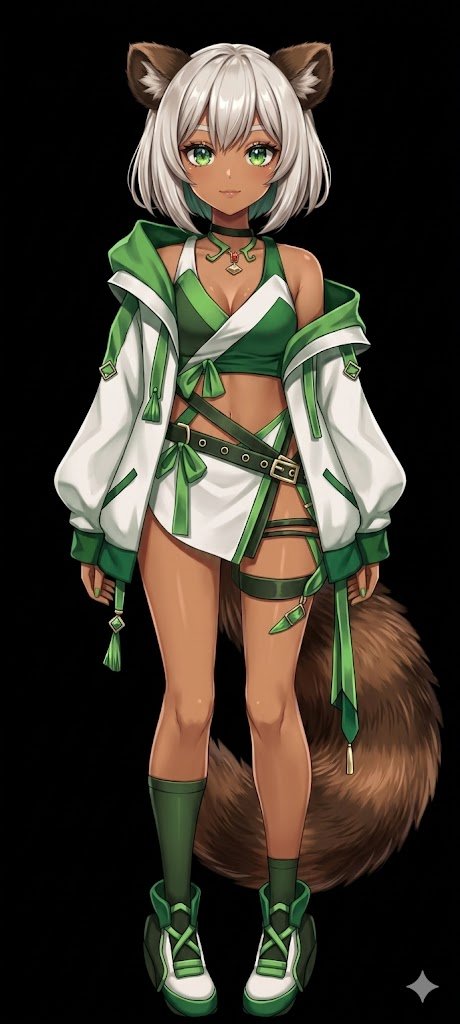
Flat Color to Anime Rendering — AI Illustration Prompt
PROMPT · EN
使用 REFERENCE_0,将平涂配色的角色转换为 argart style: 完整渲染的高质量动漫插画。为皮肤、头发、眼睛、服装和尾巴应用精细的 arglighting effect: 阴影、光泽高光和深度感,赋予 2D 设计精致的立体感。为扣环和珠宝添加金属光泽。将背景更改为 argbackground color: 纯黑色。请务必保留角色在参考图中的原始设计、服装和中性姿势。

Informazioni su questo prompt

Transform flat-colored character references into fully rendered anime illustrations with dynamic lighting, metallic accents, and a pure black background. Use it as a Concept Art starting point for GPT Image 2: keep the visual structure and style constraints intact, then swap in your own subject, brand, or scene.

Start by replacing art style, lighting effect, and background color, then keep the camera, composition, and material cues in the same order. This makes the output easier to compare across variations.

Come usare questo prompt

  1. Copy the prompt and paste it into your AI image generation tool.
  2. Select an anime-specialized model (e.g., Niji Journey, NovelAI, Stable Diffusion with anime checkpoints).
  3. Customize the art style, lighting effect, and background color arguments to fit your vision.
  4. Generate the image and refine by iterating with slight adjustments if needed.
  5. For optimal outcome, use a reference character with a neutral pose and distinct design elements.

FAQ

しーげっちは自分で描いた絵を動かしたい

@seagetch→

Pubblicato
25 apr 2026
Lingua originale
EN
Modello
GPT Image 2
Categoria
Concept Art
GPT Image 2Concept Artgpt-image-2twitter
Visualizzazioni
1.2K
Copie
63
Mi piace
98

Condividi

Altro da GPT Image 2

Vedi tutto
Cyberpunk AI Launch Banner — Cinematic Neon Poster Prompt

Cyberpunk AI Launch Banner — Cinematic Neon Poster Prompt

@ObieriI
Anime Idol Profile Page — Lavender Art Style Prompt

Anime Idol Profile Page — Lavender Art Style Prompt

@uzuyanurp
Minimalist Skincare Brand Manual — Sora 2 Prompt

Minimalist Skincare Brand Manual — Sora 2 Prompt

@FranromeGraph

Crea più velocemente con i prompt Sora2Hub.

Usa pagine prompt curate come ingressi ricercabili e passa subito alla generazione con il contesto modello corretto.

Esplora prompt

