
GPT Image 2Prompt AI
Childlike Crayon Photo-to-Drawing — Sora 2 Prompt
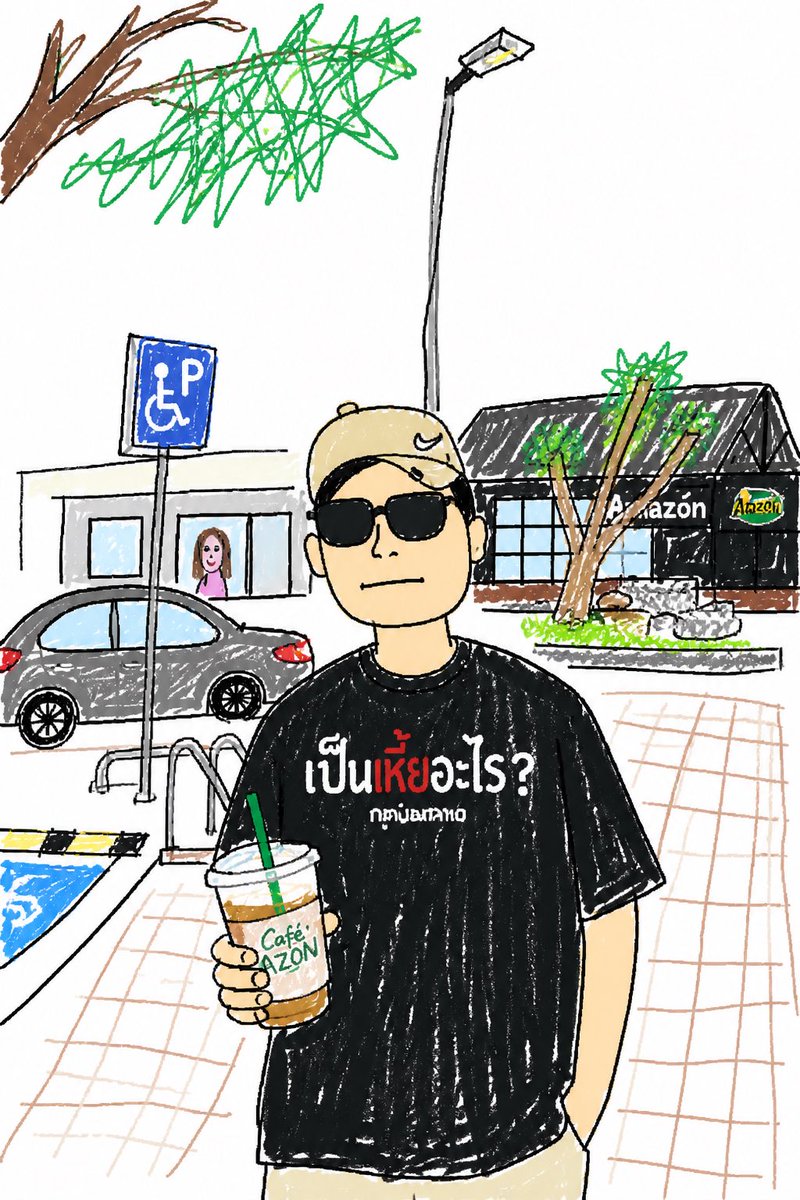
Transforms a reference photo into a whimsical, childlike crayon sketch while preserving composition, subjects, and key details for a charming, humorous result.
PROMPT · EN
使用 REFERENCE_0,重现与原图完全一致的构图、人物、姿势、服装、饮品及背景布局,但将整张图片转换为在干净白纸上绘制的俏皮儿童手绘蜡笔及彩色铅笔画风格。保持主体居中,面部依然用简单的米色模糊块遮挡。保留黑色 T 恤上的泰文以及 Café Amazon 杯子的品牌标识。将所有环境细节简化为稚拙的涂鸦,线条不均匀且填色随意:左侧 1 辆灰色汽车、1 个蓝色无障碍停车标志、2 盏路灯、3 棵可见的树木、1 间黑色屋顶的 Amazon 店铺、远处门口的 1 个小人、1 个带扶手的路缘坡道,以及画成松散透视网格线的瓷砖地面。使其看起来既可爱又粗犷且充满幽默感,就像是原照片的儿童速写版本。
Informazioni su questo prompt
Transforms a reference photo into a whimsical, childlike crayon sketch while preserving composition, subjects, and key details for a charming, humorous result. Use it as a Concept Art starting point for GPT Image 2: keep the visual structure and style constraints intact, then swap in your own subject, brand, or scene.
Start with small changes to subject, scene, camera, and color, then generate a few variations to compare composition and detail without turning the page copy into keyword stuffing.
Come usare questo prompt
- Copy the entire prompt text from the page.
- Select the Sora 2 model (or a compatible image generation AI) in your platform.
- Upload or specify your reference image (REFERENCE_0).
- Generate the image. The AI will interpret the sketch style instructions.
- Adjust the prompt's style keywords (e.g., 'crayon,' 'pencil') for different drawing effects.


