
GPT Image 2Prompt AI
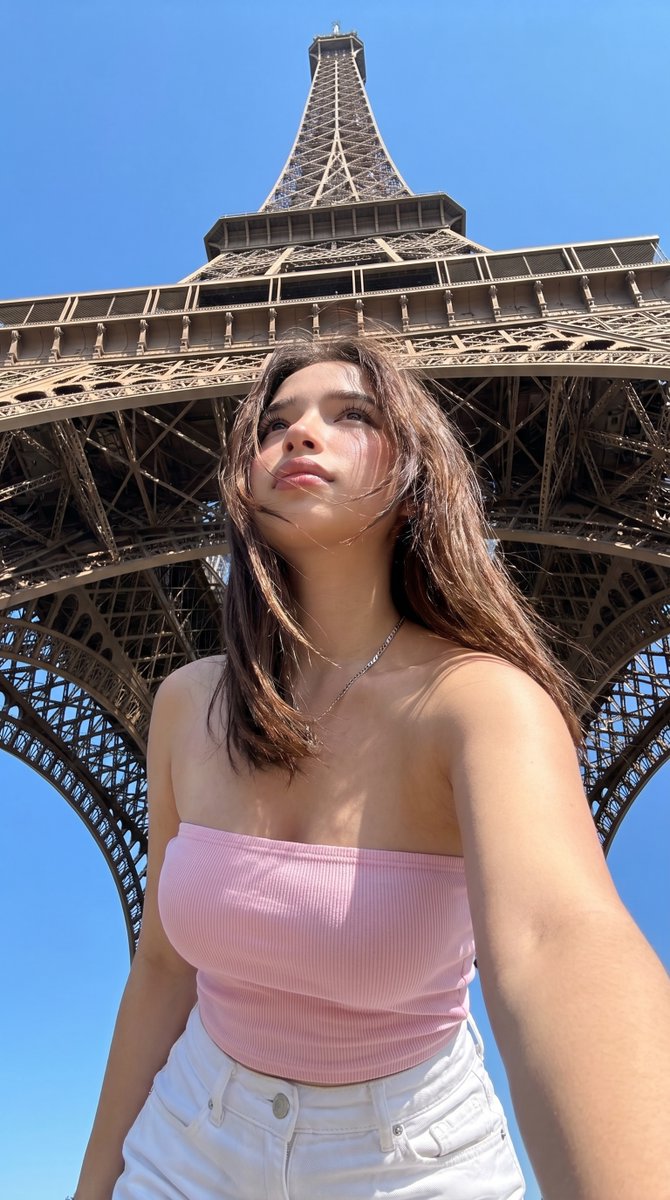
Paris Eiffel Tower Vacation Selfie — Sora 2 Prompt
Create a stunning, ultra-realistic low-angle vacation selfie with the Eiffel Tower perfectly framed in the background for social media-ready travel photos.
1 / 2
PROMPT · EN
一张超写实的度假自拍,一位年轻女性站在巴黎埃菲尔铁塔正下方,采用戏剧性的低角度拍摄,手机置于胸部下方,使铁塔在头顶上方高耸并填满整个背景。她位于画面中央,取景范围从大腿中部向上,身体微微前倾,一只手臂向前伸展,呈现经典的自拍视角。她留着 arghair color: 中棕色 的齐肩直发,头发自然侧分,被微风轻轻吹乱,肤色白皙温暖,穿着休闲的夏季服装。她身穿 argtop color: 浅粉色 的修身罗纹抹胸,搭配 argpants color: 白色 高腰牛仔裤,佩戴一条精致的细银链项链。明亮的正午阳光,万里无云的深蓝色天空,清晰的阴影,真实的皮肤纹理,自然的旅行照片瑕疵,真实的手机摄像头清晰度,休闲游客快照美学,轻微的广角镜头畸变,轻松自信的姿势,随性的社交媒体度假风。埃菲尔铁塔构图对称,其铁质拱门环绕着她的身体,结构延伸至图像的最顶端。使其看起来像是一张在 arglocation: 巴黎 拍摄的真实自发夏季旅行照片,超写实,精细的金属网格结构,色彩鲜艳且自然。
Informazioni su questo prompt
Create a stunning, ultra-realistic low-angle vacation selfie with the Eiffel Tower perfectly framed in the background for social media-ready travel photos. Use it as a Concept Art starting point for GPT Image 2: keep the visual structure and style constraints intact, then swap in your own subject, brand, or scene.
Start by replacing hair color, top color, pants color, and location, then keep the camera, composition, and material cues in the same order. This makes the output easier to compare across variations.
Come usare questo prompt
- Copy the entire prompt text.
- Paste it into your preferred AI image generator like Sora 2.
- Customize variables in the
{argument name=...}sections (e.g., hair color, top color) to personalize the look. - Generate the image and experiment with small tweaks for different styles.


