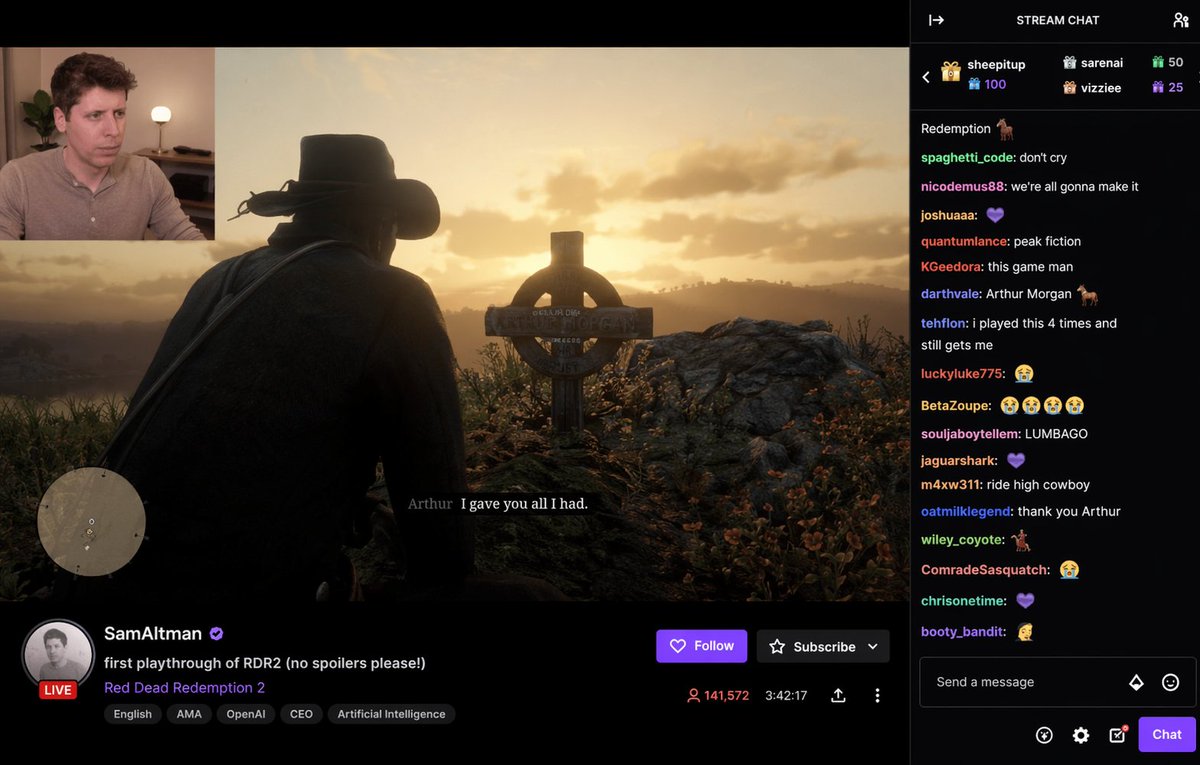
RDR2 Live Stream Overlay Mockup — Sora 2 Prompt
Generate a detailed live streaming UI mockup featuring a customizable game feed (RDR2), streamer webcam, live stats, and interactive chat sidebar for AI video creation.
Informazioni su questo prompt
Generate a detailed live streaming UI mockup featuring a customizable game feed RDR2 , streamer webcam, live stats, and interactive chat sidebar for AI video creation. Use it as a Concept Art starting point for GPT Image 2: keep the visual structure and style constraints intact, then swap in your own subject, brand, or scene.
This prompt is organized as structured JSON with fields such as type and layout. Keeping that hierarchy helps the model separate the subject, layout, interface elements, and detail constraints.
Start with small changes to subject, scene, camera, and color, then generate a few variations to compare composition and detail without turning the page copy into keyword stuffing.
Come usare questo prompt
- Copy the prompt JSON from this page.
- Open your AI video generator (e.g., Sora) and paste it into the prompt field.
- Customize the variables like
game subtitleorstreamer nameto your preferences. - Generate the output and review the live stream mockup.
- Tweak the variables and regenerate until the result matches your vision.