
GPT Image 2Prompt AI
Realistic South African ID Card — AI Prompt with Security Hologram
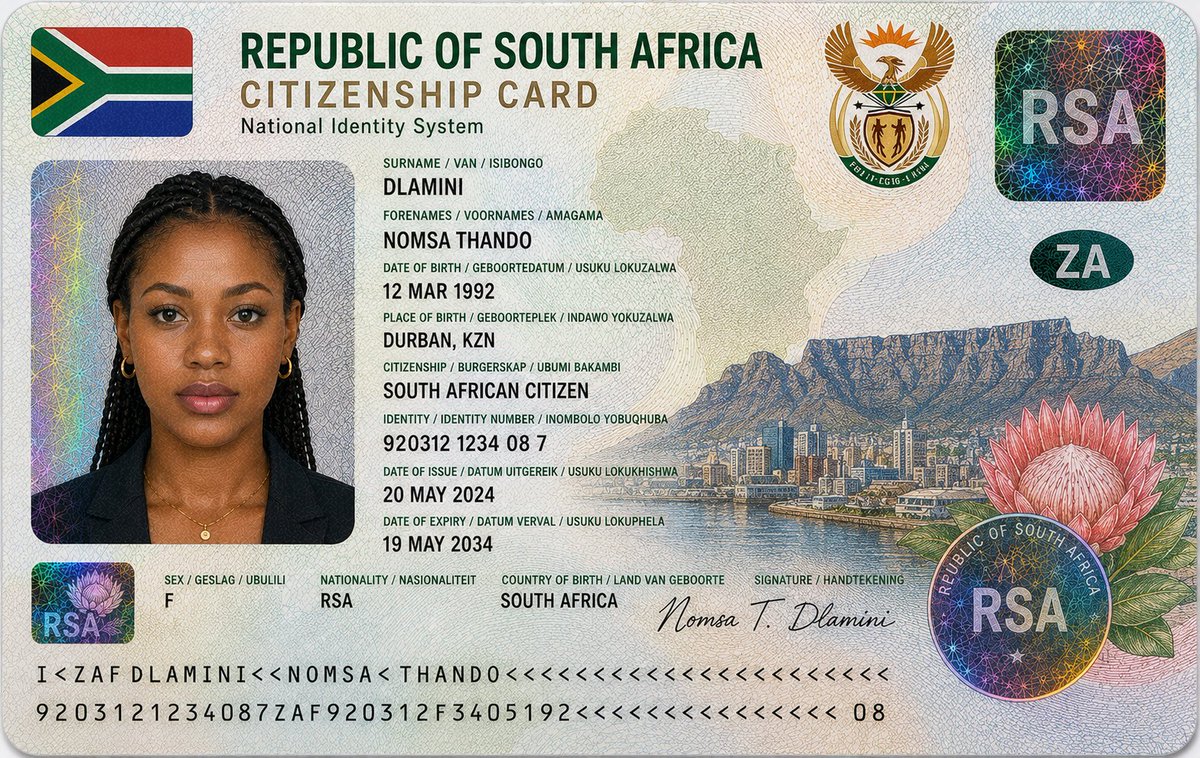
Generate a hyper-realistic, government-style South African citizenship card featuring intricate holographic details, security textures, and multilingual data.
1 / 2
PROMPT · EN
16:9 超写实特写摄影,拍摄一张放置在干净浅灰色或柔和中性背景上的南非公民身份证。卡片水平对齐,位于画面中心,采用锐利的微距对焦,配以柔和的漫射影棚光。
设计遵循现代南非政府签发的身份证件美学,具有结构化的多语言排版、雕刻安全艺术图案以及先进的防伪细节。
顶部的大号粗体标题为:“REPUBLIC OF SOUTH AFRICA”,副标题为“CITIZENSHIP CARD”,次级标题为“National Identity System”。
左上角印有南非国旗。右上角包含官方南非国徽,带有鹰冠和盾徽。
卡片包含一张年轻南非黑人女性的护照风格肖像:
– 深暖棕色肤色,具有真实的皮肤纹理
– 黑色长辫发型,整齐地向后梳理
– 深棕色眼睛,表情中性,直视前方
– 极简妆容,具有纪实写实感
– 身穿黑色西装外套或深色正式上衣,佩戴精致的金色项链和耳环
个人身份信息以南非多语言格式显示:
– 姓氏 / Van / Isibongo: argsurname: DLAMINI
– 名字 / Voornames / Amagama: argforenames: NOMSA THANDO
– 出生日期 / Geboortedatum / Usuku Lokuzalwa: 12 MAR 1992
– 出生地 / Geboorteplek / Indawo Yokuzalwa: DURBAN, KZN
– 公民身份 / Burgerskap / Ubuni Bakambi: SOUTH AFRICAN CITIZEN
– 身份号码 / Identity Number / Inombolo Yobuqhuba: argidentity number: 920312 1234 08 7
– 签发日期 / Datum Uitgereik / Usuku Lokukhishwa: 20 MAY 2024
– 有效期至 / Datum Verval / Usuku Lokuphela: 19 MAY 2034
– 性别 / Geslag / Ubulili: F
– 国籍 / Nasionaliteit: RSA
– 出生国家 / Land van Geboorte: SOUTH AFRICA
安全与设计特征包括:
– 覆盖整个卡片表面的复杂扭索纹安全线条图案
– 精细的微缩防伪纹理
– 带有彩虹色反射的全息箔片贴片
– 透明的分层安全覆盖层
– 圆形“RSA”全息安全印章
– 带有国家花卉帝王花(Protea)的全息花卉贴片
– 融入背景纹理的南非淡化轮廓地图
– 右侧雕刻有桌山(Table Mountain)和开普敦天际线的详细插图
– 右下角融合了大型帝王花艺术图案
– 底部边缘设有机器可读身份条
– 底部签名:“Nomsa T. Dlamini”
附加设计风格:
– 受南非国旗启发的柔和绿、金、蓝、红、黑、白渐变色
– 聚碳酸酯层压卡片质感,具有真实的反射效果和浮雕微细节
– 现代高安全性政府证件外观,带有雕刻钞票风格的插图工艺
光线柔和且均匀漫射,强调全息效果、雕刻纹理和真实的印刷细节,无刺眼阴影。画面中无手部出现。
风格:超细节,照片写实
Informazioni su questo prompt
Generate a hyper-realistic, government-style South African citizenship card featuring intricate holographic details, security textures, and multilingual data. Use it as a Concept Art starting point for GPT Image 2: keep the visual structure and style constraints intact, then swap in your own subject, brand, or scene.
Start by replacing surname, forenames, and identity number, then keep the camera, composition, and material cues in the same order. This makes the output easier to compare across variations.
Come usare questo prompt
- Copy the full prompt, replacing the default placeholder values (e.g., surname, ID number) with your desired custom text.
- Select a high-capability image generation model such as Sora 2 or similar text-to-image tools known for fine detail.
- Adjust the aspect ratio to 16:9 as specified in the prompt to maintain the correct orientation and framing.
- Generate the image and review the output. If details like text clarity or holographic effects need refinement, slightly tweak the lighting or style descriptors.
- Use the final image for creative projects, graphic design inspiration, or secure-looking mockup references.


