
GPT Image 2Prompt AI
Bold Red & White Fashion Magazine Layout — Sora 2 Prompt
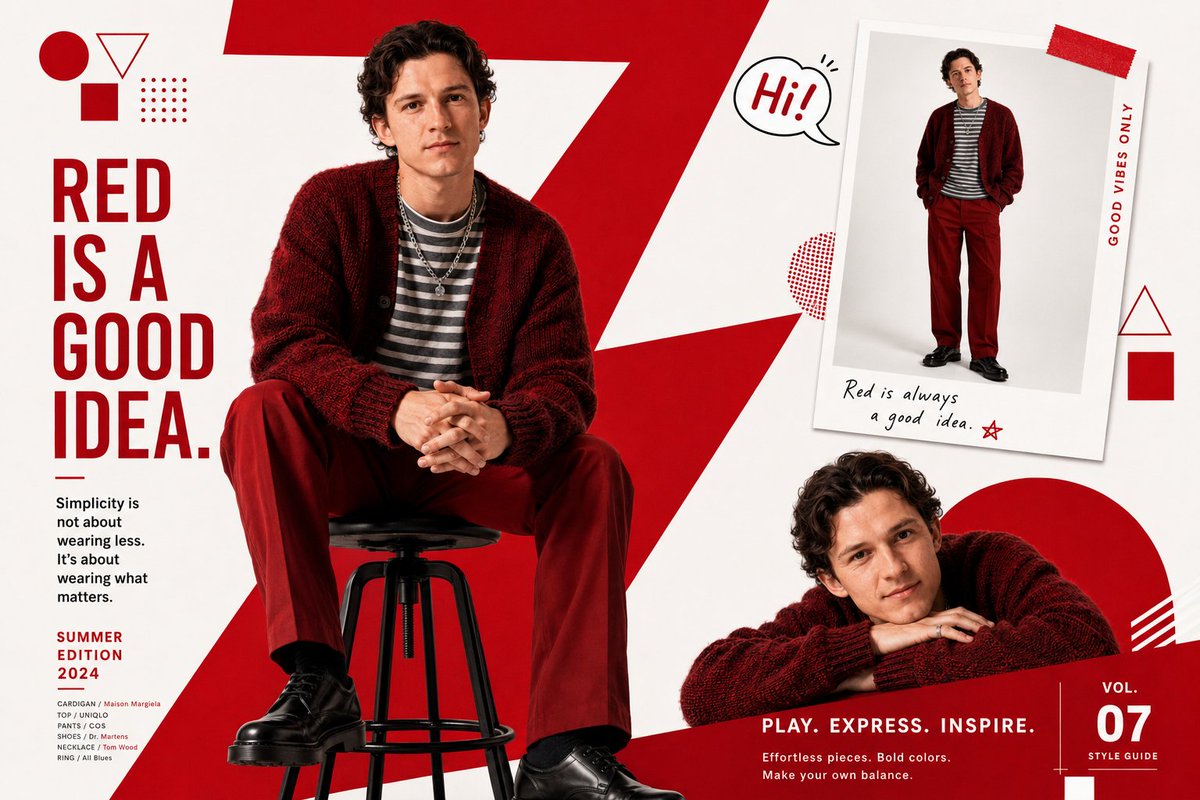
Generate a multi-pose, editor-style fashion layout with bold geometric overlays, a confident male model, and vibrant red accents for striking visual impact.
PROMPT · EN
一个时尚杂志编辑排版,采用大胆的 argprimary color: 红色 和白色图形设计布局。背景图形元素为一个巨大的红色对角线锯齿状“Z”形。年轻男模特(argface reference: 使用我上传的面部参考图),留着黑色短锅盖头,坐在黑色吧台凳上,身穿深红色/酒红色超大款针织开衫,内搭灰白横条纹衬衫,下穿红色直筒裤,脚蹬黑色皮鞋,佩戴叠层项链和戒指。自信放松的坐姿,双手交叠。画面中展示了同一模特的三个实例:1. 中心偏左的主要大型坐姿;2. 右上角的小型拍立得风格插图,展示身穿红色毛衣的全身照;3. 右下角的小型趣味姿态,托腮微笑,探头或趴着。背景:大胆的红白几何形状——顶角处有圆形、三角形和正方形。左侧带有竖排日文排版文字。拍立得照片附近有一个写着“Hi!”的小气泡贴纸。白色背景配红色图形叠加。干净的编辑杂志排版风格。
Informazioni su questo prompt
Generate a multi-pose, editor-style fashion layout with bold geometric overlays, a confident male model, and vibrant red accents for striking visual impact. Use it as a Concept Art starting point for GPT Image 2: keep the visual structure and style constraints intact, then swap in your own subject, brand, or scene.
Start by replacing primary color and face reference, then keep the camera, composition, and material cues in the same order. This makes the output easier to compare across variations.
Come usare questo prompt
- Copy the prompt from sora2hub.com.
- Select a compatible AI model (e.g., Sora 2).
- Customize the
primary colorandface referencevariables if desired. - Adjust any other details to match your creative vision.
- Generate and download your high-quality magazine-style image.


