
GPT Image 2Prompt AI
Greywater Recycling System Diagram — Sora 2 Engineering Prompt
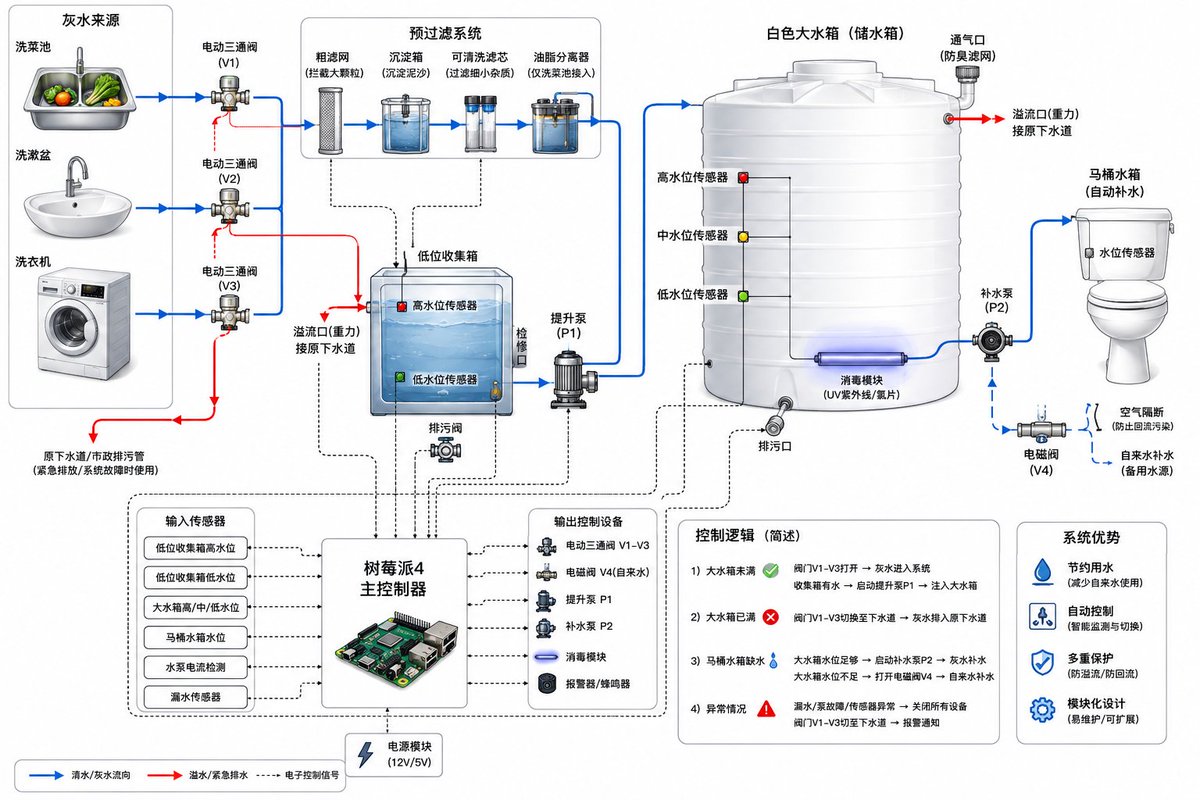
Generates a detailed residential greywater recovery system schematic with filters, tanks, pumps, and a Raspberry Pi controller, complete with clear blue/red flow indicators.
PROMPT · EN
创建一个用于冲厕的住宅 argsystem type: 中水回收系统 的简洁技术系统图。在左侧展示 argsources: 三个水源:厨房洗菜盆、浴室洗手盆和洗衣机。每个水源通过分流阀连接到原始下水道或中水回收管线。中水管线进入一个预过滤模块,该模块包含粗滤网、沉淀槽、可清洗滤芯以及用于厨房用水的隔油池。接着展示一个带有溢流管至下水道、高低水位传感器及检查盖的低位中水收集箱。从该水箱引出中水输送泵,将水向上输送至一个大型白色塑料储水箱。大水箱配有低、中、高水位传感器、溢流至下水道的出口、排水口、可选的紫外线消毒模块及通风装置。从储水箱引出水泵或重力出水口,为马桶水箱供水。包含一个带有空气隔断和防回流装置的备用清水供应系统,连接至马桶水箱。展示一个 argcontroller: Raspberry Pi 4 控制器,通过信号线连接至传感器、电磁阀、水泵、泄漏传感器和报警器。使用蓝色箭头表示水流,红色箭头表示溢流/紧急排水,黑色虚线表示电子控制。风格:现代工程示意图,白色背景,标注组件,箭头清晰,细节丰富且简洁。
Informazioni su questo prompt
Generates a detailed residential greywater recovery system schematic with filters, tanks, pumps, and a Raspberry Pi controller, complete with clear blue/red flow indicators. Use it as a Concept Art starting point for GPT Image 2: keep the visual structure and style constraints intact, then swap in your own subject, brand, or scene.
Start by replacing system type, sources, and controller, then keep the camera, composition, and material cues in the same order. This makes the output easier to compare across variations.
Come usare questo prompt
- Copy the entire prompt text and paste it into your AI image generator.
- Select the Sora 2 model (or similar capable model like Midjourney v6).
- Customize the variables: change
system type,sources, orcontrollerto fit your specific project. - Generate the image and review the output for clarity of components and labels.
- Iterate by adjusting detail level or style descriptors if needed.


