
GPT Image 2Prompt AI
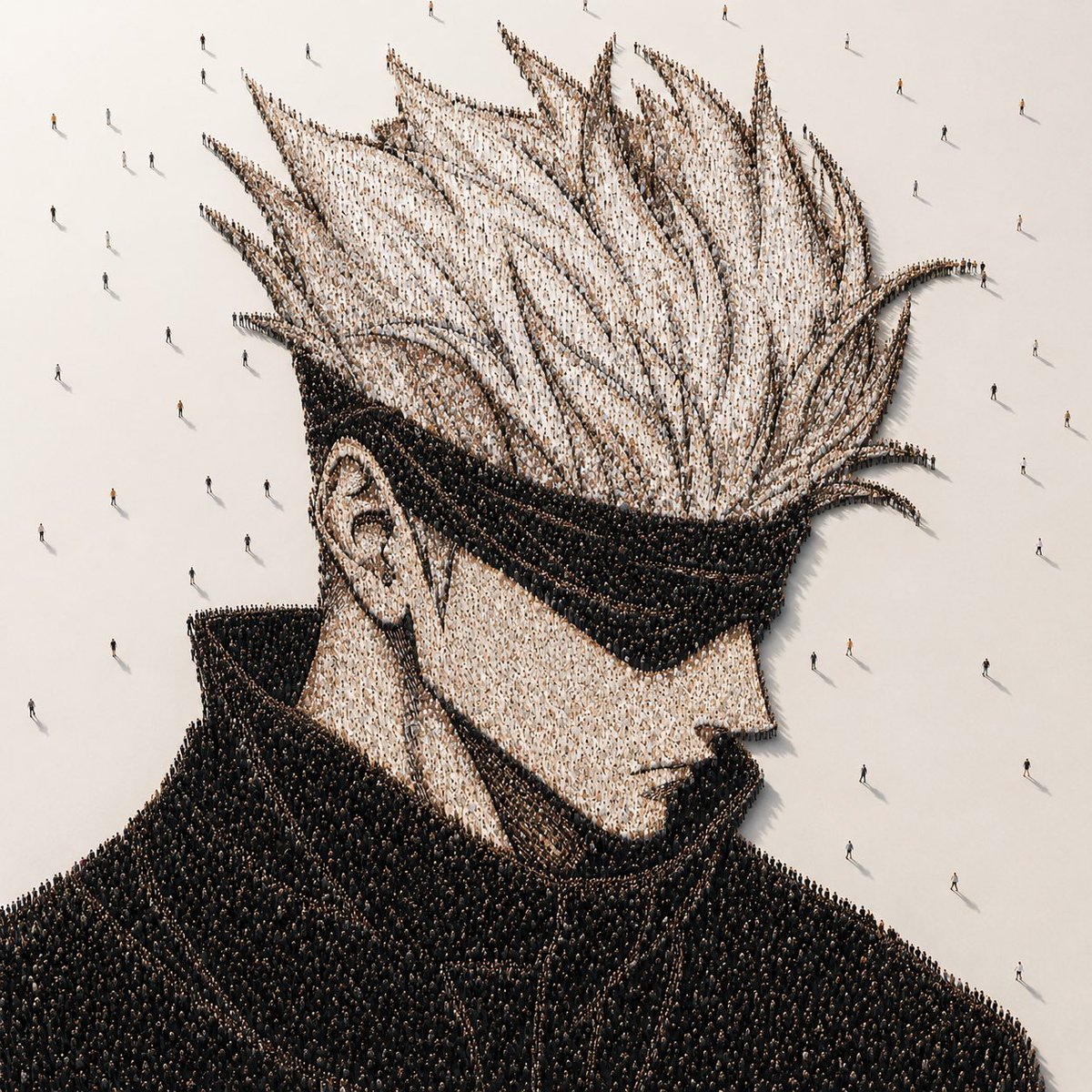
Anime Portrait Made of Thousands of People — Sora 2 Prompt
Create stunning aerial portraits where thousands of tiny figures form a massive anime character on a minimalist floor — perfect for concept art and unique visuals.
PROMPT · EN
在方形画布上创作一幅照片级真实感的概念人群肖像:俯瞰/等轴测视角,展示一个由数千个微小站立人群组成的巨大动漫风格男性半身像。角色呈肩部以上四分之三侧面,面向右侧,拥有夸张的高耸尖刺白发、清晰可见的左耳;通过浅色着装人群呈现苍白肤色,通过密集排列的黑色着装人群呈现巨大的黑色高领和深色外套。整幅肖像由无数个体人形像点彩像素般排列而成,从上方看,发丝尖端和外套边缘清晰可辨。将该造型置于广阔的哑光灰白色地面上,周围留有空白负空间,零星散布着几个远离人群的行人,投下细长的阴影。在面部区域中心添加一个巨大的不透明暖灰色方形遮挡块,覆盖从前额到下巴的大部分面部特征,同时保持头发、耳朵、衣领、肩膀及周围人群可见。采用电影级极简照明、柔和的高角度阳光、逼真的微小阴影、超精细的装置艺术质感,色调为柔和的米色、白色、黑色和炭灰色,无文字,无标识,无边框。肖像主体可自定义为 argcharacter archetype: spiky-haired anime male with high collar,并可设置 arghair color: white、argcoat color: black、argfloor color: warm off-white 以及 argcensor block color: warm gray。
Informazioni su questo prompt
Create stunning aerial portraits where thousands of tiny figures form a massive anime character on a minimalist floor — perfect for concept art and unique visuals. Use it as a Concept Art starting point for GPT Image 2: keep the visual structure and style constraints intact, then swap in your own subject, brand, or scene.
Start by replacing character archetype, hair color, coat color, and floor color, then keep the camera, composition, and material cues in the same order. This makes the output easier to compare across variations.
Come usare questo prompt
- Copy the prompt into your Sora 2 or compatible AI video/image generator.
- Select your model (e.g. Sora 2, Kling, or similar high-fidelity generators).
- Customize variables like
{character archetype},{hair color},{coat color},{floor color}, and{censor block color}to match your vision. - Generate and review the output. Adjust lighting or crowd density if needed.
- Export your favorite result in high resolution for prints, social media, or portfolios.


