
Sora2 Hub
Sora2 Hub
  • Libreria di Prompt
  • Prezzi
  • Vetrina
Sora2 Hub
Sora2 Hub
Sora2 Hub

Sora2 Hub

Piattaforma di creazione professionale AI basata su Sora 2, Veo 3.1 e Nano Banana Pro. Crea video straordinari e immagini di qualità da studio con controllo avanzato, qualità HD e senza filigrana.

Email:support@sora2hub.org

Generatore Video IA

  • Testo a Video
  • Immagine a Video
  • Veo 3.1
  • Sora 2
  • Kling 3.0
  • Kling 2.6
  • Kling 2.5
  • Runway
  • Wan 2.6
  • Seedance 2.0
  • Hailuo 2.3
  • Grok Imagine
  • HappyHorse-1.0

Generatore Immagini IA

  • Testo a Immagine
  • Immagine a Immagine
  • Nano Banana Pro
  • Nano Banana
  • 4o Image
  • Flux Kontext
  • Z Image
  • Seedream 4.5
  • Seedream 5.0 Lite
  • Nano Banana 2
  • GPT Image 2
  • Ingranditore Immagini IA

Effetti IA

  • Filtro Età IA
  • Scambio Genere IA
  • Bacio IA
  • Abbraccio IA
  • Immagine Ghibli
  • Filtro Sirena IA
  • Scossa Corporea IA
  • Filtro Sorriso
  • Grasso IA
  • Action Figure

Prodotto

  • Funzionalità
  • Vetrine
  • Prezzi

Azienda

  • Chi siamo
  • Contatto

© 2025 • Sora2 Hub ORG Tutti i diritti riservati.

  • Informativa sulla Privacy
  • Termini di Servizio
  • Politica di Rimborso
  1. Home
  2. /
  3. Prompt
  4. /
  5. GPT Image 2
  6. /
  7. Hand-Torn Paper Collage Art Generator — Sora 2 Prompt
GPT Image 2Prompt AI

Hand-Torn Paper Collage Art Generator — Sora 2 Prompt

Transform any image into a realistic hand-torn paper collage with textured edges, wrinkles, and glue marks for authentic mixed-media art.
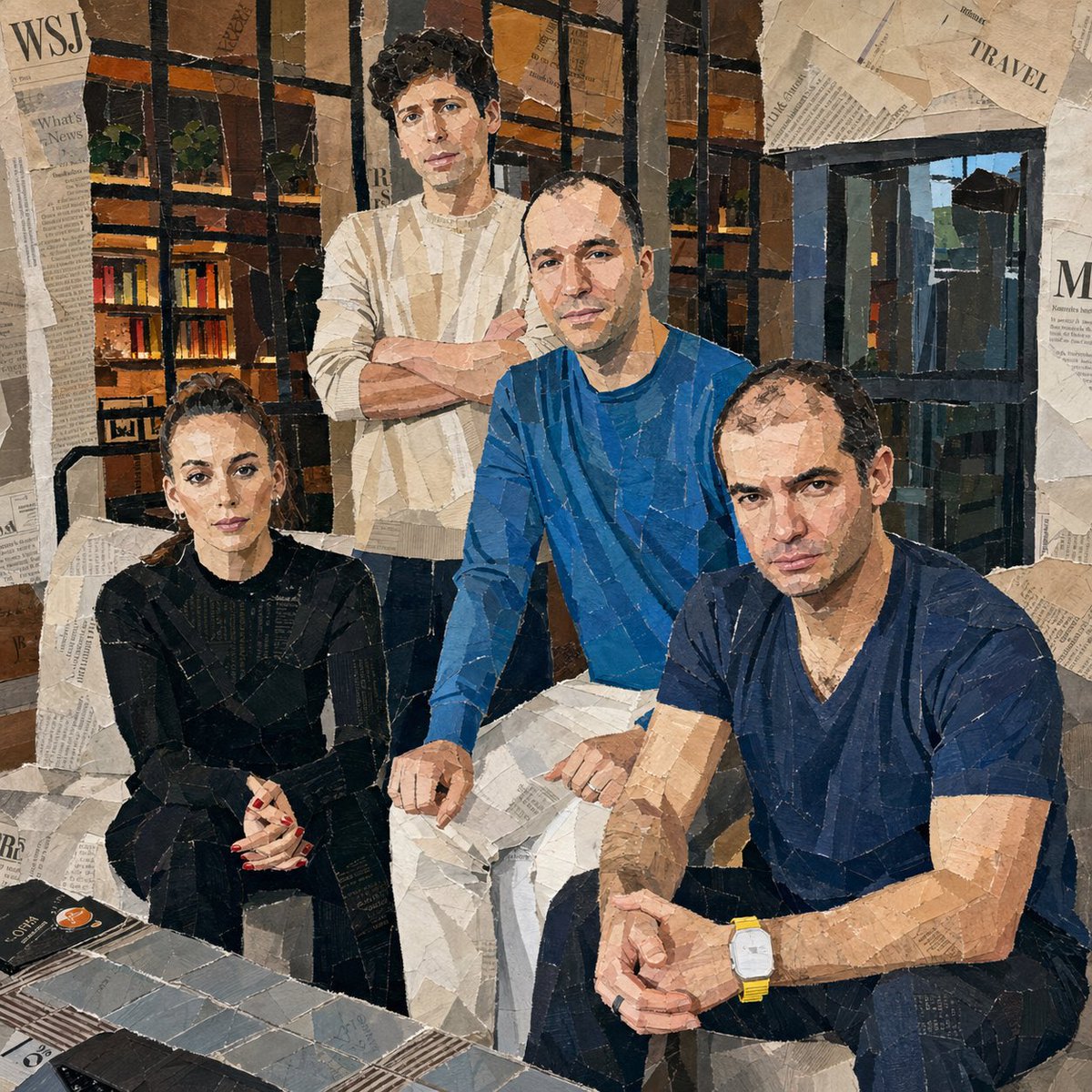
Hand-Torn Paper Collage Art Generator — Sora 2 Prompt
1 / 4
PROMPT · EN
将附带的图像转换为拼贴艺术作品。使其看起来像是从报纸、杂志和传单上手撕下来并粘贴而成。每一个表情都应使用大块的撕纸来完成。详细呈现纸张上的撕裂边缘、褶皱、重叠部分和胶水痕迹。使用相对较大的纸块,不要太小,并将它们随机放置在不同的角度和方向上,纸张方向要随意旋转。创作出看起来像是人工粗略手工粘贴的真实拼贴画效果。

Informazioni su questo prompt

Transform any image into a realistic hand-torn paper collage with textured edges, wrinkles, and glue marks for authentic mixed-media art. Use it as a Concept Art starting point for GPT Image 2: keep the visual structure and style constraints intact, then swap in your own subject, brand, or scene.

Start with small changes to subject, scene, camera, and color, then generate a few variations to compare composition and detail without turning the page copy into keyword stuffing.

Come usare questo prompt

  1. Copy the full prompt text and paste it into your preferred AI image generation model (Sora 2, Midjourney, DALL·E, etc.).
  2. Attach or reference the source image you want to convert into a collage style.
  3. Adjust style keywords if desired — try adding "vintage," "punk zine," or "colorful" for different vibes.
  4. Set your preferred aspect ratio and resolution for the output.
  5. Generate the image and iterate by tweaking paper size, rotation angles, or layering depth.

FAQ

Sigrid Jin 🌈🙏

@realsigridjin→

Pubblicato
15 mag 2026
Lingua originale
EN
Modello
GPT Image 2
Categoria
Concept Art
GPT Image 2Concept Artgpt-image-2twitter
Visualizzazioni
4.3K
Copie
637
Mi piace
304

Condividi

Altro da GPT Image 2

Vedi tutto
Anime Idol Profile Page — Lavender Art Style Prompt

Anime Idol Profile Page — Lavender Art Style Prompt

@uzuyanurp
Anime Schoolgirls Sharing Transparent Umbrella — Sora 2 Prompt

Anime Schoolgirls Sharing Transparent Umbrella — Sora 2 Prompt

@yB7CqdfoDmrbhgD
Anime Reaction Thumbnail Prompt — Neon Edgy VTuber

Anime Reaction Thumbnail Prompt — Neon Edgy VTuber

@abdiisan

Crea più velocemente con i prompt Sora2Hub.

Usa pagine prompt curate come ingressi ricercabili e passa subito alla generazione con il contesto modello corretto.

Esplora prompt

