
GPT Image 2Prompt AI
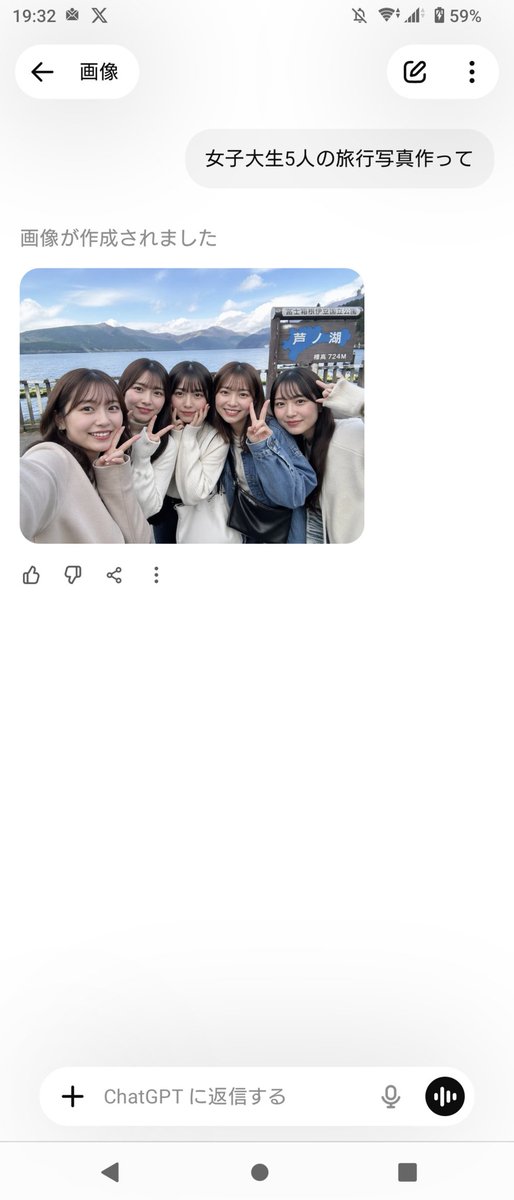
Japanese Group Selfie at Lake Ashi — Sora 2 Prompt
Create a realistic Lake Ashi group selfie with Japanese students, perfect for social media mockups, travel visuals, or AI art inspiration.
PROMPT · EN
一张抓拍风格的智能手机旅行自拍,画面中 arggroup size: 五位 日本女大学生紧密地站在一起,位于 arglocation: 箱根芦之湖 岸边。采用手臂伸展的拍摄视角,带有轻微的广角前置摄像头质感。她们肩并肩紧靠,对着镜头微笑并比出剪刀手,呈现出好友出游时轻松愉悦的氛围。她们的造型写实且现代,留着深棕色至黑色的中长发,妆容自然,穿着柔和的中性色秋季服装:米白色针织毛衣、蓝色牛仔外套,画面中右侧可见一个黑色单肩包。背景是湖畔风光,平静的蓝色湖水,远处是明亮天空下云朵稀疏的山峦,右侧设有一个木质旅游指示牌,上面清晰地印有日文 argsign text: 芦ノ湖 以及较小的海拔标记 724M。构图应呈现出真实的社交媒体旅行照片质感,边缘略有裁剪,仿佛有人从左侧手持手机拍摄,具备自然日光、真实的肤色、柔和的景深以及纪实摄影的写实感。画面中需包含正好 argpeace sign count: 三个 清晰可见的剪刀手手势。整体氛围应如同在日本一日游期间拍摄的真实团体纪念照。
Informazioni su questo prompt
Create a realistic Lake Ashi group selfie with Japanese students, perfect for social media mockups, travel visuals, or AI art inspiration. Use it as a Concept Art starting point for GPT Image 2: keep the visual structure and style constraints intact, then swap in your own subject, brand, or scene.
Start by replacing group size, location, sign text, and peace sign count, then keep the camera, composition, and material cues in the same order. This makes the output easier to compare across variations.
Come usare questo prompt
- Copy the prompt text from the code block.
- Paste it into your preferred AI image generator (e.g., Sora, DALL·E, Midjourney, Stable Diffusion).
- Adjust the variables in curly braces (e.g., group size, location, sign text) to customize the scene.
- Generate the image and review the output; you might need to tweak the prompt for specific details.
- Download and use the realistic travel selfie for mockups, social media, or design projects.


