
GPT Image 2Prompt AI
Cinematic Injured Man Close-Up — Sora 2 Prompt
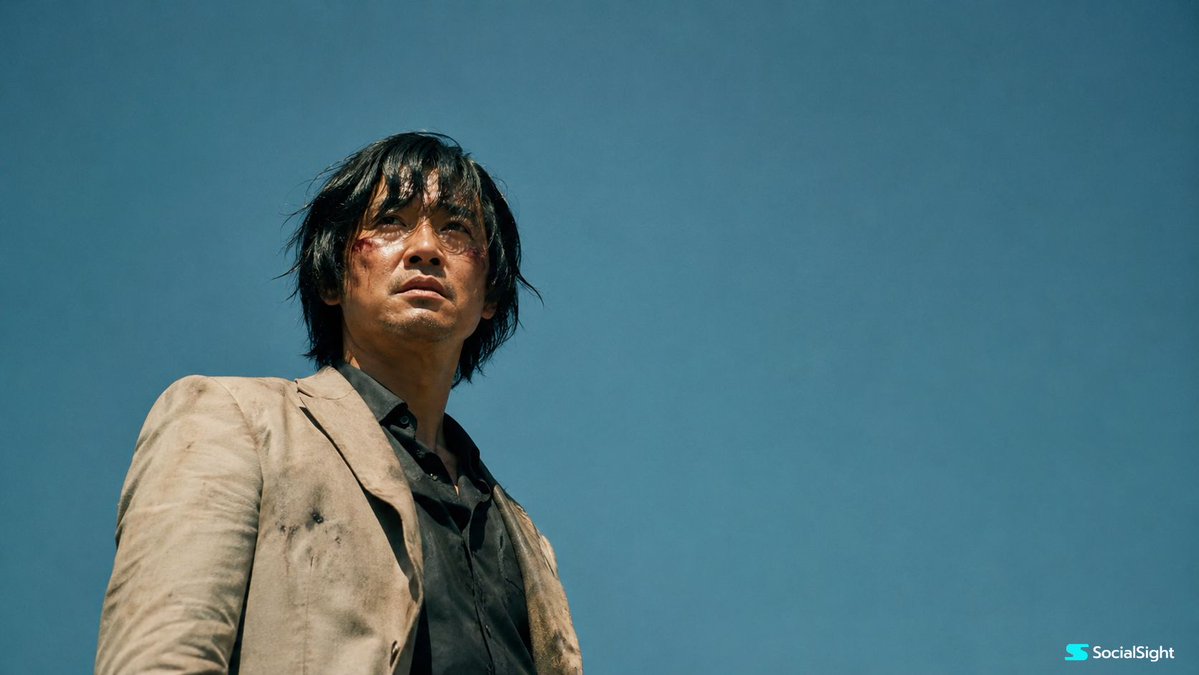
Create a hyper-realistic, film-like portrait of a wounded man against a vast sky, featuring dramatic low-angle lighting and a deep emotional tone.
PROMPT · EN
创作一张电影质感的写实剧照,画面中一位受伤的 argsubject: 亚洲男子 站在广阔晴朗的蓝天下,采用戏剧性的低角度仰拍视角。他留着凌乱的中长黑发,被风微微吹起,表情疲惫而强烈,脸颊上有一道新鲜的小伤口,带有细微的血迹。他穿着一件深色衬衫,外搭一件布满灰尘的米色西装外套,衣物显得有些脏旧,暗示他刚刚经历了一场激烈的冲突或艰难的旅程。 构图应营造出孤独、有力且具有电影感的氛围,将人物置于画面偏左位置,背景留出大面积的空白天空。使用自然强烈的日光,高对比度,真实的皮肤纹理,柔和的胶片颗粒感,低饱和度的色彩,以及原始的电影氛围。基调应显得紧张、宁静且情感沉重,仿佛混乱过后的瞬间。使用复古变形宽银幕镜头拍摄,宽画幅,浅景深,真实的真人电影剧照,无文字,无标志,无额外角色。
Informazioni su questo prompt
Create a hyper-realistic, film-like portrait of a wounded man against a vast sky, featuring dramatic low-angle lighting and a deep emotional tone. Use it as a Concept Art starting point for GPT Image 2: keep the visual structure and style constraints intact, then swap in your own subject, brand, or scene.
Start by replacing subject, then keep the camera, composition, and material cues in the same order. This makes the output easier to compare across variations.
Come usare questo prompt
- Copy the full prompt text and paste it into your chosen AI video or image generator, such as Sora 2.
- Ensure you select a high-quality model capable of photorealistic and cinematic outputs.
- Customize the
{subject}variable to change the character's ethnicity or description to match your creative vision. - Adjust details like hair color, clothing style, or background weather if desired for a different mood.
- Generate the output and review the results, refining the prompt if needed for better composition or lighting.


