GPT Image 2Prompt AI

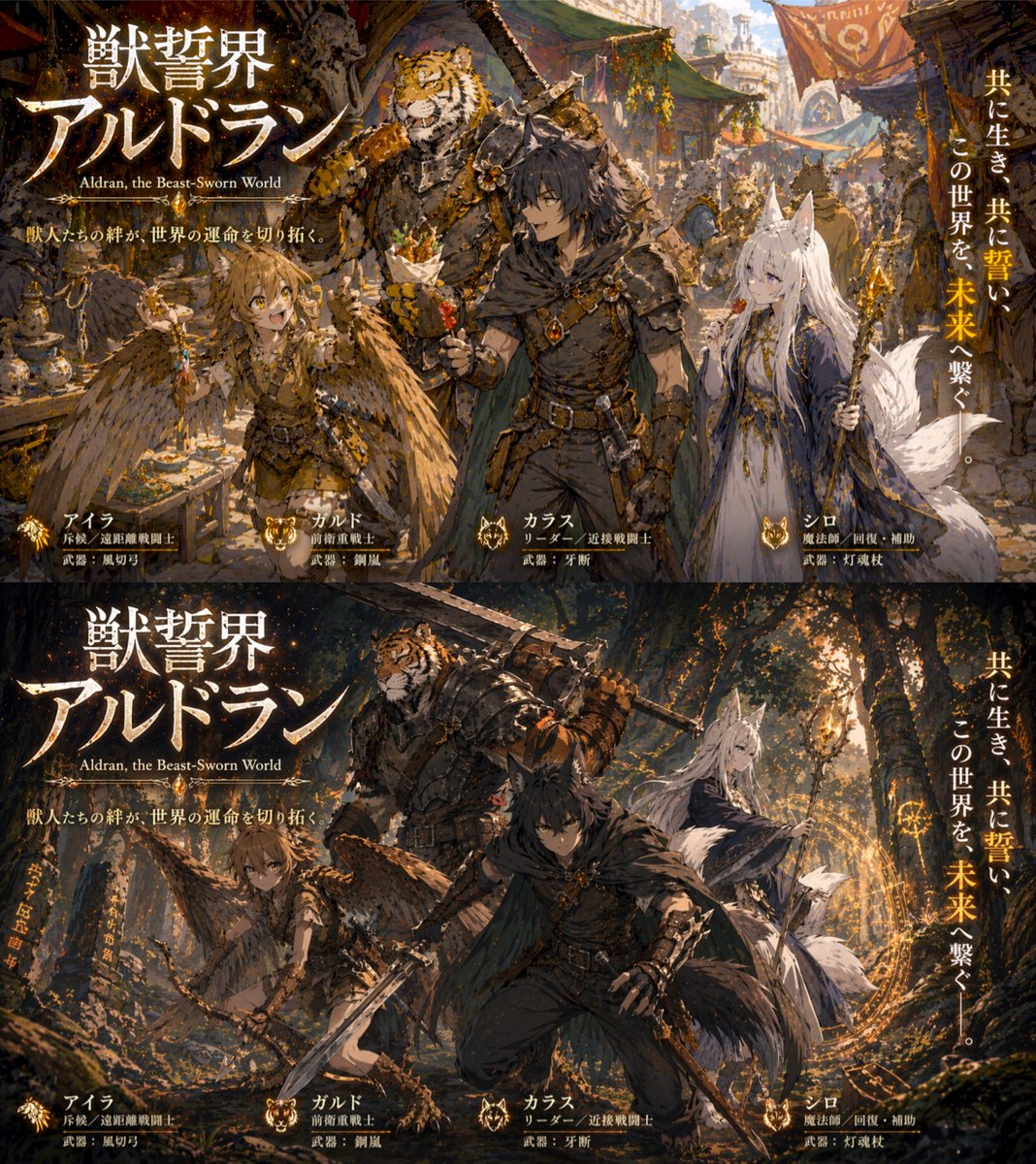
Dual-Panel Fantasy RPG Art — Generate Beast Sworn World Scenes

Create a dynamic two-panel promotional illustration of a beastfolk RPG party in peaceful and combat settings, with customizable character and scene variables.
Dual-Panel Fantasy RPG Art — Generate Beast Sworn World Scenes
PROMPT · EN
type
双联画幅奇幻 RPG 宣传插图
global_elements
main_title
{argument name="main title" default="獣誓界アルドラン"}
english_subtitle
{argument name="english subtitle" default="Aldran, the Beast-Sworn World"}
catchphrase
兽人间的羁绊,将开辟世界的命运。
vertical_tagline
{argument name="tagline" default="共に生き、共に誓い、この世界を、未来へ繋ぐ。"}
characters
item 1
name
アイラ
description
长有褐色头发和羽翼的兽人少女
role_label
斥候 / 远程战斗员
weapon_label
武器:风切弓
item 2
name
ガルド
description
身着重型板甲的魁梧虎族兽人
role_label
前卫重装战士
weapon_label
武器:钢岚
item 3
name
カラス
description
黑发狼耳、有尾巴,身穿深色皮甲并披着斗篷的狼族少年
role_label
队长 / 近战战斗员
weapon_label
武器:牙断
item 4
name
シロ
description
长白发、狐耳、拥有多条蓬松尾巴,身穿蓝白长袍的白狐少女
role_label
魔法师 / 治疗与辅助
weapon_label
武器:灯魂杖
layout
panels
item 1
position
上半部分
scene
{argument name="peaceful setting" default="bustling fantasy market town in warm daylight"}
action
角色们神情放松、面带微笑,聚在一起享用街头小吃
item 2
position
下半部分
scene
{argument name="combat setting" default="dark atmospheric forest with glowing magic runes"}
action
角色们处于动态战斗姿态,武器出鞘,正在施展魔法,氛围紧张

Informazioni su questo prompt

Create a dynamic two-panel promotional illustration of a beastfolk RPG party in peaceful and combat settings, with customizable character and scene variables. Use it as a Concept Art starting point for GPT Image 2: keep the visual structure and style constraints intact, then swap in your own subject, brand, or scene.

This prompt is organized as structured JSON with fields such as type, global elements, characters, and layout. Keeping that hierarchy helps the model separate the subject, layout, interface elements, and detail constraints.

Start with small changes to subject, scene, camera, and color, then generate a few variations to compare composition and detail without turning the page copy into keyword stuffing.

Come usare questo prompt

  1. Copy the prompt from the page.
  2. Paste it into your AI image generator (e.g., Sora 2, DALL-E 3).
  3. Tweak the variables in brackets to set your own scenes, titles, and taglines.
  4. Generate and iterate, refining the prompt for the best dual-panel output.
FAQ

Altro da GPT Image 2

Vedi tutto

Crea più velocemente con i prompt Sora2Hub.

Usa pagine prompt curate come ingressi ricercabili e passa subito alla generazione con il contesto modello corretto.

Esplora prompt