
Sora2 Hub
Sora2 Hub
  • Libreria di Prompt
  • Prezzi
  • Vetrina
Sora2 Hub
Sora2 Hub
Sora2 Hub

Sora2 Hub

Piattaforma di creazione professionale AI basata su Sora 2, Veo 3.1 e Nano Banana Pro. Crea video straordinari e immagini di qualità da studio con controllo avanzato, qualità HD e senza filigrana.

Email:support@sora2hub.org

Generatore Video IA

  • Testo a Video
  • Immagine a Video
  • Veo 3.1
  • Sora 2
  • Kling 3.0
  • Kling 2.6
  • Kling 2.5
  • Runway
  • Wan 2.6
  • Seedance 2.0
  • Hailuo 2.3
  • Grok Imagine
  • HappyHorse-1.0

Generatore Immagini IA

  • Testo a Immagine
  • Immagine a Immagine
  • Nano Banana Pro
  • Nano Banana
  • 4o Image
  • Flux Kontext
  • Z Image
  • Seedream 4.5
  • Seedream 5.0 Lite
  • Nano Banana 2
  • GPT Image 2
  • Ingranditore Immagini IA

Effetti IA

  • Filtro Età IA
  • Scambio Genere IA
  • Bacio IA
  • Abbraccio IA
  • Immagine Ghibli
  • Filtro Sirena IA
  • Scossa Corporea IA
  • Filtro Sorriso
  • Grasso IA
  • Action Figure

Prodotto

  • Funzionalità
  • Vetrine
  • Prezzi

Azienda

  • Chi siamo
  • Contatto

© 2025 • Sora2 Hub ORG Tutti i diritti riservati.

  • Informativa sulla Privacy
  • Termini di Servizio
  • Politica di Rimborso
  1. Home
  2. /
  3. Prompt
  4. /
  5. GPT Image 2
  6. /
  7. AI Product Launch Infographic — 3D Isometric Sora 2 Prompt
GPT Image 2Prompt AI

AI Product Launch Infographic — 3D Isometric Sora 2 Prompt

Creates a stunning long vertical tech product announcement poster with 3D illustrations, feature grids, and side-by-side model comparisons.
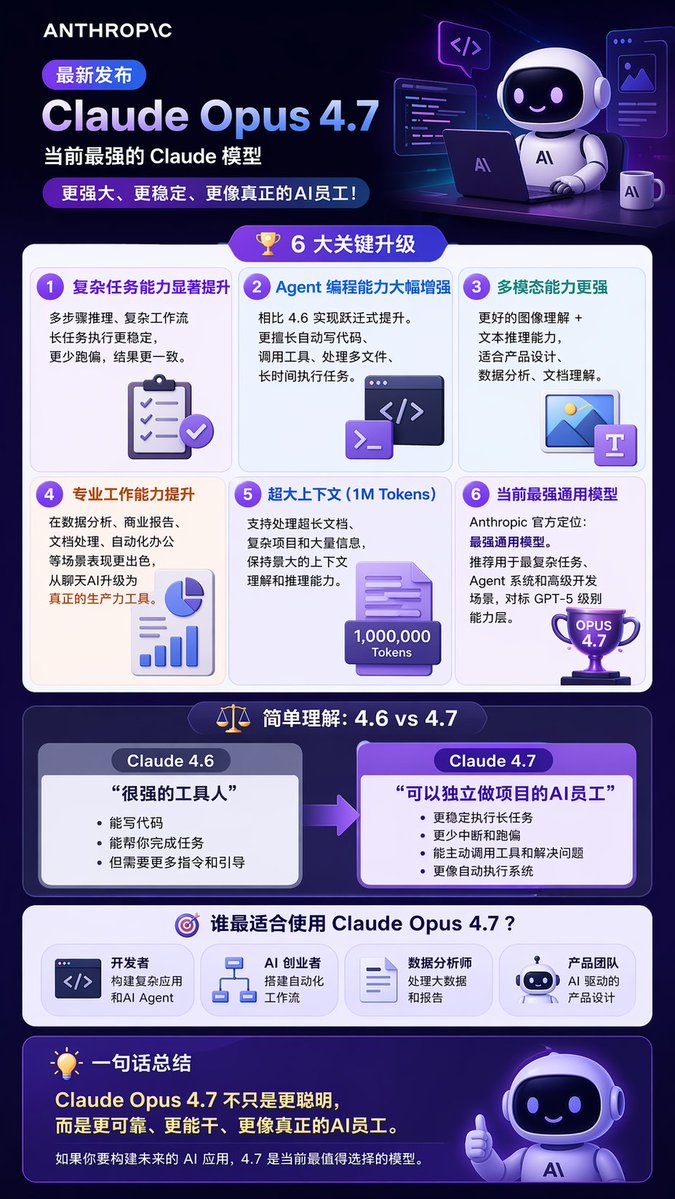
AI Product Launch Infographic — 3D Isometric Sora 2 Prompt
PROMPT · EN
type
long vertical infographic poster
style
modern tech, 3D isometric illustrations, dark purple and blue color palette, glassmorphism UI elements
header
logo
{argument name="company logo" default="ANTHROPIC"}
badge
最新发布
title
{argument name="product name" default="Claude Opus 4.7"}
subtitle
{argument name="main subtitle" default="当前最强的 Claude 模型"}
tagline
更强大、更稳定、更像真正的AI员工!
illustration
3D cute robot sitting at a desk with a laptop, coffee mug, and floating code windows
layout
sections
item 1
title
6 大关键升级
icon
3D gold trophy
layout
2x3 grid
count
6
items
item 1
title
复杂任务能力显著提升
icon
3D clipboard with checkmarks
item 2
title
Agent 编程能力大幅增强
icon
3D code terminal window
item 3
title
多模态能力更强
icon
3D image and text document
item 4
title
专业工作能力提升
icon
3D pie chart and bar graph
item 5
title
超大上下文 (1M Tokens)
icon
3D document with 1,000,000 Tokens text
item 6
title
当前最强通用模型
icon
3D purple trophy with OPUS 4.7 text
item 2
title
简单理解:4.6 vs 4.7
icon
3D balance scale
layout
side-by-side comparison with right-pointing arrow
count
2
columns
item 1
header
{argument name="comparison version 1" default="Claude 4.6"}
quote
很强的工具人
style
grey box
item 2
header
{argument name="comparison version 2" default="Claude 4.7"}
quote
可以独立做项目的AI员工
style
purple box, highlighted
item 3
title
谁最适合使用 Claude Opus 4.7?
icon
3D target
layout
horizontal row
count
4
labels
item 1
开发者
item 2
AI 创业者
item 3
数据分析师
item 4
产品团队
footer
title
一句话总结
icon
3D lightbulb
main_text
Claude Opus 4.7 不只是更聪明,而是更可靠、更能干、更像真正的AI员工。
sub_text
如果你要构建未来的 AI 应用,4.7 是当前最值得选择的模型。
illustration
3D cute robot giving a thumbs up

Informazioni su questo prompt

Creates a stunning long vertical tech product announcement poster with 3D illustrations, feature grids, and side-by-side model comparisons. Use it as a Concept Art starting point for GPT Image 2: keep the visual structure and style constraints intact, then swap in your own subject, brand, or scene.

This prompt is organized as structured JSON with fields such as type, style, header, and layout. Keeping that hierarchy helps the model separate the subject, layout, interface elements, and detail constraints.

Start with small changes to subject, scene, camera, and color, then generate a few variations to compare composition and detail without turning the page copy into keyword stuffing.

Come usare questo prompt

  1. Copy the full prompt JSON and paste it into your chosen AI model (e.g., Sora 2, DALL·E 3, or Midjourney).
  2. Replace the default variable values (like ANTHROPIC, Claude Opus 4.7) with your own product or brand details.
  3. Adjust the style keywords or color palette in the style field if you prefer a different aesthetic.
  4. Submit the prompt and wait for the AI to generate the complete infographic image.
  5. Download, review, and make minor edits or re-generate if needed.

FAQ

老莫

@prompts→

Pubblicato
30 apr 2026
Lingua originale
EN
Modello
GPT Image 2
Categoria
Concept Art
GPT Image 2Concept Artgpt-image-2gptimage2api promptsgptimage2apien
Visualizzazioni
450
Copie
49
Mi piace
30

Condividi

Altro da GPT Image 2

Vedi tutto
Graphic Novel Ink Splash Portrait — Sora 2 Prompt

Graphic Novel Ink Splash Portrait — Sora 2 Prompt

@iamsofiaijaz
Minimalist Skincare Brand Manual — Sora 2 Prompt

Minimalist Skincare Brand Manual — Sora 2 Prompt

@FranromeGraph
Dynamic Nike Ad Poster — Sora 2 Prompt with Sydney Sweeney

Dynamic Nike Ad Poster — Sora 2 Prompt with Sydney Sweeney

@im_shahid7

Crea più velocemente con i prompt Sora2Hub.

Usa pagine prompt curate come ingressi ricercabili e passa subito alla generazione con il contesto modello corretto.

Esplora prompt

