
GPT Image 2AI 프롬프트
Early 2000s Computer Lab ChatGPT — Sora 2 Prompt
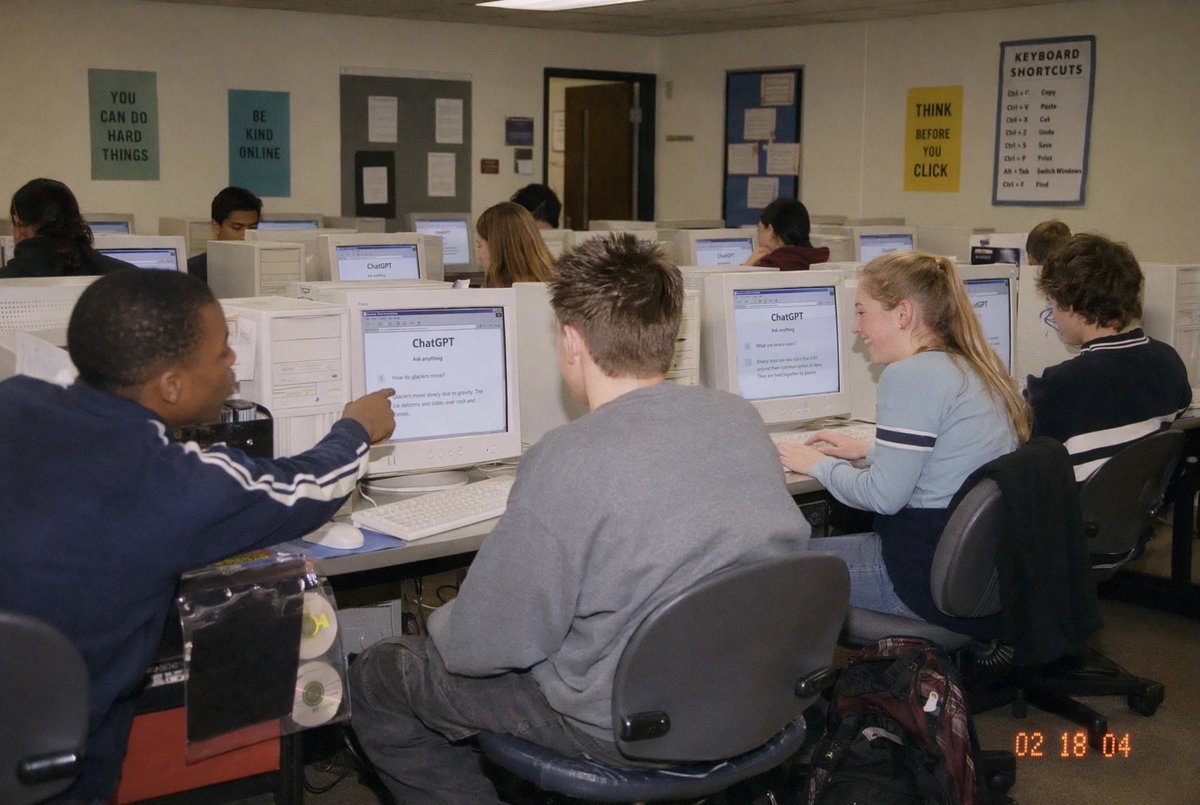
Create a realistic snapshot of students using ChatGPT in a 2000s computer lab, complete with CRT screens, fluorescent lighting, and classic timestamp—ideal for nostalgic tech content.
프롬프트 · EN
一张纪实风格的抓拍照片,场景为 argsetting: 高中计算机实验室教室,室内有 10 名学生正坐在成排笨重的米白色 CRT 台式机前,视角位于教室左后方,呈轻微广角。画面应呈现出 21 世纪初使用消费级数码相机拍摄的快照感,带有直接闪光灯效果、柔和的噪点、略显温暖的室内荧光灯光,右下角带有时间戳 argtimestamp: 02 18 04。左侧前景中,一名身穿海军蓝运动夹克、袖口带有白色条纹的学生正指向一台 CRT 显示器;中央前景中,一名留着短刺猬头的学生穿着超大号灰色卫衣,背对镜头坐着;右侧前景中,一名扎着马尾辫的金发学生穿着浅蓝色长袖上衣,袖子上有深色横条纹,正在键盘上打字;最右侧,另一名留着深色卷发的学生坐在工作站前。其他几名学生坐在中间和后排,全都面向屏幕。显示器上清晰地显示着 ChatGPT 界面,可见的标题为 argscreen title: ChatGPT,下方是简单的提示词文本。房间墙壁为米色,配有吊顶天花板,墙上挂着多张励志海报:后墙上挂着 4 张清晰可见的海报,内容分别为 argposter one: YOU CAN DO HARD THINGS、“BE KIND ONLINE”、“THINK BEFORE YOU CLICK”,以及一张标题为“KEYBOARD SHORTCUTS”的大海报,下方列有清单。画面中还应包含项目、后方的教室门、转椅、白色键盘和鼠标,以及右侧前景桌旁地板上的背包。人物面部应部分遮挡或进行柔和的匿名处理,在保留真实课堂照片质感的同时,将焦点集中在学生在老式计算机实验室中使用 ChatGPT 的场景上。
프롬프트 소개
Create a realistic snapshot of students using ChatGPT in a 2000s computer lab, complete with CRT screens, fluorescent lighting, and classic timestamp—ideal for nostalgic tech content. Use it as a 컨셉 아트 starting point for GPT Image 2: keep the visual structure and style constraints intact, then swap in your own subject, brand, or scene.
Start by replacing setting, timestamp, screen title, and poster one, then keep the camera, composition, and material cues in the same order. This makes the output easier to compare across variations.
이 프롬프트 사용법
- Copy the entire prompt from the text box above.
- Paste it into Sora 2 or any AI image generator that supports detailed text-to-image generation.
- (Optional) Replace the variables like {setting}, {timestamp}, and {poster one} to customize the classroom, date, and posters.
- Generate the image and download your retro classroom photo.


