
GPT Image 2AI 프롬프트
3D Cinematic Social Media Portrait — Sora 2 Prompt
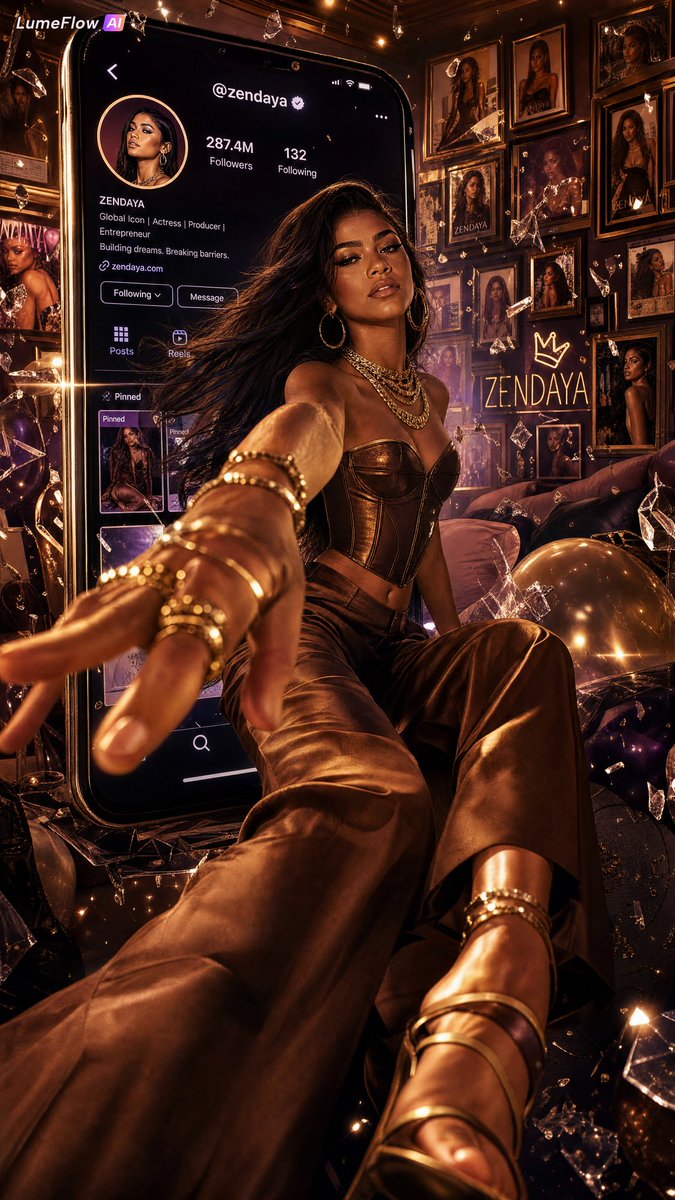
Create a hyper-realistic 3D poster of a celebrity breaking out of a smartphone screen in a luxurious, magazine-cover style with forced perspective and Hollywood lighting.
1 / 2
프롬프트 · EN
一张令人叹为观止的 3D 立体电影感肖像海报,以 argsubject: Zendaya 为核心主体——散发着高贵、酷女孩般的优雅与随性。她标志性的长直发戏剧性地飘动,深邃的肤色在屏幕光影下显得格外迷人。妆容呈现出杂志大片般的完美质感——轮廓分明的颧骨、亮泽的唇妆以及精致的眼线。她身着巧克力色与金色协调的全身造型——结构感十足的短款束身衣、深焦糖色流线型缎面阔腿裤、系带高跟穆勒鞋,叠戴着粗金链项链,超大号圆环耳环在电影级光线下熠熠生辉。她被描绘成坐在一部巨大的超大号智能手机屏幕内,置身于一个原创的虚构社交媒体个人资料界面中——风格借鉴了 Instagram 的视觉语言但完全原创——包含账号 arghandle: @zendaya、圆形个人头像、显示为 argfollowers: 287.4M 的粉丝数、置顶帖子轮播图,以及在柔和的淡紫色屏幕光中发光的简洁 UI 按钮。通过极端的强制透视和戏剧性的广角构图,她完全冲破了手机屏幕:一只戴着叠戴金戒指的手以从容的自信直接伸向镜头,而她的长腿和系带高跟鞋则延伸到手机下边框之外,打破了屏幕与现实的界限。深度错觉感达到极致——超电影感,具有《Vogue》封面般的张力。背景是一个装饰奢华的豪华卧室——墙上叠放着装裱好的杂志照片、拍立得拼贴画和霓虹背光艺术印刷品,展示了她职业生涯中的各个瞬间。空间中自由漂浮着:虹彩香槟金和深李子色的气球、捕捉着暖光的层叠水钻碎片、悬浮在半空中的破碎透明玻璃碎片,以及慢动作漂浮的超细金粉颗粒。房间色调:深紫红与香槟色,点缀着古董金金属色。灯光:好莱坞魅力三点式布光——来自手机屏幕的冷蓝白主光、来自室内实用灯具的暖琥珀色补光,以及勾勒她轮廓的锐利金色轮廓光。变形镜头光晕在屏幕破裂点处划过。细微的金色散景颗粒在背景景深中闪烁。渲染风格:超写实主义杂志摄影与超现实 CGI 合成。ARRI Alexa 65 摄影机,Panavision 变形镜头,采用浓郁暖色调 LUT 进行调色,高光边缘带有光晕效果,符合《Vogue》标准的精修质感。纵横比 2:3 竖屏。氛围:不可触及的明星贵族感——从互联网中走出,从容不迫,极具磁性。
프롬프트 소개
Create a hyper-realistic 3D poster of a celebrity breaking out of a smartphone screen in a luxurious, magazine-cover style with forced perspective and Hollywood lighting. Use it as a 컨셉 아트 starting point for GPT Image 2: keep the visual structure and style constraints intact, then swap in your own subject, brand, or scene.
Start by replacing subject, handle, and followers, then keep the camera, composition, and material cues in the same order. This makes the output easier to compare across variations.
이 프롬프트 사용법
- Copy the prompt from sora2hub.com, which uses variable placeholders like
{subject}. - Open your preferred AI image generator that supports long-form, detailed prompts (e.g., Sora 2).
- Replace the placeholder variables (e.g.,
subject,handle,followers) with your desired names, handles, and numbers. - Adjust the aspect ratio setting in your model to 2:3 for a vertical portrait.
- Generate the image. For best results, ensure the model's style is set to 'cinematic' or 'photorealistic'.


