
Sora2 Hub
Sora2 Hub
  • 프롬프트 라이브러리
  • 가격
  • 쇼케이스
Sora2 Hub
Sora2 Hub
Sora2 Hub

Sora2 Hub

Sora 2, Veo 3.1, Nano Banana Pro로 구동되는 전문 AI 창작 플랫폼입니다. 고급 제어, HD 화질, 워터마크 없는 놀라운 동영상과 스튜디오급 이미지를 제작하세요.

Email:support@sora2hub.org

AI 비디오 생성

  • 텍스트에서 비디오
  • 이미지에서 비디오
  • Veo 3.1
  • Sora 2
  • Kling 3.0
  • Kling 2.6
  • Kling 2.5
  • Runway
  • Wan 2.6
  • Seedance 2.0
  • Hailuo 2.3
  • Grok Imagine
  • HappyHorse-1.0

AI 이미지 생성기

  • 텍스트에서 이미지
  • 이미지에서 이미지
  • Nano Banana Pro
  • Nano Banana
  • 4o Image
  • Flux Kontext
  • Z Image
  • Seedream 4.5
  • Seedream 5.0 Lite
  • Nano Banana 2
  • GPT Image 2
  • AI 이미지 업스케일러

AI 효과

  • AI 나이 필터
  • AI 성별 변환
  • AI 키스
  • AI 허그
  • 지브리 이미지
  • AI 인어 필터
  • AI 바디쉐이크
  • 스마일 필터
  • AI 뚱뚱하게
  • 액션 피규어

제품

  • 기능
  • 쇼케이스
  • 가격

회사

  • 소개
  • 문의

© 2025 • Sora2 Hub ORG 모든 권리 보유.

  • 개인정보 처리방침
  • 서비스 약관
  • 환불 정책
  1. 홈
  2. /
  3. 프롬프트
  4. /
  5. GPT Image 2
  6. /
  7. Monochrome 3D Character Reference Sheet — Sora 2 Prompt
GPT Image 2AI 프롬프트

Monochrome 3D Character Reference Sheet — Sora 2 Prompt

Generate a clean, 16-panel grayscale character reference sheet with 3D rendered poses, motion arrows, and a technical aesthetic for concept art.
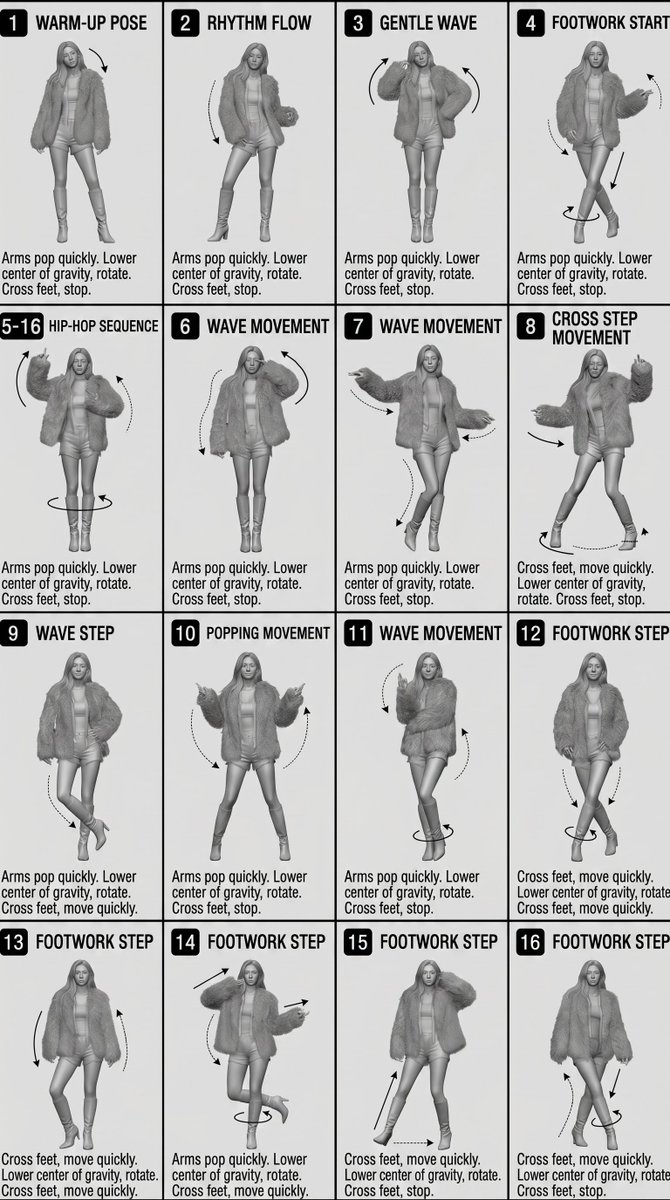
Monochrome 3D Character Reference Sheet — Sora 2 Prompt
프롬프트 · EN
[风格]
单色灰度插图,3D 渲染角色,简洁的 argsheet type: 教学参考表,白色背景,漫画风格单元格网格布局,技术图示美学。 [布局]
arggrid layout: 4×4 网格布局,共 16 个面板。每个面板由细黑边框分隔。单元格从 1 到 16 编号,面板尺寸一致。 [角色] image1(同一角色在所有面板中保持一致) [面板结构 – 每个单元格] 左上角:粗体数字徽章 + argtext content: 英文标题文本 中心:全身角色姿势插图 左下角:英文描述文本(3–4 行) 叠加层:指示运动方向的箭头 [箭头 / 动作指示]
围绕角色放置的弯曲箭头、直线箭头和圆形旋转指示器,以展示运动流向和方向。 [渲染风格]
高度精细的 3D 雕刻风格,柔和的摄影棚灯光,细腻的阴影,无色彩,灰度明暗处理,干净的线条,游戏概念艺术品质。 [负面提示]
无背景场景,无色调,无额外角色,无复杂背景。

프롬프트 소개

Generate a clean, 16-panel grayscale character reference sheet with 3D rendered poses, motion arrows, and a technical aesthetic for concept art. Use it as a 컨셉 아트 starting point for GPT Image 2: keep the visual structure and style constraints intact, then swap in your own subject, brand, or scene.

Start by replacing sheet type, grid layout, and text content, then keep the camera, composition, and material cues in the same order. This makes the output easier to compare across variations.

이 프롬프트 사용법

  1. Copy the prompt from below.
  2. Open an AI image generator (e.g., Midjourney, DALL·E 3, Stable Diffusion).
  3. Paste the prompt and adjust variables like grid layout (e.g., 3×3) or text content if desired.
  4. Run the generation to get your 4×4 character reference sheet.
  5. If the grid alignment isn’t perfect, refine the prompt by adding emphasis on “thin black borders” or “perfectly aligned grid.”


FAQ

Oogie

@oggii_0→

게시일
2026년 4월 30일
원본 언어
EN
모델
GPT Image 2
카테고리
컨셉 아트
GPT Image 2컨셉 아트gpt-image-2twitter
조회
502
복사
74
좋아요
23

공유

GPT Image 2의 더 많은 프롬프트

전체 보기
Photorealistic Fashion Magazine Cover — Sora 2 Prompt

Photorealistic Fashion Magazine Cover — Sora 2 Prompt

@aichof21
Dynamic Nike Ad Poster — Sora 2 Prompt with Sydney Sweeney

Dynamic Nike Ad Poster — Sora 2 Prompt with Sydney Sweeney

@im_shahid7
Anime Idol Profile Page — Lavender Art Style Prompt

Anime Idol Profile Page — Lavender Art Style Prompt

@uzuyanurp

Sora2Hub 프롬프트로 더 빠르게 제작하세요.

검색 가능한 프롬프트 페이지에서 시작해 적합한 모델 컨텍스트로 바로 생성하세요.

프롬프트 탐색
