GPT Image 2AI 프롬프트
Tekken Style Fight Storyboard Grid — Sora 2 Prompt
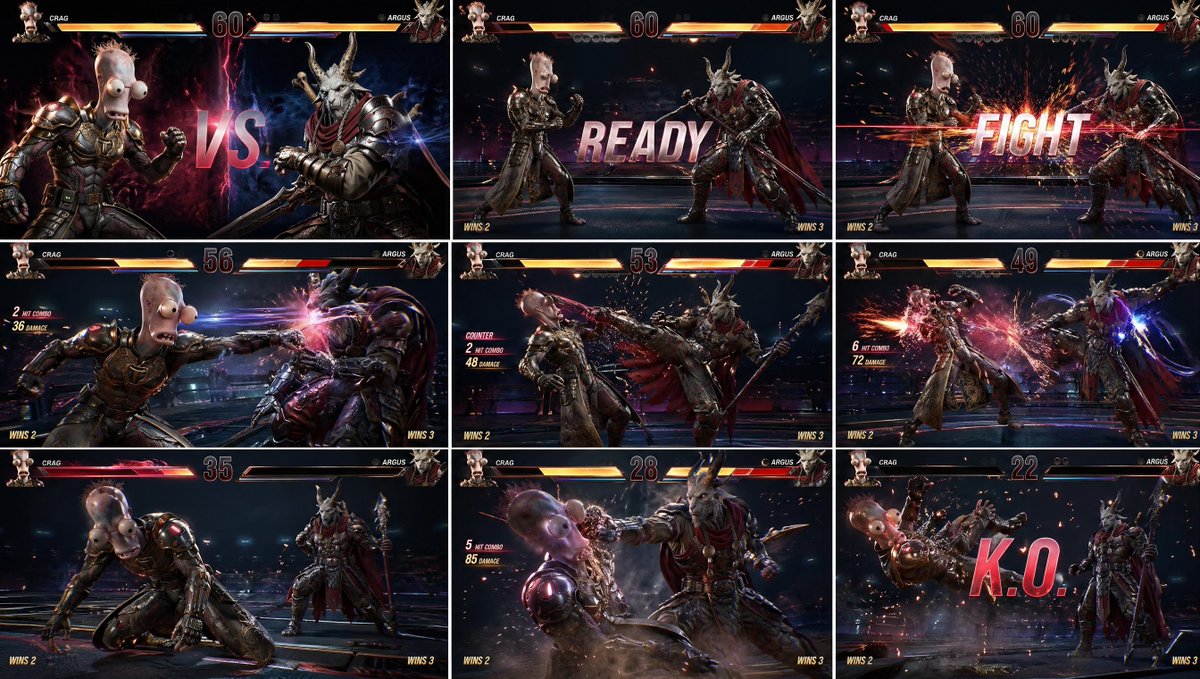
Generate a cinematic 3x3 fighting game storyboard with consistent characters, full HUD, and AAA Tekken-inspired visuals using two reference images.
프롬프트 · EN
{ "instruction": "使用提供的两张角色图像作为精确的视觉参考。完美保留身份、面部、服装、比例和细节。", "concept": "argument name=\"game concept\" default=\"以 Tekken 风格游戏网格故事板呈现的 AAA 格斗游戏场景\"", "layout": { "type": "3x3 网格", "description": "九个分镜展示连续的战斗过程,每帧均可见完整的游戏 UI" }, "panels": [ "分镜 1:戏剧性的 VS 画面 — 角色 A 对战角色 B,两人面对面,发光的背景,中心显示 versus 文字", "分镜 2:回合开始 — 两位格斗家处于待机姿态,屏幕显示 READY 文字", "分镜 3:FIGHT 时刻 — 战斗开始时电影般的火花爆炸", "分镜 4:首次攻击 — 角色 A 出拳,带有动态模糊", "分镜 5:反击 — 角色 B 出脚,带有冲击火花", "分镜 6:连招序列 — 多重打击火花、运动轨迹、动态镜头", "分镜 7:低血量时刻 — 血条闪烁红色,紧张时刻", "分镜 8:终结技 — 慢动作重击,电影级视角", "分镜 9:KO 画面 — 对手向后倒下,巨大的 KO 文字,粒子飞溅" ], "style": "argument name=\"art style\" default=\"超写实 AAA Tekken 风格格斗游戏,电影级游戏渲染,高细节角色,写实光影\"", "camera": "游戏内格斗视角,略带角度的侧视图,冲击时动态缩放", "environment": "高端格斗竞技场,带有霓虹点缀的深色背景,微妙的景深,不喧宾夺主", "ui_elements": { "health_bars": "左上和右上,细节丰富,发光,随分镜逐渐减少", "timer": "顶部中心", "player_names": "左上和右上", "round_indicator": "可见", "combo_counter": "在打击时出现", "hit_effects": "火花、闪光、光束", "KO_text": "大号粗体,最终分镜屏幕中心", "READY_FIGHT_text": "街机风格粗体排版" }, "effects": [ "攻击时的动态模糊", "冲击火花", "能量轨迹", "镜头抖动效果", "终结打击时的慢动作感", "打击时的屏幕光晕" ], "color_grading": "argument name=\"color grading\" default=\"高对比度,街机电影感,鲜艳的高光,深邃的阴影\"", "output": "整洁的 3x3 网格,完美对齐的分镜,完整的 UI 可见,无 Logo,无水印"
}
"reference_style": "Tekken 8 游戏 UI,街机格斗游戏界面,现代 AAA 格斗 HUD"
프롬프트 소개
Generate a cinematic 3x3 fighting game storyboard with consistent characters, full HUD, and AAA Tekken-inspired visuals using two reference images. Use it as a 컨셉 아트 starting point for GPT Image 2: keep the visual structure and style constraints intact, then swap in your own subject, brand, or scene.
Start with small changes to subject, scene, camera, and color, then generate a few variations to compare composition and detail without turning the page copy into keyword stuffing.
이 프롬프트 사용법
- Copy the entire prompt JSON block into your AI video generator.
- Choose a model that supports image references and multi-frame outputs (e.g. Sora 2 or compatible).
- Replace the two character reference images with your own portraits to maintain identity across all nine panels.
- Adjust the
{argument}variables (game concept, art style, color grading) to match your creative vision. - Generate and review the 3x3 grid, ensuring all UI elements and fight progression are visible.