
GPT Image 2AI 프롬프트
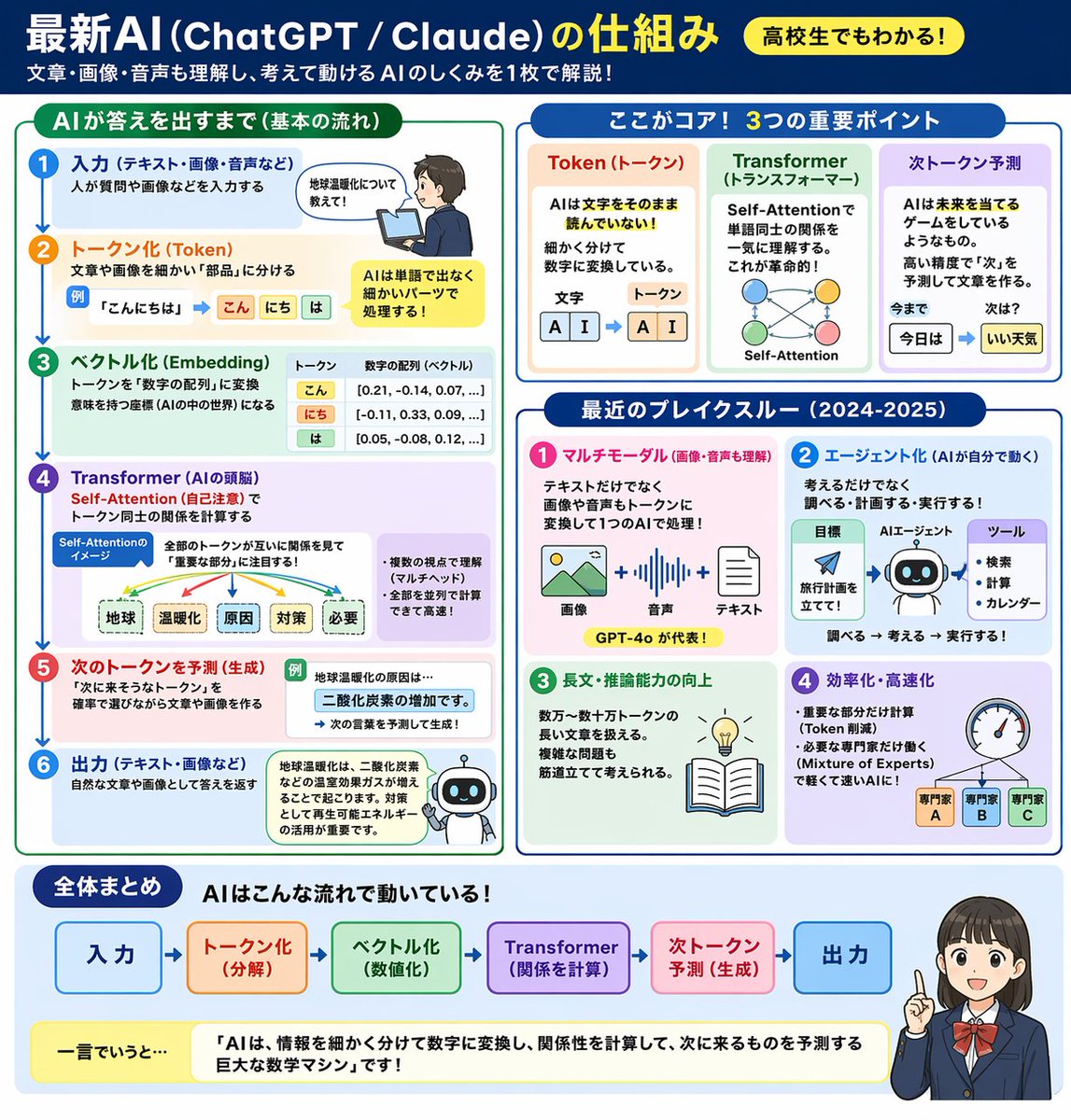
一张图看懂 AI:ChatGPT/Claude 运行机制信息图
使用该提示词可快速生成一张直观的教育信息图,用流程图、图标和动漫角色解释 AI 运行机制,让高中生也能轻松看懂 ChatGPT/Claude 的原理。
프롬프트 · EN
type
教育信息图header
title
{argument name="main title" default="最新 AI (ChatGPT / Claude) 的运行机制"}badge
{argument name="target audience badge" default="高中生也能看懂!"}subtitle
{argument name="subtitle" default="一张图带你了解 AI 如何理解文字、图像、音频并进行思考与行动!"}layout
style
简洁、扁平化设计、结构化网格、中文文本sections
item 1
title
AI 输出答案的过程 (基本流程)position
左侧栏count
6labels
item 1
输入item 2
分词 (Tokenization)item 3
向量化 (Embedding)item 4
Transformer (AI 的大脑)item 5
预测下一个 Token (生成)item 6
输出visuals
带有箭头的垂直流程、使用笔记本电脑的男孩、分词示意图、向量数字数组、自注意力机制树、机器人图标item 2
title
核心要点:3 大关键点position
右上角count
3labels
item 1
Token (词元)item 2
Transformer (转换器)item 3
下一词元预测visuals
分词模块、自注意力节点网络、词语预测序列item 3
title
近期突破 (2024-2025 年)position
右侧中部count
4labels
item 1
多模态item 2
Agent 化item 3
长文本与推理能力提升item 4
效率与速度优化visuals
图像/音频/文本图标、机器人 Agent 流程图、灯泡与书籍、带有 3 个专家节点的速度计item 4
title
总结position
底部全宽elements
item 1
水平 6 步流程图item 2
黄色总结框,文本内容:{argument name="summary text" default="AI 是一个巨大的数学机器,它将信息拆解并转换为数字,通过计算关系来预测下一个出现的内容!"}item 3
{argument name="character style" default="动漫风格女学生,正在指引并微笑"}프롬프트 소개
使用该提示词可快速生成一张直观的教育信息图,用流程图、图标和动漫角色解释 AI 运行机制,让高中生也能轻松看懂 ChatGPT/Claude 的原理。 Use it as a 컨셉 아트 starting point for GPT Image 2: keep the visual structure and style constraints intact, then swap in your own subject, brand, or scene.
This prompt is organized as structured JSON with fields such as type, header, and layout. Keeping that hierarchy helps the model separate the subject, layout, interface elements, and detail constraints.
Start with small changes to subject, scene, camera, and color, then generate a few variations to compare composition and detail without turning the page copy into keyword stuffing.
이 프롬프트 사용법
- Copy the prompt text from this page.
- Paste it into an AI model that supports structured infographic generation, such as Sora or a text-to-diagram tool.
- (Optional) Modify the variables like
main title,summary text, andcharacter styleto personalize the content. - Generate the infographic.
- If the layout needs refinement, tweak the prompt and regenerate.


