
GPT Image 2AI 프롬프트
Dark Mode AI Viewer Japanese Course Landing — Sora Prompt
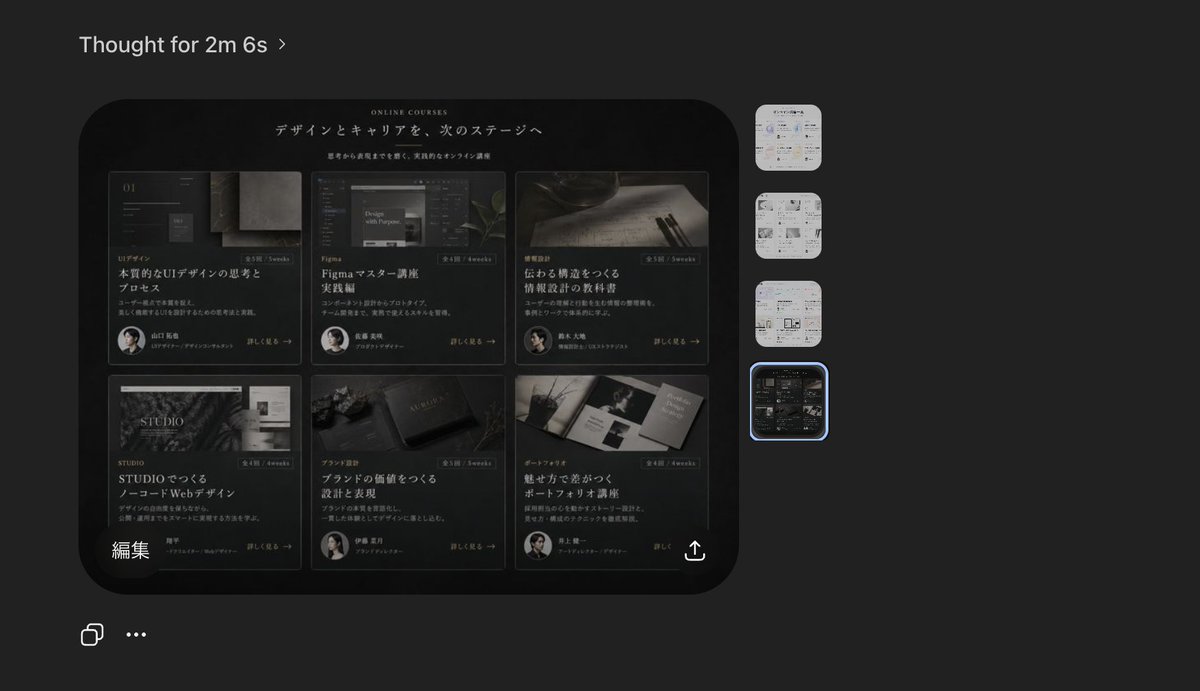
Generate a realistic dark-theme AI viewer screenshot featuring a luxury Japanese course landing page, ideal for product mockups and design workflows.
프롬프트 · EN
一张深色模式的桌面端 AI 图像查看器界面截图,展示了生成的网站设计预览。整体画布为炭灰色,采用极简现代应用 UI。左上角放置小号白色无衬线文本标题“Thought for 2m 6s”,并配有细微的折角图标。中左侧展示一张大型圆角矩形预览图,内容为一个日文在线课程的黑色奢华风格网页落地页。在预览图内部,网站首屏区域为黑色背景,采用优雅的衬线与无衬线字体,上方有小型英文标题“ONLINE COURSES”,下方为大型日文主标题“デザインとキャリアを、次のステージへ”,其下配有较小的日文副标题。网站主要内容区域包含 6 张课程卡片,以 3 列 2 行的网格排列。每张卡片风格深邃、具有电影质感且高端,包含氛围感图片、类别标签、日文标题、简短描述、小型圆形讲师头像以及“詳しく見る →”样式的链接。卡片 1 展示 UI 设计图像,大标题为“本質的なUIデザインの思考とプロセス”。卡片 2 展示 Figma 相关屏幕图像,标题为“Figmaマスター講座 実践編”。卡片 3 展示纸面书写工具,标题为“伝わる構造をつくる 情報設計の技術”。卡片 4 展示 STUDIO 主题视觉,标题为“STUDIOでつくる ノーコードWebデザイン”。卡片 5 展示品牌或书籍类物体,标题为“ブランドの価値をつくる 設計と表現”。卡片 6 展示作品集画册,标题为“魅せ方で差がつく ポートフォリオ講座”。添加细微的金灰色高光、细边框、柔和的反射效果,呈现精致的高端日式设计美学。在预览图左下角,包含白色日文标签“編集”。在预览图右下角,添加一个小型白色分享/导出图标。在应用界面的最右侧,垂直堆叠放置 4 个圆角方形缩略图,代表其他生成的图像;前 3 个缩略图为浅色主题页面设计,第 4 个缩略图与深色课程网格设计相匹配。用发光的蓝色选中边框高亮显示第 4 个缩略图。在整体截图的左下角,添加 2 个小型白色界面图标:复制图标和水平三点菜单。整体构图应呈现出真实创意 AI 工具的产品截图质感,具备清晰的 UI 间距、细腻的阴影以及精准的屏幕捕捉真实感。
프롬프트 소개
Generate a realistic dark-theme AI viewer screenshot featuring a luxury Japanese course landing page, ideal for product mockups and design workflows. Use it as a 컨셉 아트 starting point for GPT Image 2: keep the visual structure and style constraints intact, then swap in your own subject, brand, or scene.
Start with small changes to subject, scene, camera, and color, then generate a few variations to compare composition and detail without turning the page copy into keyword stuffing.
이 프롬프트 사용법
- Copy the prompt text and paste it into your AI image generator (e.g., Sora, Midjourney, DALL·E).
- Select a model capable of photorealistic UI screenshots; set aspect ratio to 16:9 for optimal composition.
- Optionally adjust the language or color scheme by editing the text within the prompt (e.g., change Japanese to English).
- Generate the image and iterate on minor details like thumbnail highlights or UI icons by re-running with slight tweaks.
- Use the output for product demos, social media, or design presentations as-is or with your own branding.


