
Anime Fox Girl Hugging Viewer — Customizable Sora Prompt
Create a warm, welcoming anime illustration of a fox-eared girl in a kimono reaching out for a hug, with customizable ears, hair, and environment.
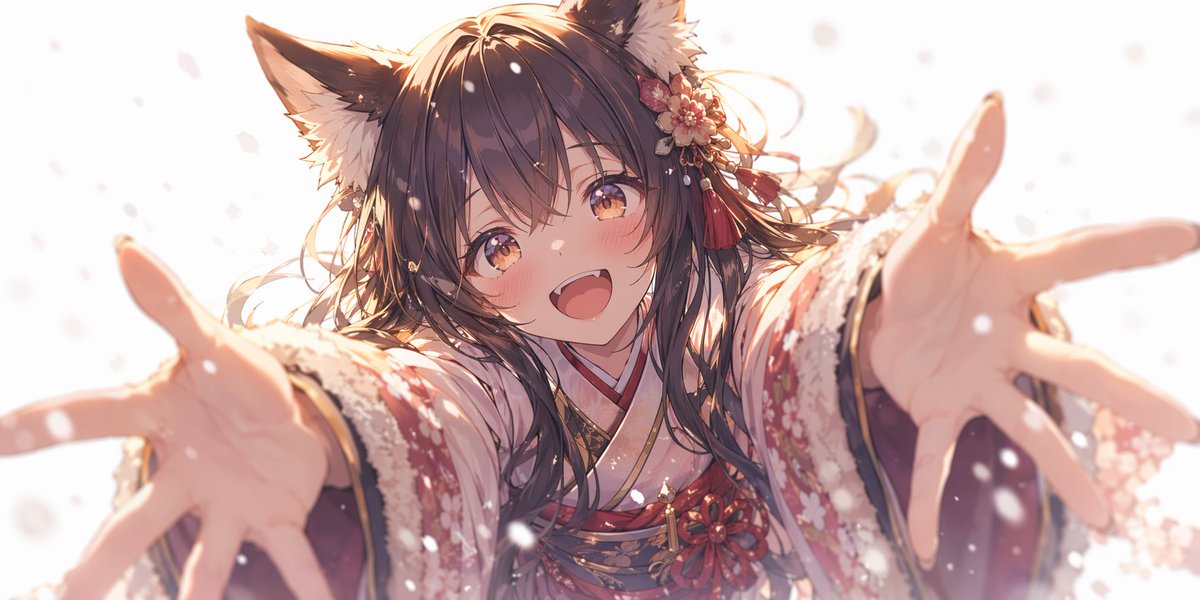
An anime-style illustration of a cute girl with arganimal ears: fluffy dark brown fox ears and long flowing arghair color: dark brown hair. She is wearing a detailed argclothing: red and white floral kimono with fur trim and a floral hair accessory with red tassels. She has a argexpression: bright happy smile with a slight blush and warm amber eyes, reaching both hands forward towards the viewer in a welcoming hug. The perspective features strong foreshortening on her hands, which are slightly out of focus. The scene is set with argenvironment: falling snow against a bright white background, illuminated by soft, warm, ethereal lighting.
프롬프트 소개
Create a warm, welcoming anime illustration of a fox-eared girl in a kimono reaching out for a hug, with customizable ears, hair, and environment. Use it as a 컨셉 아트 starting point for GPT Image 2: keep the visual structure and style constraints intact, then swap in your own subject, brand, or scene.
Common directions include gptimage2api prompts, gptimage2api, and en. Treat these tags as creative cues; the prompt structure and preview image are the more useful guide.
Start by replacing animal ears, hair color, clothing, and expression, then keep the camera, composition, and material cues in the same order. This makes the output easier to compare across variations.
이 프롬프트 사용법
- Copy the full prompt text from the page.
- Choose your preferred AI image model (e.g., Sora 2, Midjourney, DALL·E).
- Customize the variables in curly braces—change the animal ears, hair color, clothing, expression, or background to your liking.
- Paste the edited prompt into your chosen AI tool and generate.
- Refine by adjusting keywords or re-running until you get the perfect result.


