
GPT Image 2AI 프롬프트
Cute CAD Cleanup Infographic — Sora 2 Prompt
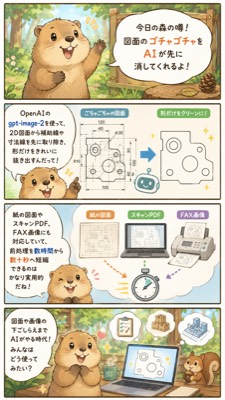
Generate a vertical Japanese-style mascot infographic showing how AI removes clutter from 2D technical drawings for faster document prep.
프롬프트 · EN
{"type":"垂直日式说明漫画信息图","style":"可爱的 2D 水彩故事书插画,带有柔和的墨线、温暖的森林色调、圆润的对话气泡、浅奶油色背景,以及友好的商务科技风格","format":{"aspect_ratio":"9:16 垂直智能手机海报","panel_count":4,"layout":"四个堆叠的长方形面板,由细深色边框分隔"},"main_character":{"species":"浣熊或狸猫吉祥物","appearance":"圆滚滚的米棕色身体,深色的耳朵和爪子,奶油色的口鼻部和腹部,大而有光泽的眼睛,开心的张嘴表情,富有表现力的小手","role":"友好的森林传闻讲述者,解释 AI 工作流程"},"theme":"使用 argAI tool name: gpt-image-2 通过移除辅助引导线、尺寸线、标题和手写注释来预处理 2D 图纸,只保留干净的形状","visible_text":{"top_title":"今天的森林传闻! AI 可以先帮你清理图纸上的杂乱内容!","tool_label":"听说使用 OpenAI 的 gpt-image-2,可以先从 2D 图纸中去除辅助线和尺寸线,让图纸变得更容易阅读!","middle_caption":"支持纸质图纸、扫描版 PDF 和传真格式,即使是客户发来的带有“手写备注”的图纸也能快速整理","bottom_caption":"AI 辅助整理图纸。这种用法也变得越来越普遍了呢!"},"layout":{"sections":[{"title":"森林传闻介绍","position":"顶部面板","count":1,"description":"浣熊站在阳光明媚的森林里,旁边是一个木牌形状的对话气泡,宣布 AI 可以先擦除杂乱的图纸内容"},{"title":"CAD 清理前后对比","position":"第二个面板","count":3,"labels":["左侧工具名称说明气泡","中间充满尺寸和施工标记的杂乱 2D 机械图","右侧仅保留主要形状的简化干净轮廓图"],"description":"一个蓝色箭头从杂乱的图纸指向提取出的干净形状;小闪光标记和一个微型机器人图标强调了自动化过程"},{"title":"文档输入示例","position":"第三个面板","count":4,"labels":["纸质图纸","扫描版 PDF","传真格式","秒表图标"],"description":"三张文档卡片展示了可接受的来源,包括纸质图纸、扫描 PDF 和传真格式,彩色箭头指向秒表以暗示更快的预处理速度;浣熊在左下角微笑"},{"title":"AI 辅助工作场景","position":"底部面板","count":5,"labels":["浣熊讲述者","显示已清理图纸的笔记本电脑","浮动的清单文档","浮动的点赞徽章","小松鼠助手"],"description":"浣熊坐在森林里的书桌前,打开的笔记本电脑显示着清理后的技术形状,上方漂浮着有用的图标,一只松鼠在右侧观看"}]},"art_direction":"保持所有日语文字清晰可辨,使用圆润的无衬线字体,浅蓝色和奶油色的 UI 面板,小闪光,简单的 CAD 风格线条图,带有树木和阳光的舒适林地背景,适合社交媒体的可爱生产力信息图","customization":{"headline":"argument name=\"headline text\" default=\"今天的森林传闻! AI 可以先帮你清理图纸上的杂乱内容!\"","mascot":"argument name=\"mascot animal\" default=\"浣熊\"","workflow_result":"argument name=\"cleanup result\" default=\"移除辅助线和尺寸线,仅保留主要形状\""}}프롬프트 소개
Generate a vertical Japanese-style mascot infographic showing how AI removes clutter from 2D technical drawings for faster document prep. Use it as a 컨셉 아트 starting point for GPT Image 2: keep the visual structure and style constraints intact, then swap in your own subject, brand, or scene.
Start by replacing AI tool name, then keep the camera, composition, and material cues in the same order. This makes the output easier to compare across variations.
이 프롬프트 사용법
- Copy the full prompt JSON from this page.
- Choose a compatible image model like Sora 2 or GPT-image-1.
- Customize variables such as the AI tool name and headline in the argument fields.
- Generate the image and select the 9:16 vertical output if needed.
- Use the resulting infographic for social media, blogs, or client onboarding materials.


