GPT Image 2AI 프롬프트
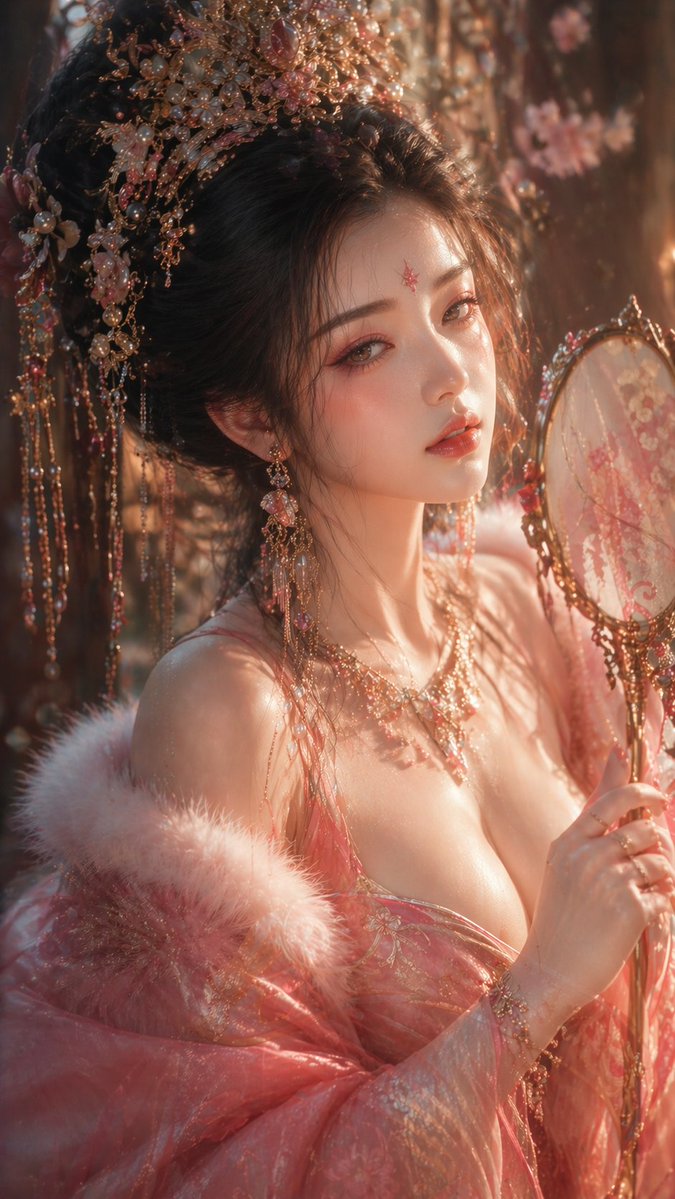
Tang Dynasty CG Portrait — Hyper-Realistic Eastern Beauty Prompt
Create stunning cinematic portraits of Tang Dynasty beauties with 8K detail, filmic lighting, and classic CG illustration style.
프롬프트 · EN
argstyle: 中式 CG 插画, 唐代美学,argcharacter description: 精致古风女子, 半身特写镜头,聚焦面部与上半身,高端肖像构图,电影级镜头语言与空间透视。 角色设定:
东亚古典美人,冷白通透肤色,细腻真实的皮肤纹理,柔和微光;五官精致立体但自然不夸张,细长凤眼,眼角微挑,眼神含情脉脉且羞涩,微醺朦胧,长睫毛投下细微阴影;唇色如胭脂,双唇微启,柔和且富有情绪张力,呈现“含蓄的东方美”。 造型设计:
粉色调华丽唐风服饰,柔和贴合身体曲线,层次丰富但不堆砌;适度的低领设计强调锁骨与颈肩线条,自然的视觉引导;精致凤冠(金属、珍珠、宝石、流苏),写实材质反射,随动作轻微晃动。 动态与姿态:
微侧身或轻微旋转姿态,颈部延伸,肩线舒展,双手形成柔和的引导线,增强画面韵律与女性柔美张力。 光影系统:
电影级布光。主光:暖金色前侧光,聚焦面部与皮肤高光。补光:冷色环境光,塑造体积感与空间感。轮廓光勾勒发丝与颈部剪影。高光控制不过曝,阴影保留细节,面部光影过渡柔和。 艺术风格:
超写实 CG 肖像融合东方写意神韵,轻微朦胧美学。 氛围与质感:
梦幻、含蓄、高端的东方美学氛围;虚化背景以弱化环境,强化角色;轻微胶片颗粒 + 柔焦光晕,增强情绪与质感。 色彩系统:
主色:胭脂粉、金色。辅助色:冷蓝灰色。整体低饱和度、高质感,避免艳俗。 镜头参数:
85mm 人像镜头,f1.4–f2,浅景深,电影级取景。 质量:
超细节,8K–16K,极致细节,高分辨率,电影级光影。 画面比例:
argaspect ratio: 9:16
프롬프트 소개
Create stunning cinematic portraits of Tang Dynasty beauties with 8K detail, filmic lighting, and classic CG illustration style. Use it as a 컨셉 아트 starting point for GPT Image 2: keep the visual structure and style constraints intact, then swap in your own subject, brand, or scene.
Start by replacing style, character description, and aspect ratio, then keep the camera, composition, and material cues in the same order. This makes the output easier to compare across variations.
이 프롬프트 사용법
- Copy the Prompt: Copy the full prompt text from the page.
- Choose Your Model: Paste it into a compatible AI image generator like Sora 2 or Midjourney.
- Customize Variables: Adjust the
{style},{character description}, or{aspect ratio}variables to fit your vision. - Generate & Refine: Generate the image. If needed, tweak the prompt or use the model's variation features to perfect the result.